2. OPERATION
2.1 START-UP PROCEDURE
Power-up: Apply power in the following sequence:
1. Apply the 230 VAC power to the searchlights first.
2. Apply the 24 VDC power to the panels next. If the panels have
several separate supplies, ensure that the master panel is pow-
ered up last. The panels will be in the ‘on’ mode when powered
up.
2.2 CONTROL PANEL
GENERAL
Any user can control any searchlight at any time. When the lamp on
a searchlight is turned on, it will be indicated in all the other panels
by the indicator for that searchlight (In the select buttons) flashing
slowly. If the same search¬light is selected from another panel (the
select button is pressed), then the other panel gains control over that
searchlight, and the first panel will loose its control. As this happens
the searchlight will maintain the previous lamp on or off setting, but
the speed setting will be dependent on the setting of the new control
panel.
When the control panel is turned off, the searchlights last operated
from this panel will automatically be turned off.
NOTE: Slow flashing is 1 sec on, 1 sec off. Fast flashing is 2 flashes
per second.
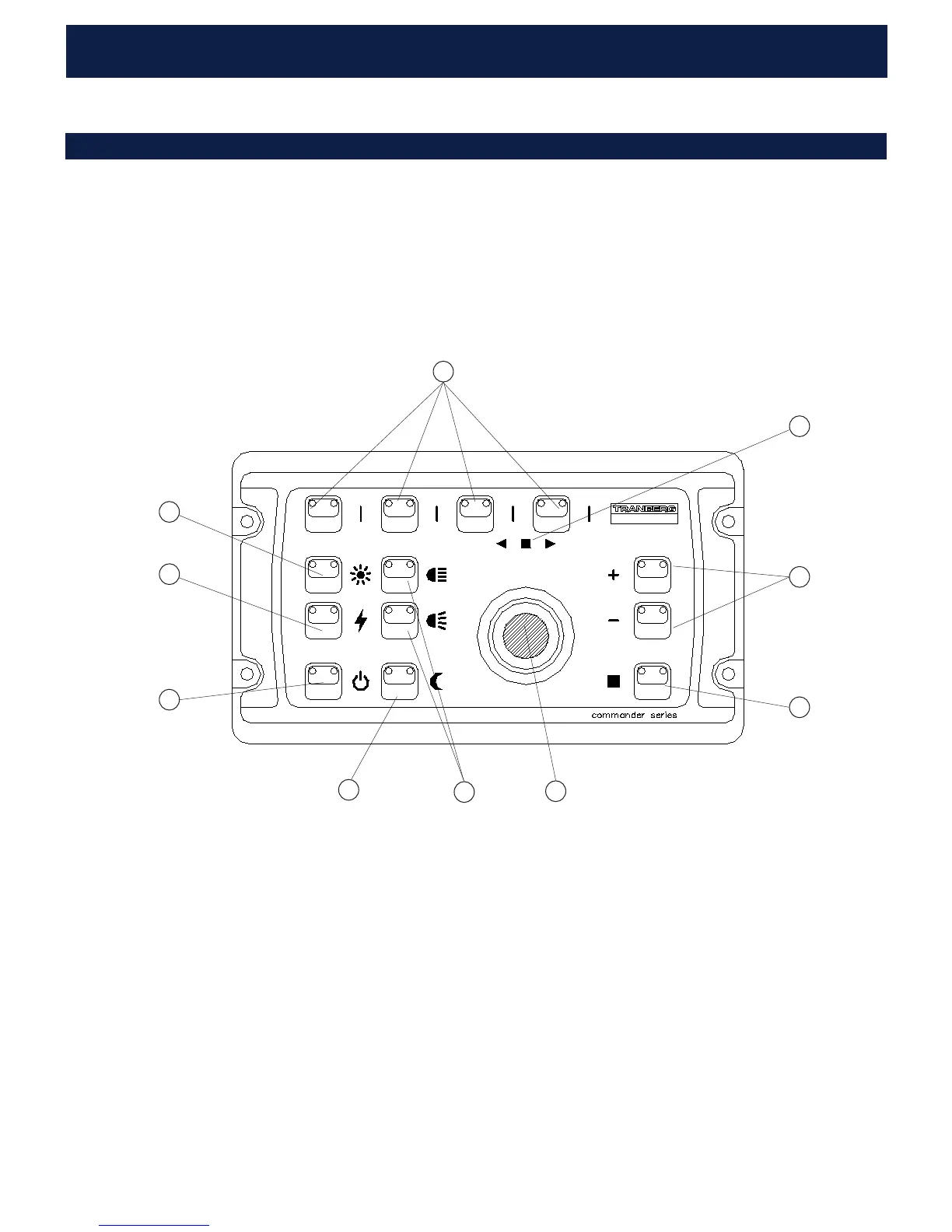
1. “ON/STBY” or “POWER” (2612 / 2613 / 2614)
On / Standby button, activates the panel. The backlight will turn
on. Press momentarily to turn on, press and hold for 1 sec to go to
standby. In standby the panel will turn off all searchlights that was
used by that panel. The yellow indicator will light steady if it is a mas-
ter panel, or flash slowly if it is a slave panel.
2. “DIM” (2612 / 2613 / 2614)
Adjusts the panel backlight level. Press shortly yo change level one step,
press and hold to change the level to min or max.
3. SEARCHLIGHT SELECT BUTTONS
2613: To select which searchlight you want to operate, press the but-
tons on the top row. The first is used to select searchlight no. 1 and 5.
The first press selects searchlight no. 1, press once more (within a sec-
ond) to select searchlight no. 5. For the three other buttons works the
same way. It is only possible to select searchlights that are connected. The
panel may operate up to 8 searchlights and the system will automatically
detect the number and adresses of the searchlights that are connected.
2614: To select which searchlight you want to operate, press the but-
tons on the top row. The first (‘A’) is used to select searchlight no. 1.
The first press selects the first lightsource of searchlight no. 1, press
once more (within a second) to select the second lightsource. For the
three other buttons it works the same way. It is only possible to select
searchlights that are connected. The panel may operate up to 4 search-
lights (addresses 1 to 4) and the system will automatically
detect the number and adresses of the searchlights that are connected.
If, for some reason, this is not possible, please do a manual re-scan as
described in chapter 5.2 after all units are powered up.
A searchlight will do a position reference search when powered up and
receiving a bus query message from the master panel (a bus re-scan).
It will slowly turn to the right and tilt upwards until the end positions is
reached. The searchlight will not respond to joystick commands from
a panel until it has finished this position search phase (but the light can
be turned on and off).
3
7
2
1
8
5
6
4
9
10
600A102101
MULTI SEARCHLIGHT CONTROL PANEL TEF 2613
1
LIGHT
IGNITION
ON/STBY
NARROW
WIDE
DIM
FAST
SLOW
GROUP
HOME/
5
2
6 3 7 4 8
5
1
6
2
7
3
8
4



 To Next Page