EasyManua.ls Logo

Trans Air EC3.0 - User Manual

Default Icon
6 pages
Print Icon
To Next Page IconTo Next Page
Loading...
EC3 Service Manual Jan. 8, 2008 1
Service Manual For
Trans/Air EC3.0 Electronic Climate Control System
Specification
Operating Voltage:
9~16 VDC
Current capacity:
Evaporator: 40 amp
Condenser: 40 amp
Compressor: 10 amp
Tie-in Condenser: 40 amp
Tie-in Compressor: 10 amp
Heat Relay: 10 amp
Setpoint range:
60ºF ~ 90ºF
Component:
EC3.0 system consist of two major components: driver control switches and relay board. A
communication cable connects the switches to the board.
Switches
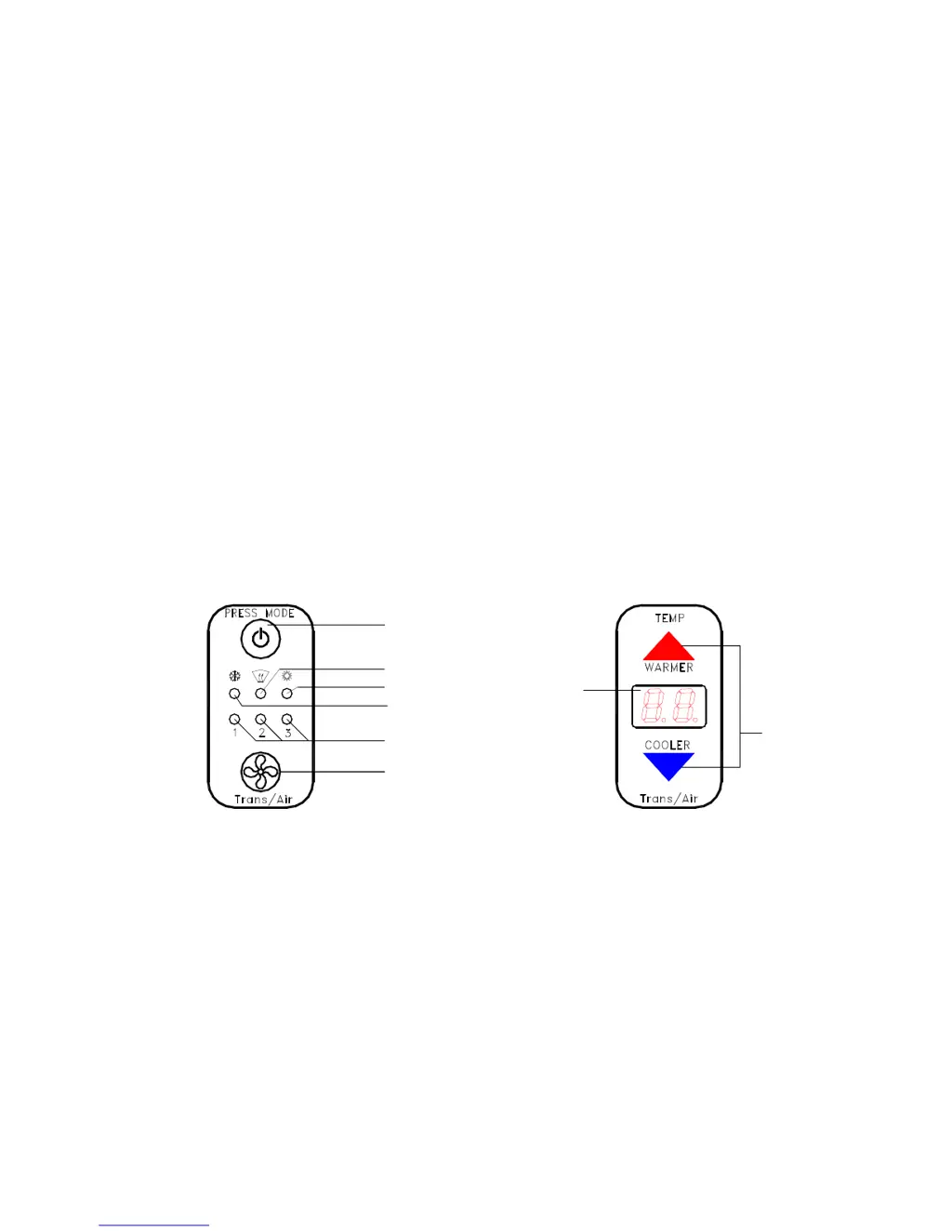
EC3.0 control switches: Mode switch (701426), Thermostat (701425).
ON/OF & MODE SELECT
A/C-DEFOG-HEAT-OFF
FAN SPEED INDICATOR
FAN SPEED SELECT
AUTO-L-M-H-OFF
A/C
DEFOG
HEAT
SET POINT
ADJUST
DISPLAY
Figure 1 Control Switches
Relay Board
The layout of an EC3.0 relay board is shown below. It has five relays, one 12 position
terminal block, three 10 amp fuses, two connectors and seven LED indicators. The function
of each component are listed in table below

Questions and Answers

  • R
    Ricardo EllisJul 30, 2025
    What to do if the fault code persists on my Trans Air EC3.0 Network Router?
    • P
      Patricia BaileyJul 30, 2025
      If the fault code persists on your Trans Air Network Router, first check the safety harness connections at the evaporator and board. If the fault condition continues, check the pressure and voltage. Also, consider resetting the service timer. If none of these actions resolve the issue, the board may be faulty and require replacement.
  • J
    Jennifer WoodardAug 4, 2025
    Why Trans Air EC3.0 Network Router switch does not turn on?
    • R
      Robert OrrAug 4, 2025
      If your Trans Air Network Router switch does not turn on, begin by checking the COM LED and verifying +12vdc at terminal 5 and ground at terminal 10. If the power supply is functional, the communication cable may be faulty, requiring replacement. If the problem persists, the switch itself or the board might be faulty and need replacement.
  • S
    Stacy DavisAug 7, 2025
    Why does my Trans Air Network Router thermostat always show Hi?
    • T
      Todd PrinceAug 8, 2025
      If the thermostat on your Trans Air Network Router constantly displays 'Hi', first, verify that the cabin temperature is above 90ºF. Then, check the temperature sensor cable for an open circuit, and repair or replace the cable if necessary. If the issue continues, the temperature sensor may be faulty and require replacement.
  • E
    Eric HerreraAug 12, 2025
    Why does my Trans Air EC3.0 Network Router thermostat always show Lo?
    • A
      Anthony JacksonAug 12, 2025
      If the thermostat on your Trans Air Network Router constantly displays 'Lo', first, verify that the cabin temperature is below 60ºF. Next, check the temperature sensor cable for a short and repair or replace the cable if needed. If the problem persists, the temperature sensor itself may be faulty and require replacement.
  • M
    mendozatimAug 16, 2025
    What to do if the clutch does not engage on Trans Air EC3.0?
    • K
      Kristie SmithAug 16, 2025
      If the clutch on your Trans Air Network Router does not engage, first ensure that Tset is not greater than Tin; adjust the set point if needed. If the issue persists, the external temperature sensor or its cable may be faulty and need replacement. Check the LED on the board and the voltage on terminal 1 for bad connections. If problems continue, the board itself might be faulty and require replacement.
  • K
    Kristin GarciaAug 20, 2025
    How to fix a Trans Air EC3.0 Network Router when the fan or blower do not run?
    • J
      John GarciaAug 21, 2025
      If the fan or blower in your Trans Air Network Router isn't running, start by checking the LED and power output terminal for bad connections. If the connections are good, the board may be faulty and require replacement.
  • J
    Joshua HayesAug 26, 2025
    Why Trans Air EC3.0 blower does not stop?
    • C
      Christine FrazierAug 26, 2025
      If the blower on your Trans Air Network Router does not stop, the board is likely faulty and needs to be replaced.

Summary

Specification

Operating Voltage

Specifies the voltage range required for the system's operation.

Components

Switches

Thermostat Control Logic

Temperature Sensing

Explains how cabin and ambient air temperature sensors function.

Fan Speed Control

Safety and Fault Protections

Safety Switch Overview

Describes high pressure, low pressure, and freezestat safety switches in the system.

Faulty Codes and Actions

Clutch Engagement Delay

Troubleshooting

Fault Code Identification

Guide to using fault codes for diagnosing system issues.

Common Problems and Solutions

Lists common symptoms, probable causes, and recommended actions.

Trans Air EC3.0 Specifications

General IconGeneral
BrandTrans Air
ModelEC3.0
CategoryNetwork Router
LanguageEnglish