5
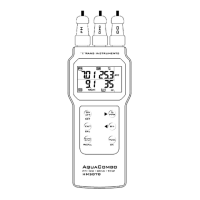
8. KEY PAD PANEL
Get familiarized with the key buttons will help you to operate the meter
with ease.
ON-OFF & SETUP KEY
1. Press to switch ON or OFF the meter
2. Press and hold down to enter SETUP mode
CALIBRATION & EXIT KEY
1. Press to enter CALIBRATION mode
2. During SETUP or RECALL mode, press to EXIT
HOLD KEY & RECALL KEY
1. Press to freeze or put display on hold. Press again to
release.
2. Press and hold down to enter RECALL mode
MODE KEY & MOVE-UP/SELECT KEY
1. Press to switch display mode between pH and mV
2. During setting, press to move digit up or next selection
MEMORY SAVE KEY & MOVE-DOWN / SELECT KEY
1. Press to save current reading into memory
2. During setting, press to move digit down or previous
selection
CONFIRM KEY, MAXIMUM / MINIMUM DISPLAY KEY
& TEMPERATURE SET KEY
1. During CALIBRATION or SETUP setting, press to
confirm setting.
2. While in RECALL mode, press to display maximum
and again for minimum reading of all saved data.
3. When making measurement without temperature
mode, press and hold down to enter temperature
adjustment mode.



 To Next Page