
 Need help?
Do you have a question about the Transcend TS8XDVDS and is the answer not in the manual?
Step-by-step guide on connecting the CD/DVD writer to a computer via USB.
Procedure for safely removing the CD/DVD writer from a Windows computer.
Troubleshooting steps when the computer cannot detect the CD/DVD writer.
Solutions for when the computer fails to recognize the CD/DVD Writer.
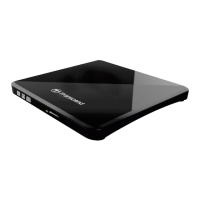
This document is a user's manual for the Transcend TS8XDVDS, an 8X Slim Portable CD/DVD Writer. It is designed to be a compact and easily portable optical drive, ideal for use with notebook computers or netbooks. The device serves multiple functions, including playing movies, installing software, and backing up various types of data such as files, folders, documents, photos, music, and videos. Its slim design and high-speed media writing capabilities make it a versatile tool for managing digital content on the go.
One of the key usage features of the TS8XDVDS is its direct power supply via USB. It does not require an external power adapter, simplifying its setup and reducing clutter. However, it is crucial to connect both large connector ends of the provided USB cable to the computer's USB ports to ensure adequate power for stable operation, especially since some computer USB ports might not supply sufficient power on their own. The device utilizes a USB 2.0 interface, enabling high-speed data transfer for efficient reading and writing processes. It supports a wide range of CD and DVD media types, including CD-R/RW, DVD+R, DVD±RW, DVD±R DL, and DVD-RAM, and is capable of reading and writing Dual Layer discs.
The manual emphasizes ease of use with its "Plug and Play" installation. To begin using the device, users simply connect the small end of the USB cable to the CD/DVD Writer and the large end(s) to available USB ports on their computer. Once successfully connected, a new drive letter will appear in "My Computer" on Windows systems, and a removable hardware icon will show in the system tray. Discs are inserted by pressing the eject button, gently pulling out the disc tray, placing the CD or DVD onto the tray, pressing down on the center until it snaps into place, and then pushing the tray back into the writer. Ejecting a disc follows a similar process: press the eject button, gently pull the tray out, place a thumb on the spindle, and pry the disc upwards until it pops free.
For data writing, the TS8XDVDS comes bundled with CyberLink's Power2Go software (full version), which allows users to easily create their own CDs and DVDs. This software is compatible with Windows XP, Vista, 7, and 8. The manual also mentions a free software download that includes CyberLink Power2Go (LE Version) and CyberLink MediaShow (trial version), which can be obtained from Transcend's website. Power2Go facilitates burning music, data, video, and bootable discs in various formats, and includes features for encrypting and safeguarding files, creating video DVDs, burning audio CDs, and ripping MP3s. MediaShow is described as a tool for compiling, arranging, and producing media files with a user-friendly interface, offering one-click fixes for photos and smart workflows for tagging and searching faces.
Maintenance features primarily revolve around ensuring the longevity and proper functioning of the device. The manual provides several safety precautions and reminders. Users are advised to avoid exposing the CD/DVD Writer to extreme temperatures (above 40°C or below 5°C) and to never drop it. It should always be used face-up on a stable, flat surface. Contact with water or other liquids should be avoided, and a damp/wet cloth should not be used for cleaning the exterior case. Crucially, users should never look directly into the laser lens, as it can be harmful to the eyes. Opening the outer case is strongly discouraged as it will void the product warranty. The device should not be stored in direct sunlight, near heat sources like air conditioners or electric heaters, or in a closed car exposed to direct sunlight.
During operation, especially when writing data, it is important not to touch, pick up, or move the CD/DVD Writer, as this can damage the device and cause errors on the disc. Transcend explicitly states that it does not take responsibility for data loss or damage resulting from the product's use, and advises using high-quality recordable media and regularly backing up important data to other storage mediums. To ensure high-speed USB 2.0 data transfer, users should verify that their computer has the relevant USB drivers.
Troubleshooting guidance is also provided. If the operating system doesn't detect the writer, users should check USB cable connections, try different USB ports, and ensure both USB connectors are plugged in. If power-related issues persist even with both USB connectors plugged in, purchasing a Transcend USB Power Adapter (TS-PA2A) is recommended. If the computer doesn't recognize the writer, users are reminded to plug both large ends of the USB cable directly into the computer's USB ports and avoid using a USB hub. If the LED does not flash (indicating no power), connections and USB port functionality should be checked. If the writer cannot read a disc, the disc itself should be checked for dirt, scratches, or damage and cleaned if necessary. For problems writing to a blank disc, using retail-packaged, name-brand recordable discs is suggested, as poor quality media can cause issues.
Finally, the manual includes important recycling and environmental considerations, adhering to European Directives for Waste Electrical and Electronic Equipment (WEEE) and Battery Disposal. It emphasizes that the product and its built-in rechargeable battery should not be disposed of with normal household waste, and local rules for separate collection should be followed to prevent negative environmental and health consequences. For products with non-exchangeable built-in batteries, removing or attempting to remove the battery invalidates the warranty, and this procedure should only be performed at the end of the product's life.
 General
| Internal | No |
|---|---|
| Product color | White |
| Purpose | Desktop/Laptop |
| Interface | USB 2.0 |
| Plug and Play | Yes |
| Optical drive type | DVD±RW |
| Disc types supported | CD-R, CD-RW, DVD+R, DVD+RW, DVD-RAM, DVD-RW |
| Operating temperature (T-T) | 5 - 40 °C |
| Compatibility | DVD-R, DVD+R, DVD-RW, DVD+RW, CD-R, CD+R, DVD-R DL, DVD+R DL, M-DISC, DVD-RAM |
| Harmonized System (HS) code | 84717030 |
 Weight and Dimensions
| Depth | 13.9 mm |
|---|---|
| Width | 142.8 mm |
| Height | 148 mm |
| Weight | 264 g |

 To Next Page