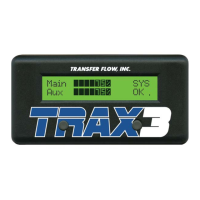
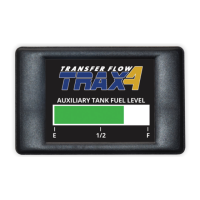
The document describes the Transfer Flow Trax-UFS Auxiliary Fuel Tank System, a sophisticated computer-controlled system designed to manage and transfer fuel between a vehicle's main (OEM) fuel tank and an auxiliary fuel tank. The system aims to function similarly to a computer-controlled balance line, ensuring optimal fuel levels and operational efficiency.
Function Description:
The core function of the Trax-UFS system is to automatically transfer fuel from the auxiliary tank to the main OEM tank as needed, eliminating the need for manual intervention or toggle switches. The system's computer module continuously monitors the fuel levels in both the main and auxiliary tanks, as well as the overall status of the vehicle's fuel system, every few seconds. When the main tank's fuel level drops, the Trax-UFS module activates the auxiliary fuel pump to transfer fuel, typically after 3 to 5 gallons have been used from the main tank, to maintain both tanks at a similar level. This process is indicated by a "PMP ON" message on the dash-mounted Liquid Crystal Display (LCD).
The system also integrates with the vehicle's OEM fuel gauge. Initially, the OEM gauge reads only the main tank's level. However, after about 15 seconds, the Trax-UFS computer takes control and adjusts the OEM fuel gauge to reflect the combined total fuel capacity of both the main and auxiliary tanks. This provides the driver with a comprehensive view of the vehicle's total available fuel.
A key safety feature is an anti-siphoning device, which prevents fuel overflow. The system also includes a diagnostic switch that allows the vehicle operator to view previously stored diagnostic trouble codes (DTCs) in the Trax-UFS module, aiding in troubleshooting.
For vehicles equipped with OBD-II and operational leak detection, the LCD may temporarily display "MLKT" (Main Leak Test) or "ALKT" (Auxiliary Leak Test). These messages indicate normal leak detection tests being conducted by the OEM computer and are not error messages.
In the event of a problem with the Transfer Flow auxiliary fuel system, the system can be bypassed by removing a fuse located on the computer module. This allows the vehicle to operate solely from the OEM tank, with the OEM fuel gauge reading only the main tank's level, and no fuel transfer from the auxiliary tank.
Important Technical Specifications:
- Components: The system includes an auxiliary fuel tank, an auxiliary fuel pump, mounting hardware, fuel lines, a computer control module, and a Liquid Crystal Display (LCD).
- Fuel Pump: The in-line fuel pump is a high-quality solenoid pump with critical forward and reverse check features. It is explicitly stated that no other pump should be substituted for this specific component.
- Power Source: The Transfer Flow auxiliary fuel system draws its power from the OEM fuel pump.
- Fuel Gauge Integration: The system adjusts the OEM fuel gauge to display the combined total of fuel from both tanks.
- Diagnostic Features:
- Dash-mounted LCD displays current gallons in the main tank, auxiliary tank, total gallons, and operational status.
- Computer control module has a green power light and a red troubleshooting light that blinks to indicate specific trouble codes.
- DTC switch on the computer module allows viewing of stored diagnostic codes.
- Fuse: A 5-amp fuse is located in the wire harness of the control module for protection and system bypass.
- Connectors: The dash-mounted LCD connects to the computer module via an 8-pin connector and a 3-pin connector on the LCD harness.
- Compatibility: The module can be reprogrammed for different diesel or gas pickups (within the same fuel type) for a small fee. Changing between diesel and gas vehicles may require additional components and reprogramming.
- Warranty: A three-year or 36,000-mile limited warranty covers defects in material and workmanship for Transfer Flow Aftermarket & O.E.M. Fuel Tank Systems. The fuel transfer pumps are warranted for one year.
Usage Features:
- Automatic Fuel Transfer: The system automatically transfers fuel from the auxiliary tank to the main tank, maintaining balanced fuel levels without driver intervention.
- Comprehensive Fuel Monitoring: The dash-mounted LCD provides real-time information on fuel levels in both tanks, total fuel, and system status (e.g., "OK," "PMP ON").
- Adjustable LCD: The LCD's contrast and backlight settings can be adjusted using two buttons on the display.
- OEM Gauge Integration: The OEM fuel gauge reflects the total combined fuel capacity, offering a unified fuel reading.
- Troubleshooting Access: A diagnostic switch on the computer module and the blinking red light provide access to trouble codes, aiding in problem identification. The LCD, if installed, also displays these codes.
- System Bypass: In case of a system malfunction, the auxiliary system can be easily disabled by removing a fuse, allowing the vehicle to operate on the OEM tank only.
- Dual OEM Tank Support: For vehicles with dual OEM tanks, the Transfer Flow auxiliary tank transfers fuel to one specific OEM tank (typically the front tank on Ford vehicles). The LCD will always display values for the auxiliary tank and the OEM tank being refueled.
Maintenance Features:
- Diagnostic Trouble Codes (DTCs): The system provides specific trouble codes indicated by the red troubleshooting light on the computer module (blinking 1 to 5 times) and messages on the LCD. These codes help diagnose issues such as:
- MSG (one blink): Main Sender Ground DTC (resistance drops below set point, indicating a bad sending unit or rubbed wire).
- MSO (two blinks): Main Sender Open DTC (resistance rises above set point, indicating resistance wire erosion or a broken wire).
- ASG (three blinks): Auxiliary Sender Ground DTC.
- ASO (four blinks): Auxiliary Sender Open DTC.
- NO FLOW (five blinks): No Flow DTC (auxiliary pump is on, but auxiliary tank fuel level does not drop, indicating a kinked line, bad pump, or broken connection).
- Fuse for Troubleshooting: A 5-amp fuse in the wire harness can be checked if the system is not receiving power or if the green power light is off.
- Component Replacement: Only Transfer Flow Inc. replacement parts should be used. Substituting generic or "off-the-shelf" parts, especially the fuel pump, is strictly prohibited due to their critical design and safety features.
- Contact for Support: Transfer Flow provides contact information (1-800-442-0056 or 530-893-5209) for troubleshooting, part replacement inquiries, and warranty claims.
- Installation Verification: If fuel readings are incorrect, verify the correct installation of the sending unit (especially the arrow orientation on Transfer Flow tanks) and ensure the vehicle information label on the computer module matches the vehicle's year, make, model, and tank sizes.
- Battery Disconnection: Disconnect the battery before working on the Transfer Flow fuel system.
- No Modifications: Do not modify, grind, torch, weld, cut, or over-pressurize the fuel tank. Do not connect the Transfer Flow system to a previously modified fuel system without contacting Transfer Flow Inc.
Safety Procedures (Filling Your Fuel Tank):
- Never fill near a flame or ignition source.
- Avoid breathing fuel vapors or skin contact with fuel.
- Always fill with the vehicle on a flat, level surface and the engine OFF.
- Open the fuel cap slowly to release pressure.
- Never overfill or "top-off" any fuel tank to prevent damage to the emissions system, dangerous spills, fire hazards, or system shutdown.
- Never siphon fuel by mouth; use an appropriate pump.
- Properly contain and dispose of spilled fuels and cleanup materials.
- Use only Transfer Flow Inc. replacement parts.
- Disconnect the battery before working on the fuel system.
- Never place any fluid other than motor fuel in the fuel tanks.
- Never modify or over-pressurize a fuel tank.
- Do not grind, torch, weld, cut, or modify a fuel tank.
- Do not sleep in a pickup with a camper shell containing an in-bed fuel tank system.
- NEVER connect a Transfer Flow Inc. fuel system to a previously modified fuel system without contacting Transfer Flow Inc.
- Do not smoke near a fuel tank.
- This fuel tank is not intended for use with aircraft.

 Need help?
 General

 To Next Page