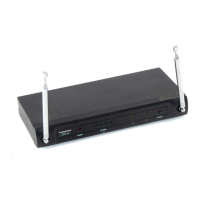
The Trantec S3500, S4000 & S4000F Series are microprocessor-controlled synthesised VHF and UHF diversity radio microphone systems designed to improve the quality of life through reliable audio transmission. These systems are available in handheld, beltpack, and guitar variations, offering flexibility for various applications.
Function Description:
The core function of these systems is to provide wireless audio transmission. The diversity receiver utilizes two antennas and automatically switches to the one with the best signal strength. This minimizes signal drop-outs caused by natural radio wave phenomena, ensuring consistent audio quality. The systems are capable of operating on up to 32 different channels, which can be organized into up to four banks, depending on the factory programming. This channel flexibility is particularly useful in varying locations where other radio microphone users might cause interference. The S4000F system is a fixed-channel version of the S4000, offering a single channel and lacking the display capabilities found on the S3500 and S4000.
Important Technical Specifications:
- System Types: VHF and UHF diversity systems (S3500 and S4000 respectively).
- Channel Capacity: Up to 32 different channels, programmable into up to 4 banks (exact selection depends on factory programming).
- Receiver Type: Diversity receiver with two antennas for optimal coverage.
- Antenna Angle: Approximately 60 degrees between antennas is recommended for optimum coverage; antennas should never be exactly parallel.
- Power Supply: Uses a 9V (MN1604) battery for transmitters and a mains power adapter for receivers. Only the Trantec power supply provided with the system should be used.
- Audio Output: XLR (fixed level) and jack (variable level via GAIN control) for receivers.
- Transmitter Range: Typically around 100m.
- Frequency Selection: Microprocessor-controlled synthesised receiver and transmitter.
- Display (S3500 & S4000): LCD display showing current channel, bank, RF MUTE status, frequency, RF power bar chart, VU meter, and user-defined name.
- Display (S4000F): POWER LED, RF LEVEL LEDs (4), Antenna A LED, Antenna B LED, AF PEAK LED.
Usage Features:
General Operating Guidelines:
- Receiver Placement: Always locate the receiver as close as possible to the transmitter to minimize drop-outs.
- Line of Sight: Ensure a clear line of sight between the transmitter and receiver, as obstacles like walls can significantly reduce signal strength.
- Channel Matching: Transmitter and receiver must be on the same channel.
- Intermodulation: If using multiple systems simultaneously, choose intermodulation-free frequencies (refer to channel listings).
- Licensing: Operating on channels other than license-exempt ones in the UK requires a license.
- Interference Avoidance: Avoid placing the receiver near computers or mobile telephone equipment.
- Antenna Extension: Always operate with antennas fully extended.
- Walk Test: Perform a "walk test" in the intended use area to identify and resolve potential problem areas by adjusting receiver location or antenna alignment.
Receiver Setup (S3500 & S4000 Diversity Receivers):
- Antenna Connection: Connect the two antennas to the rear. S3500 only: fully extend attached antennas.
- Power Connection: Connect the mains power adapter to the DC IN rear panel and mains supply.
- Audio Output Connection: Turn down mixer/PA system gain, then connect the audio output (XLR or jack) to the desired audio input. Adjust jack output GAIN control as needed.
- Mute Level Adjustment: Adjust the MUTE LEVEL control on the rear panel when the transmitter is off to mute unwanted radio signals.
Front Panel Explanation (S4000F only):
- POWER LED: Lights when the receiver is muted.
- RF LEVEL LEDs: Indicate received RF signal strength (more LEDs lit = stronger signal).
- Antenna A/B LEDs: Indicate which antenna is currently being used for reception.
- AF PEAK LED: Lights when the received audio signal is above +3dB, useful for optimizing system gain.
Front Panel Explanation (S3500 & S4000):
- Muted Display: Shows "RF MUTE" and current frequency.
- Receiving Display: Shows current channel frequency and a small RF power bar chart, or a user-defined name if "Display Name?" is selected.
- RF Button: Press to view a large RF power bar chart.
- AF Button: Press to view a large VU meter, indicating audio level.
- LEDs: Indicate which antenna is being used and the presence of a high (> +3dB) audio signal.
Configuring the Receiver (S3500 & S4000 only):
- SETUP MENU: Enter by pressing both front panel buttons simultaneously.
- Navigation: Use the 'A' button to scroll through options, 'SELECT' button to choose.
- Options:
- CHANNEL CHANGE: Scroll through available channels in the current bank using 'A', select with 'SELECT'.
- BANK CHANGE: Scroll through banks using 'A', select with 'SELECT'. Note: Resets current frequency to the first in the new bank.
- PROGRAM INFO: Displays receiver program information, clear with 'SELECT'.
- MUTE LEVEL: Shows rear MUTE control setting, clear with 'SELECT'.
- NAME INPUT: Enter an 8-character user name. Use 'A' to scroll characters, 'SELECT' to move cursor.
- DISPLAY NAME?: Toggle user name display on/off using 'A', confirm with 'SELECT'.
Handheld Transmitters (S3500, S4000 & S4000F):
- Antenna (S4000 & S4000F): Screw external helical antenna into the connector. Avoid placing hand around it during operation.
- Antenna (S3500): Built-in antenna.
- Battery Installation: Slide down body shell, insert 9V (MN1604) battery (observe polarity).
- Power On: Switch on using the base switch. LED lights if battery is good, extinguishes when battery needs replacing.
- Display (S3500 & S4000): LCD displays current channel and bank.
Changing Transmitting Channel (S3500 & S4000 only):
- Access: Slide open microphone body to reveal two push buttons.
- Procedure: With microphone on, press and hold the switch nearest the base until "FrEq" is displayed. Release to advance frequency, hold to scroll. Release at desired frequency to select. Setting is stored in memory.
Changing Current Bank (S3500 & S4000 only):
- Access: Slide open microphone body to reveal two push buttons.
- Procedure: With microphone on, press and hold the switch nearest the LCD until "BAnc" is displayed. Release to advance bank, hold to scroll. Release at desired bank to select. Setting is stored in memory. Note: May require channel change afterward.
Changing Audio Gain (S3500 & S4000 only):
- Access: Press both push buttons simultaneously. "GAIn" and a number (0-9) will display.
- Adjustment: Hold down the right switch to increase gain (up to 9), left switch to decrease gain (down to 0).
- Optimal Setting: Refer to receiver instructions for details. Typically, 9 for low SPL applications (interviews), 0 for high SPL applications (stage use with high vocals). Factory default is 5 or 6. S4000F gain is factory optimized.
Beltpack and Guitar Transmitters (S3500, S4000 & S4000F):
- Antenna: Screw external antenna into connector. Do not shorten, coil, or wrap wire antennas with audio lead.
- Lemo Connector (Beltpack only): Insert lapel microphone Lemo connector into audio connector using red indents as polarity guide.
- Instrument Connection (Guitar only): Connect instrument to audio input jack using supplied short jack-to-jack lead.
- Battery Installation: Slide down side of beltpack, insert 9V (MN1604) battery (observe polarity).
- Power On: Switch on using the top switch. LED lights if battery is good, extinguishes when battery needs replacing.
- Display (S3500 & S4000): LCD displays current channel and bank.
Changing Transmitting Channel (S3500 & S4000 only):
- Access: Slide down side of beltpack to reveal two push button switches and a gain control.
- Procedure: With beltpack on, press and hold the switch nearest the base until "FrEq" is displayed. Release to advance frequency, hold to scroll. Release at desired frequency to select. Setting is stored in memory.
Changing Current Bank (S3500 & S4000 only):
- Access: Slide down side of beltpack to reveal two push button switches.
- Procedure: With beltpack on, press and hold the switch nearest the top until "BAnc" is displayed. Release to advance bank, hold to scroll. Release at desired bank to select. Setting is stored in memory. Note: May require channel change afterward.
Changing Audio Gain:
- Access: Slide down side of beltpack to reveal the audio gain control.
- Adjustment: Adjust the control to set the audio gain as required. Refer to receiver instructions for details on how to optimize gain.
Maintenance Features:
- Guarantee: All Trantec products are guaranteed for one year from the date of purchase against defects in materials and workmanship. Claims require return to dealer in original packaging with proof of purchase. Defects from modification, misuse, or accident are not covered.
- Battery Replacement: Transmitters indicate low battery by the LED extinguishing.
- Firmware/Software: Information on the program in the receiver can be displayed via the "PROGRAM INFO" menu option (S3500 & S4000 only).
- Specifications: Due to Trantec's continuous policy of research and development, specifications are subject to alteration without prior notice.
- Documentation: Additional copies of instructions and other information are available on the Trantec website: http://www.trantec.co.uk.

 Need help?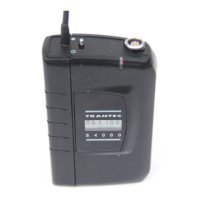

 To Next Page
 General