18
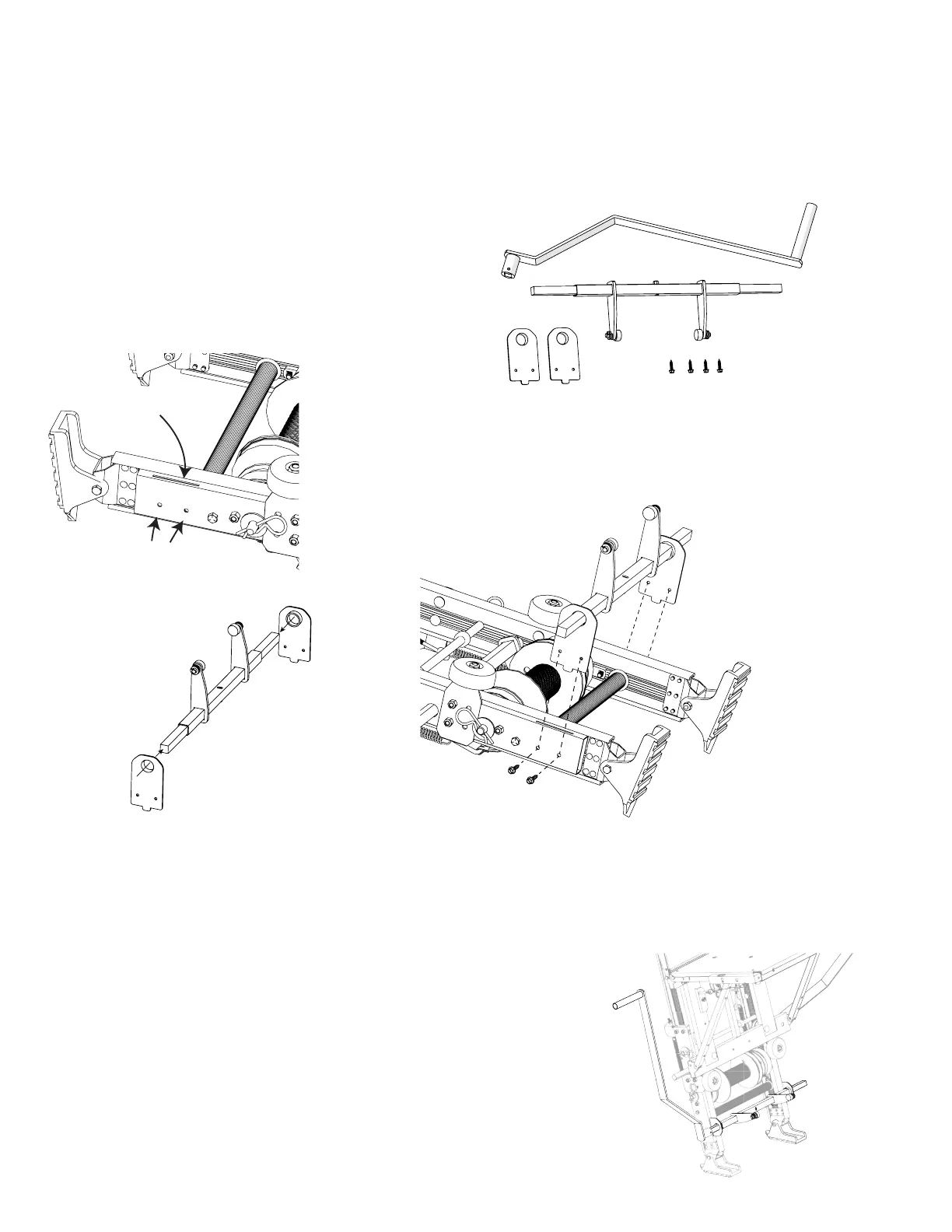
Mounting
Slot
Screw Holes
Assembly Instructions TP250/400 Secondary Handle Kit #48468
(Purchased Separately)
Allows use of a left side handle to engage the motor and carriage. It is highly recommended when using
with the Solar/Plywood Saddle Carriage. Can be used for both TP250 & TP400 models.
Step 1
Lay the base section flat on a hard surface. Locate the mounting
slot and holes on the bottom portion of the base section.
Step 2
With one hand, hold the pivot/brake weldment just above the lower base section. Slide the mounting plates over
the pivot/brake rod. Make sure the raised hole side of the mounting plates goes on the inside.
Step 3
Using the two holes provided; insert two screws per side.
Tighten screws using a screw driver or wrench.
Parts included with the Secondary Handle Kit:
1 Handle
2 Pivot/Brake Weldmont
3 2 - Mounting Plates
4 4 - Screws
1
2
34
Secondary Handle Kit Assembly
Step 4
Attach secondary handle
to either side.


 To Next Page