Indoor Mobility Point™ Quick Start Guide
23
Trapeze Networks
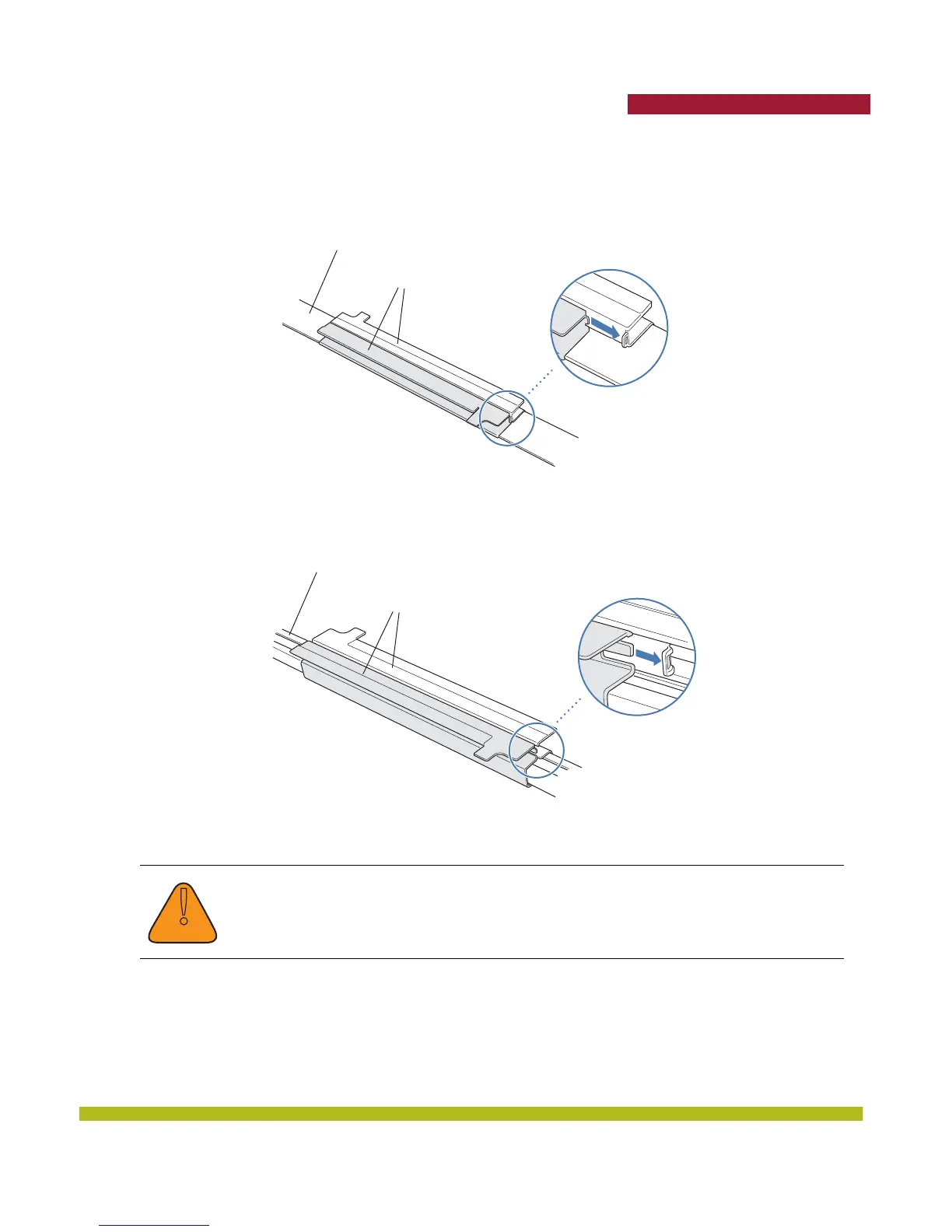
Figure 1–12 shows an example for a 23.9-millimeter (15/16-inch) T-bar. Figure 1–13 shows an
example for a 15.9-millimeter (5/8-inch) T-bar.
Figure 1–12. Step 3—Installing the T-bar Clamp for a 23.9-millimeter (15/16-inch) T-bar
Figure 1–13. Step 3—Installing the T-bar Clamp for a 15.9-millimeter (5/8-inch) T-bar
4. Unlock the universal mounting bracket from the MP by inserting a small-pointed instrument or a
paperclip into the Unlock hole on the MP as shown in Figure 1–14 below.
!
Caution
Use a small-pointed instrument or a paperclip to unlock the MP. Do not use a
screwdriver because it may cause damage to the MP lock mechanism or electronic
components. Do not use excessive force when inserting a tool into the Unlock or Lock
hole.
T-bar
T-bar clamp halves
Slide together
T-bar
T-bar clamp halves
Slide together



 To Next Page