Indoor Mobility Point™ Quick Start Guide
24
Trapeze Networks
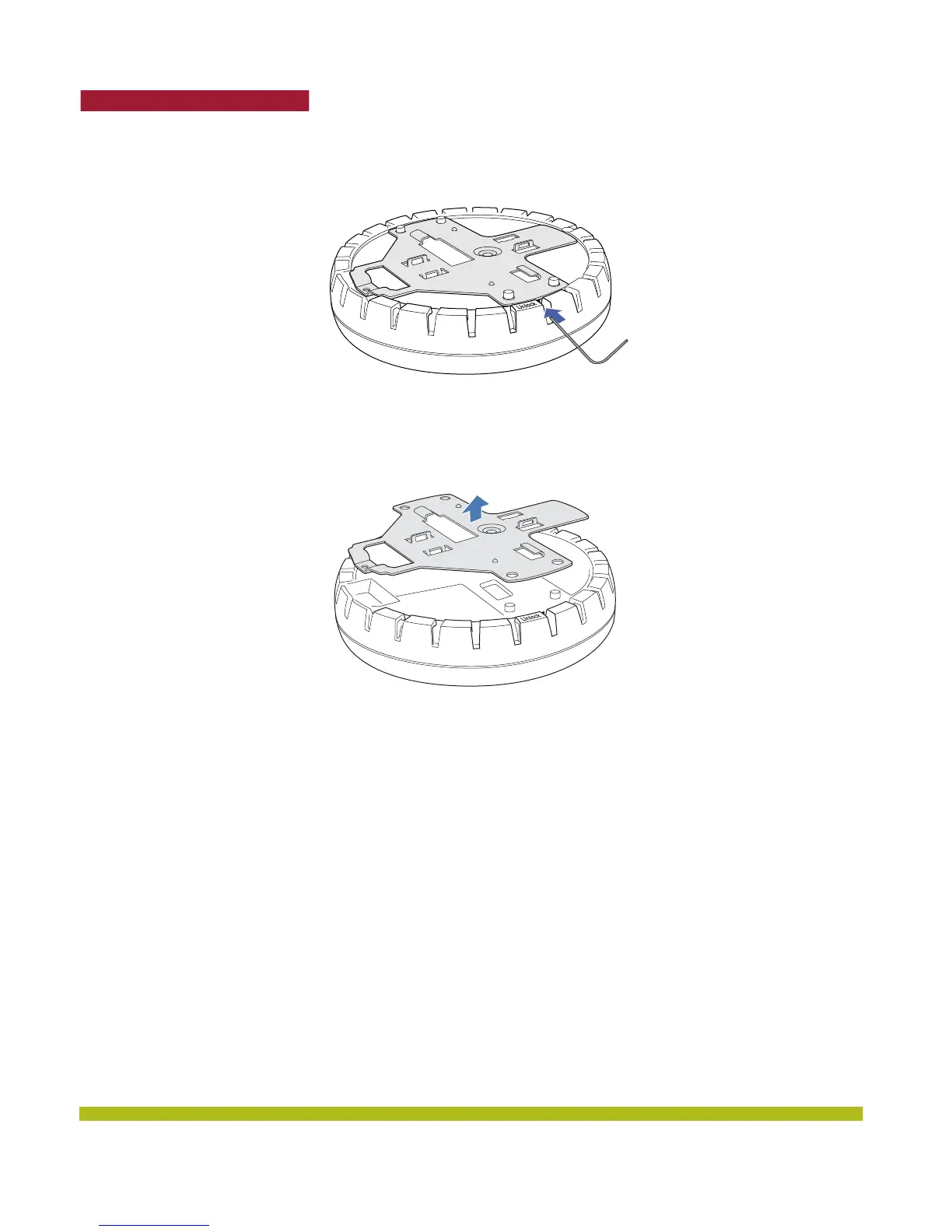
Figure 1–14. Step 4—Unlocking the Bracket
5. Remove the bracket as shown in Figure 1–15 below.
Figure 1–15. Step 5—Removing the Bracket
6. Install the universal mounting bracket as follows onto the T-bar clamp:
a. As shown in Figure 1–16, place the universal mounting bracket against the T-bar clamp so that
the two screw holes face downward and the two T-bar flanges face upward and are adjacent to
the T-bar edges.
b. Properly align the bracket for mounting by placing the bracket so that the port connector
opening is to the left of the hole you cut for the cables.
c. Rotate the universal mounting bracket clockwise until the flanges snap into place on the T-bar
clamp as shown below.



 To Next Page