-5-
IV. SERVICING THE EPICON CONTROL (cont’d)
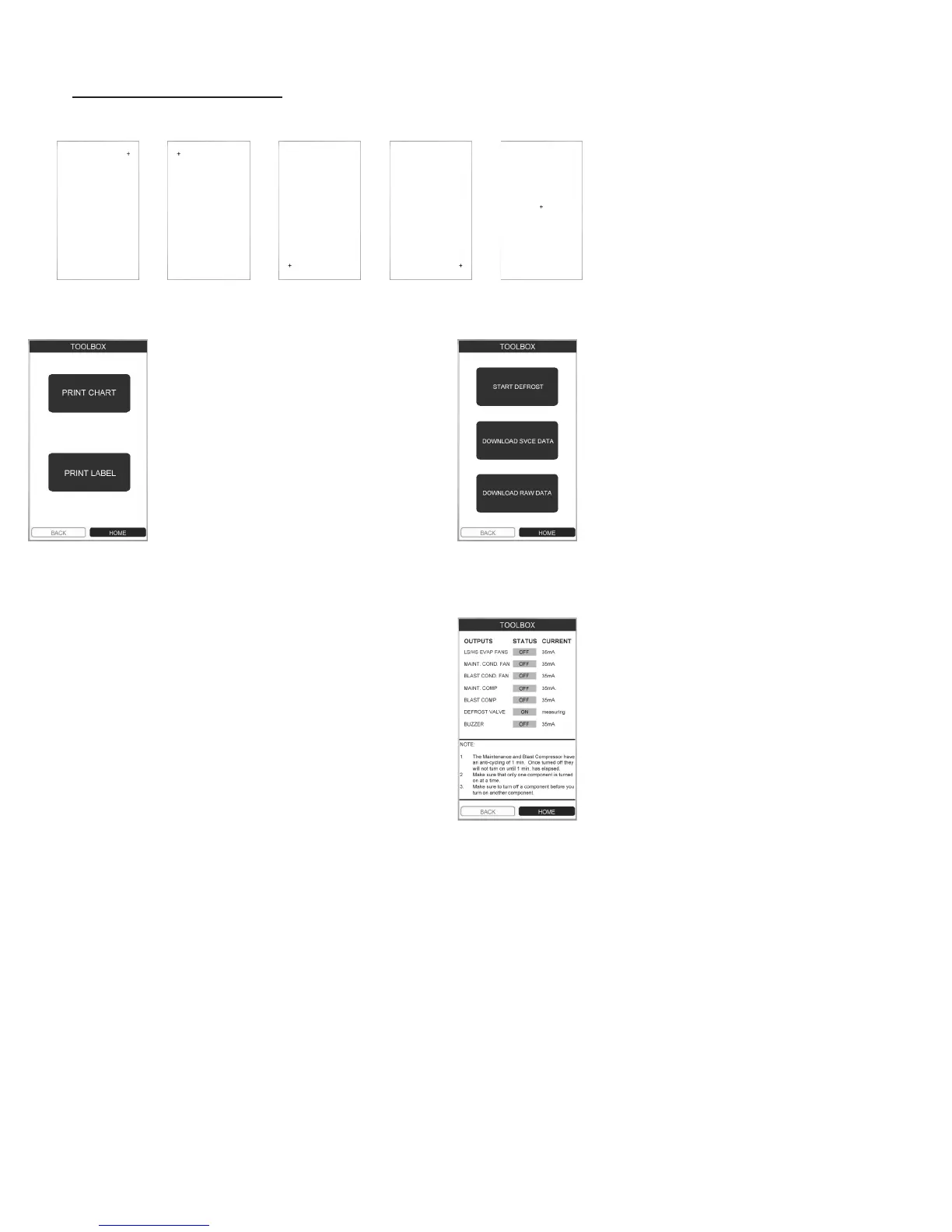
Touch
Point 1
Touch
Point 2
Touch
Point 3
Touch
Point 4
Touch
Point 5
PRINTERS: This feature allows you to
check each printer for proper operation.
Press PRINT CHART to test the record
printer.
Press PRINT LABEL to test the label
printer on models supplied with the
optional label printer.
PARAMETERS:
Press START DEFROST to initiate an
on demand defrost cycle.
Press DOWNLOAD SERVICE DATA to
transfer all temperature data (as shown
on the TEMPERATURE menu) through
the USB port to a thumb drive.
Press DOWNLOAD RAW DATA to
transfer all data in memory through the
USB port to a thumb drive. NOTE: this
feature requires use of special software
available from Traulsen.
DIAGNOSTICS:
Press each OUTPUT one at a time in
order to change test status from OFF
to ON. Record the reading and then
turn the OUTPUT off before proceeding
to the next one.
NOTE: If you do not turn each OUTPUT
off before proceeding to the next one
you can potentially cause damage to
that component.
Normal readings for each OUTPUT
should be...
LS EVAP FANS = 3.7A +/- .55A
HS EVAP FANS = 3.9A +/- .15A
MAINT COND FAN = 1.15A +/- .25A
BLAST COND FAN =
MAINT COMP = 7.5A +/- 1.5A
BLAST COMP =
DEFROST VALVE = n/a
BUZZER = n/a
NOTE: The maintenance compressor
has an anti-cycling feature of 1-minute.
Allow the cabinet to idle for at least
1-minute before beginning a test.
IV. e - SERVICE MENU FEATURES:
CALIBRATE: This features allows for calibration of the touchscreen’s accuracy. Press CALIBRATE than each of the
ve plus symbols (+) as closely as possible to do so. Note use of a stylus is highly recommended.
TEMPERATURES:
Displays key temperature sensor data. Expected values
for each should be in similar to those shown below...
AMBIENT 66°F
CABINET 34°F
MAINT EVAP IN 63°F
MAINT EVAP CORE 42°F
BLAST EVAP IN 32°F
BLAST EVAP CORE 37°F
BLAST EVAP OUT 32°F
BLAST LIQUID LINE 66°F
MAINT LIQUID LINE 66°F
SOFTWARE: Select this feature when updating the control’s
operating software.
The current software versions are displayed at the top
of the TOOLBOX main menu. Contact Traulsen at (800)
825-8220 to verify if you have the latest software versions.
To update the control, insert a thumb drive containing the
latest software into the USB port. Note all les must be
located in the root directory. Updates should be performed
in the following order (if necessary)...
Update I/O Board
Update UI Board
Update HTML
Follow the instructions provided with the software update
and any on screen instructions. Do not remove the thumb
drive until all updates have been completed.
NOTE: The units are calibrated from the
factory and should only be recalibrated
if necessary. Exercise extreme caution
when recalibrating as improper inputs while
calibrating can result in difcultly navigating
the control.


 To Next Page