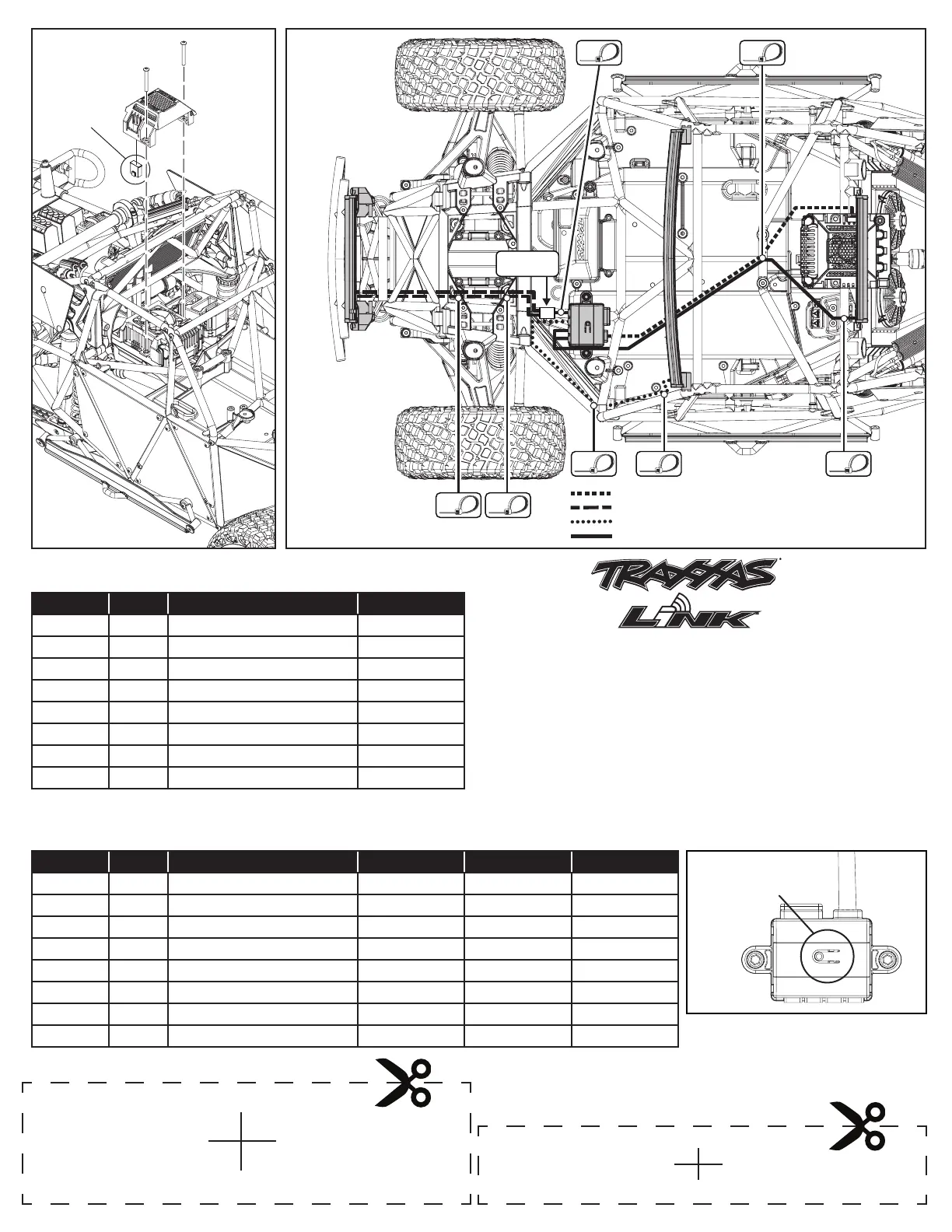
Accessory Port Cover
3x25 BCS
3x25 BCS
Front Grill LED Lightbar Wiring
Windshield LED Lightbar Wiring
Rear LED Lightbar Wiring
High-Voltage Power Amplier Wiring
2-in-1
Wire Harness
Wiring
Diagram
Fig. 5
Fig. 8
High-Voltage Power Amplifier Operation
Default Setting: Low Beam Mode
High-Voltage Power Amplifier Mode Selection
Use the Mode Select button on the high-voltage power amplifier to toggle through the different lighting modes (from Low Beam Mode to High Beam
Mode to Daytime Mode).
FRONT GRILLE
LIGHT BAR
TEMPLATE
REAR
LIGHT BAR
TEMPLATE
A
B
C
D
Connector Channel Default Connection Default Setting
A 1 Front Grille Low Beam Headlights On
2 Front Grille High Beam Headlights O
B 3 Low Beam Windshield Lights On
4 High Beam Windshield Lights O
C 5 Tail Lights On*
6 Brake Lights On when braking
D 7 Class Lights On
8 Not used N/A
Connector Channel Default Connection Low Beam Mode High Beam Mode Daytime Mode
A 1 Front Grille Low Beam Headlights On O O
2 Front Grille High Beam Headlights O On O
B 3 Low Beam Windshield Lights On O O
4 High Beam Windshield Lights O On O
C 5 Tail Lights On On O
6 Brake Lights On when braking On when braking On when braking
D 7 Class Lights On On On
8 Not used N/A N/A N/A
Change the high-voltage power amplifier settings and gain access to
additional functions using the Traxxas Link App (available in the Apple
App Store
SM
or on Google Play™). The TQi transmitter with the Traxxas
Link Wireless Module (part #6511, sold separately) are required.
Mode Select
Button
*To race the truck without tail lights, disconnect the in-line connector on the rear
LED light bar wire harness.
This device complies with FCC Part 15 & IC RSS-210 rules subject to the following conditions: (1) This device may
not cause harmful interference, and (2) This device must accept all interference received, including interference
that may cause undesired operation.
App Store is a service mark of Apple Inc. Google Play is a trademark of Google Inc.




 To Next Page