2
Features
Front Panel
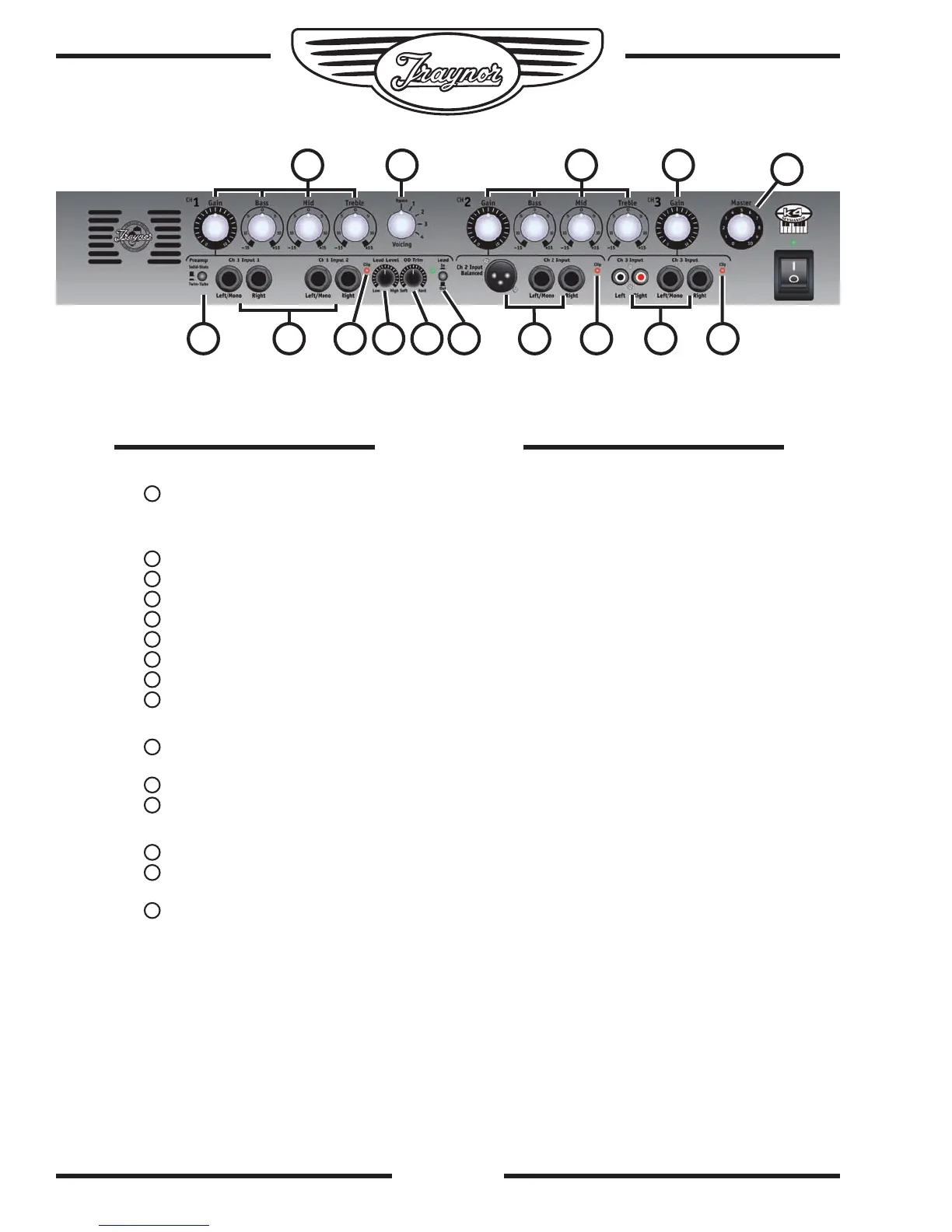
A Master Volume control is located on the front panel along with the Power
switch and LED.
Front Panel Controls for Channel 1
Two parallel pairs of balanced 1/4-inch TRS inputs for mono or stereo operation
Gain, Bass, Mid, Treble controls with a boost/cut of 15db
A 5-position voicing selector (Bypass, Studio, Live, Piano, Organ)
Tube/Solid State input switch
Lead Level control
Overdrive Trim control (use for single instrument patch only!)
Lead Bypass switch
Input clip LED
Front Panel Controls for Channel 2
Parallel pair of balanced XLR (mono only, for use with mics) and stereo balanced 1/4-
inch TRS inputs for mono or stereo operation
Gain, Bass, Mid, Treble controls
Input clip LED
Front Panel Controls for Channel 3
Gain control
Parallel pair of unbalanced RCA and stereo balanced 1/4-inch TRS inputs for
mono or stereo operation
Input clip LED


 To Next Page