Need help?
Do you have a question about the Treasure Cove TC-3020 and is the answer not in the manual?
Describes the detector's LCD screen, showing target type, depth, and settings.
Explains how distinct audio tones identify different types of metal.
Covers Super Slow Sweep Identification and the waterproof search coil.
Details the connection for headphones, which silences the internal speaker.
Step-by-step instructions for assembling the metal detector.
Instructions and cautions for installing the required 9V batteries.
Guidance on connecting headphones and protecting hearing.
An overview of the detector's main components and controls.
Details on target icons, depth indicators, and LCD readouts.
Specific metal types identified in the gold range on the display.
Specific metal types identified in the silver range on the display.
Explanation of low, medium, and high tones for metal identification.
Procedure for powering on the metal detector.
Explanation of ALL METAL, DISC, and NOTCH operational modes.
Steps for testing the detector's performance indoors.
Important considerations and warnings for indoor testing.
Instructions for testing the detector's performance outdoors.
Techniques for effective and accurate search coil sweeping.
How to fine-tune the detector's sensitivity for optimal performance.
Tips for interpreting signals and avoiding false readings.
Methods for accurately locating buried targets.
Variables that can influence detection results.
Guidelines for handling, cleaning, and maintaining the detector.
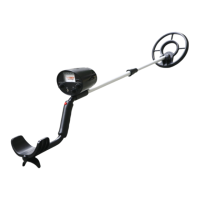
The Fortune Finder 'Platinum' Edition TC-3020 is a versatile and user-friendly metal detector designed for hunting coins, relics, jewelry, gold, and silver in various locations.
The core function of the TC-3020 is to detect different types of metal objects buried underground or hidden. It achieves this through a search coil that interacts with metallic objects, sending signals back to the control box for analysis and display. The detector offers three primary operating modes:
The detector provides a Three Tone Audio Discrimination system, which means it produces distinctive audio tones for different categories of metal when operating in DISC or NOTCH modes. A low tone typically indicates foil, nails, bottle caps, or nickels. A medium tone suggests aluminum pull tabs, zinc, or copper items. A high tone is associated with brass or silver items. In ALL METAL mode, a single tone is emitted for any detected metal.
A key feature is the LCD Display, which provides visual information about detected targets. It shows the probable type of metal with an arrow, the estimated depth of the target, the DISC/NOTCH range, the sensitivity level (SENS) with a segment indicator, the current operating mode, and a low battery indication. When a strong signal is received, the arrow appears steadily; for weak signals, it blinks or may not appear. The arrow disappears if detecting pauses for about 5 seconds. The target icons at the top of the display include categories like GOLD RANGE (Iron Foil, 5¢/NICKEL, PULL TAB, S-CAPS, 1¢) and SILVER Range (10¢, 25¢). These indications are approximations, serving as a visual reference to help decide if an item is worth investigating.
The Super Slow Sweep Identification allows for discrimination of different metal types with a very slow sweep of the search coil. The Waterproof Search coil ensures the detector can be used even if the coil needs to be submerged in water. Additionally, a Headphone Jack is included, allowing users to connect headphones (not supplied) for private operation without disturbing others or being disturbed by ambient noise. When headphones are plugged in, the internal speaker is disconnected.
Before using the detector in the field, it is recommended to test it indoors and outdoors to understand how it reacts to different metals.
Assembly: The detector is easy to assemble without special tools. This involves connecting the smaller stem to the bigger stem, inserting the handle's latch into the control box's assembly hole and securing it with a screw, and finally attaching the search coil to the stem, winding the cable, and plugging it into the control box. The stem's length is adjustable to ensure comfortable use, with the search coil positioned 1/2 to 2 inches above the ground when standing upright.
Battery Installation: The detector requires two 9-volt alkaline batteries (not supplied). Batteries are installed by sliding off the covers and matching the polarity symbols. It's crucial to use fresh alkaline batteries and avoid mixing old and new ones or different types. For prolonged storage, batteries should be removed to prevent leakage and damage to electronic parts.
Headphone Use: Headphones (3.5mm plug) can be connected to the PHONE jack. The volume should be set to a comfortable level to protect hearing, avoiding extremely high volumes that could lead to permanent hearing loss. It's also advised not to wear headphones in high-traffic areas for safety.
Turning On and Mode Selection: To operate, slide the power switch to ON. The unit will display all symbols on the LCD, sound low, medium, and high tones, and then enter a stand-by state. The LCD will show "ALL METAL" and "SENS" with a default sensitivity level of 5. The DISC/NOTCH range is also available. Operating modes (ALL METAL, DISC, NOTCH) are selected via touch keys.
Sensitivity Adjustment: Sensitivity (SENS) can be adjusted by pressing the SENS button and then the UP or Dn keys. Higher sensitivity allows for detecting deeply buried targets, but setting it to the maximum position can lead to interference and false signals from broadcast antennas or other electronic lines, resulting in unstable arrow and irregular tone indications.
Pinpointing the Target: Accurately pinpointing a target makes excavation easier.
Factors Affecting Detection: Several factors can influence detection accuracy: the angle of the target in the soil, its depth, the level of oxidization, its size, and electro-magnetic/electrical interference. Patient and correct practice is key to achieving satisfactory results.
Proper care and maintenance ensure the longevity and optimal performance of the TC-3020 metal detector.
 General
| Brand | Treasure Cove |
|---|---|
| Model | TC-3020 |
| Operating Frequency | 6.6 kHz |
| Sensitivity | Adjustable |
| Search Coil | 8-inch waterproof |
| Depth Indicator | Yes |
| Battery | 9V (not included) |
| Weight | 2.2 lbs |
| Length | Adjustable, 40 to 48 inches |

 To Next Page