Assembly
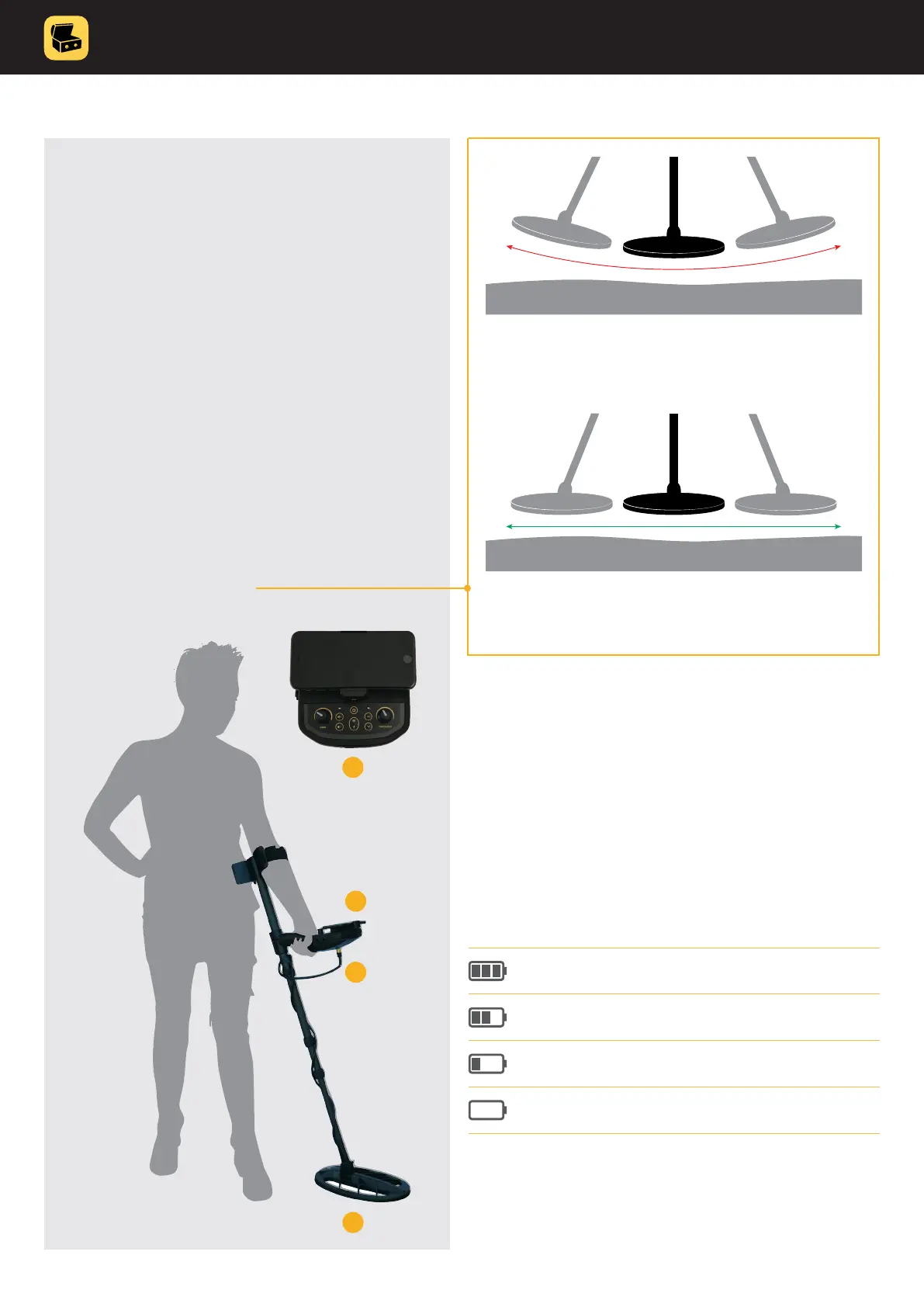
1. Attach coil to lower shaft�
2. Connect coil�
3. Fix smart control unit and make sure the batteries
are inserted�
4. Mount smartphone�
Make sure home button is on right side and that
the path between smartphone camera and
searchcoil is clear�
5. Adjust the height of the shaft�
Your arm should be relaxed and the search coil
position approximately 5 cm above the ground�
6. Learn to sweep properly�
Battery
The detector requires a single 9-volt ALKALINE or rechargeable
Lithium-Ion or nickel-metal hydride battery�
The battery is located on the back side of the smart control
unit�
Battery Status Indicator
The battery status indicator shows the current battery level�
When battery is empty, LED indicator on the smart control
unit will start to blink�
Correct way of sweeping
The search coil must be parallel to the ground
at all times.
70% – 100%
30% – 70%
<30%
<5% (Battery is empty)
Instruction manual 7
TREASUREHUNTER3D
Makes underground treasures visible
Incorrect way of sweeping
In order to get the best results it is important to keep the
search coil parallel to the ground.
1
2
3
4



 To Next Page