EasyManua.ls Logo

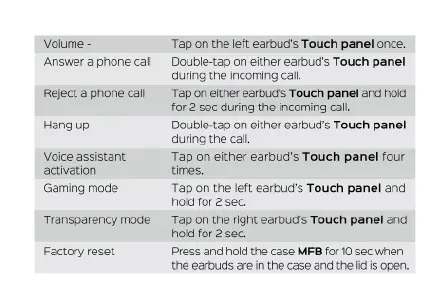
TREBLAB X1 - Call Handling; Special Modes Activation; Factory Reset

TREBLAB X1
28 pages
Print Icon
To Next Page IconTo Next Page
To Previous Page IconTo Previous Page
Loading...
Volume
-
Answer
a
phone
call
Reject
a
phone
call
Hang
up
Voice
assistant
activation
Gaming
mode
Transparency
mode
Factory
reset
Tap
on
the
left
earbud's
Touch
panel
once.
Double-tap
on
either
earbud's
Touch
panel
during
the
incoming
cal.
Tap
on
elther
earbuds
Touch
panel
and
hoid
for
2
sec
during
the
incoming
cal.
Double-tap
on
either
earbud's
Touch
panel
during
the
cal.
Tap
on
either
earbud's
Touch
panel
four
times.
Tap
on
the
left
earbud's
Touch
panel
and
hold
for
2
sec.
‘Tap
on
the
right
earbud's
Touch
panel
and
hold
for
2
sec.
Press and
hold
the
case
MFB
for
10
Sec
when
the
earbuds
are
in
the
case and
the
i
is
open.

Related product manuals