2023 Fetch+ 4
20
Steering Dr ivetrain Routing Battery Headsets Frame Accessor ies
Headsets: instructions
Install the front headset/fork
1. Assemble the headset/fork and tighten the
compression bolt (1).
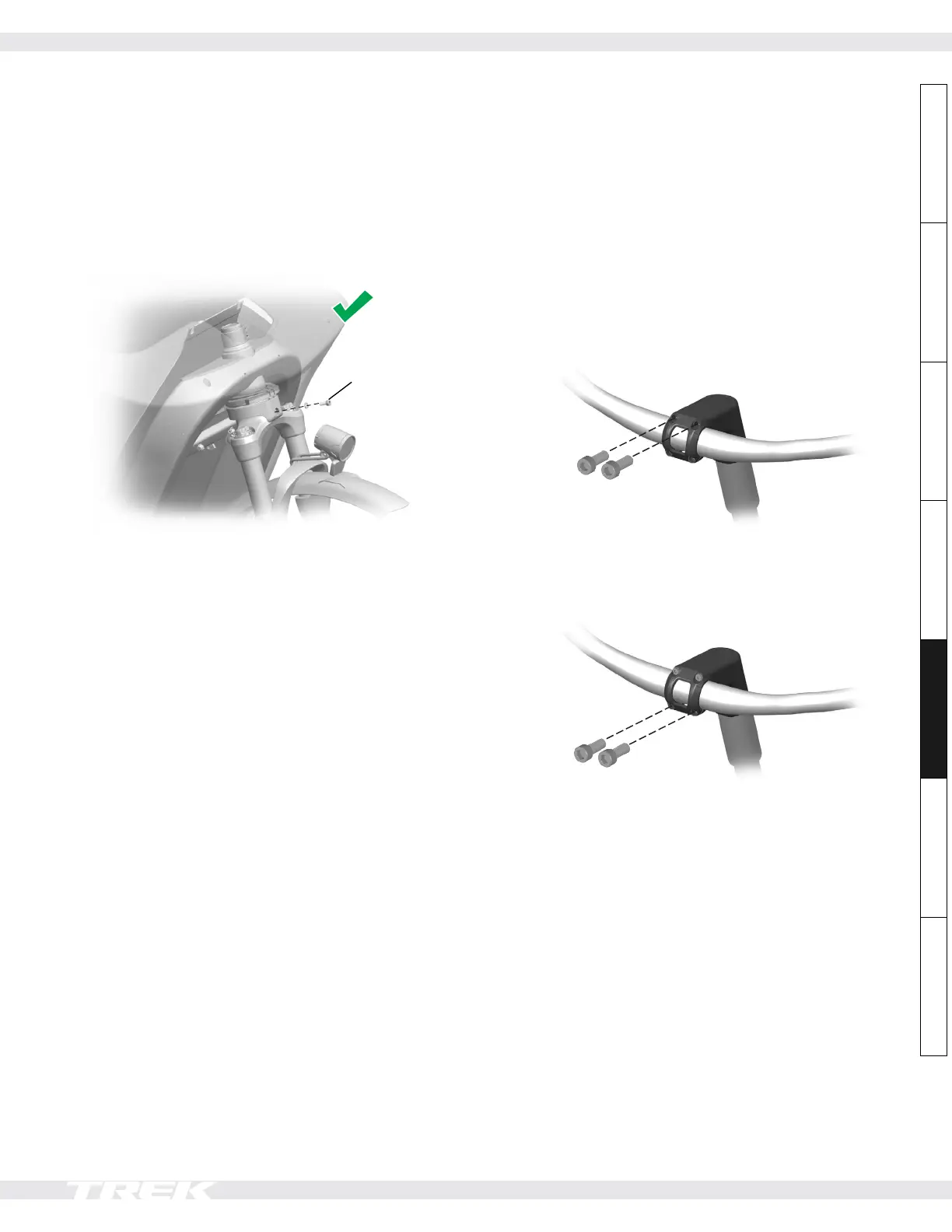
2. Install the bolt (12) and washer (11).
NOTE: If you do this in the reverse order, the
assembly can be misaligned.
Install bolt
last
Remove the steering cables before uninstalling
either headset assembly
See pages 3-4 for instructions on how to remove them.
NOTICE: If you do not remove the steering cables before
uninstalling the headset, they can get damaged by the
weight of the steerer tube.
Verify rear headset tightness
1. Hold the stem (3) and move it up/down and forward/
backward to ensure the headset is assembled
and tightened properly. The steering should be
responsive, direct, and without play.
2. If there is play, reassemble and tighten the headset
parts as necessary (see page 17).
Stem clamp bolts tightening order
1. Tighten the top two bolts to 10Nm.
2. Tighten the lower two bolts to 10Nm.










 To Next Page