2023 Fetch+ 4
2
Steering Dr ivetrain Routing Battery Headsets Frame Accessor ies
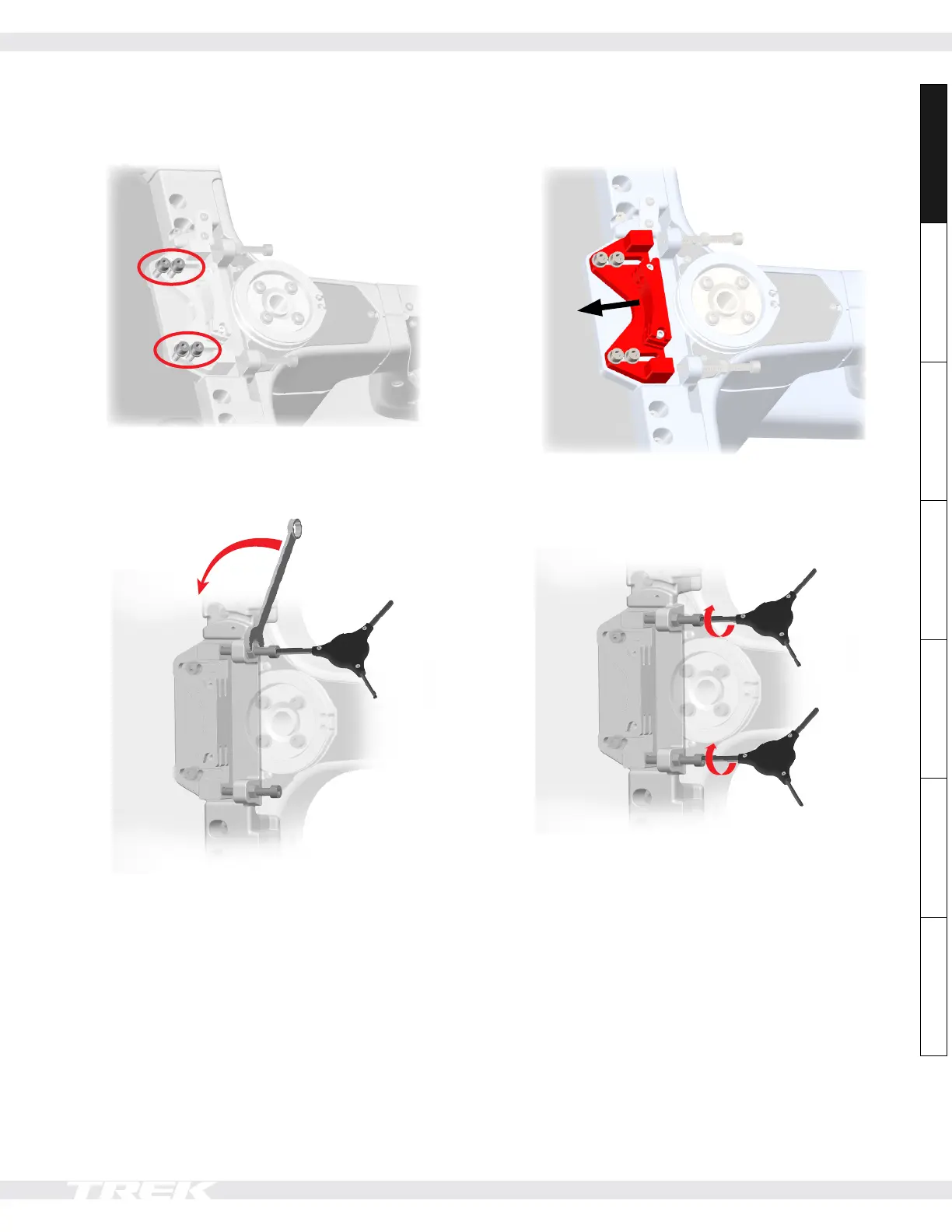
Steering: adjust cable tension
1. Loosen the four rear cable mount bolts (2) — do not
remove them.
2. Hold the tensioning bolt (4) in place and use a 13mm
wrench to loosen the tensioning nut (5). Then, loosen
the tensioning bolt (4) to remove tension from the
cables. Repeat for the other side.
3. Move the cable mount (6) to increase tension in the
cables.
4. Tighten both tensioning bolts (4) — alternating
between them to keep the cable mount parallel —
until they are snug into the cable mount (6). Then,
tighten both tensioning nuts (5) to 18Nm.
5. Test the front wheel steering and adjust the cable
tension, if necessary. There should be no noticeable
slack when steering quickly.
• Too loose — the wheel will feel disconnected from
the steering.
• Too tight — the steering will feel heavy with a lot of
friction.
Notice: If the cables are too tight, the bearings
will wear out much faster than if the cables are
tensioned properly.
6. Tighten all four rear cable mount bolts (2) to 18Nm
(see Step 1).
7. Tighten both tensioning nuts (5) to 18Nm.













 To Next Page