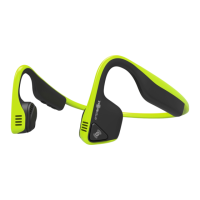
• Store the headphones in a cool and dry place. The working temperature should be 0~45°C(32~113°F). Working in cold/hot environments or highly humid
areas may reduce the life of the battery.
• After storing the headphones for an extended period, charge the unit before using it again.
• The headphones are sweat resistant, but are NOT waterproof. DO NOT submerge the headphones in water.
• Listening with headphones at a high volume may affect your hearing and may distort the audio.
• When cleaning the headphones, use a soft dry cloth.
• Do not charge your headphones immediately after exercising, as any sweat or moisture inside the charging port could lead to a circuit burning.
Note:
Storage and maintenance
This device complies with Part 15 of the FCC Rules. Operation is subject to the following two conditions:
(1) This device may not cause harmful interference, and
(2) This device must accept any interference received, including interference that may cause undesired operation.
This device and its antenna(s) must not be co-located or operating in conjunction with any other antenna or transmitter.
Note:
This equipment has been tested and found to comply with the limits for a Class B digital device, pursuant to Part 15 of the FCC Rules. These limits are designed
to provide reasonable protection against harmful interference in a residential installation. This equipment generates, uses and can radiate radio frequency energy
and, if not installed and used in accordance with the instructions, may cause harmful interference to radio communications. However, there is no guarantee that
interference will not occur in a particular installation. If this equipment does cause harmful interference to radio or television reception, which can be determined by
turning the equipment off and on, the user is encouraged to try to correct the interference by one or more of the following measures:
• Reorient or relocate the receiving antenna.
• Increase the separation between the equipment and receiver.
• Connect the equipment into an outlet on a circuit different from that to which the receiver is connected.
• Consult the dealer or an experienced radio/TV technician for help.
FCC caution
This device complies with Industry Canada license-exempt RSS standard(s). Operation is subject to the following two conditions:
(1) This device may not cause interference, and
(2) this device must accept any interference, including interference that may cause undesired operation of the device.
This Class (B) digital apparatus complies with Canadian ICES-003.
Declaration of Conformity of Industry of Canada


 To Next Page
 Loading...