Need help?
Do you have a question about the TREND NETWORKS LanTEK IV and is the answer not in the manual?
Fully charge the display and remote units using the power supply. Charging ports are detailed.
Select the language by navigating the setup gear at the top left of the screen.
Visit anyware.trend-networks.net to set up your free account to manage projects and tests.
Log in to your AnyWARE account, select Menu, then Devices, and Add Device.
Access on-board help via the Menu Bar icon or Settings > Usage Guides.
Access AnyWARE Cloud assistance via the Walk Me Through tab on the bottom right.
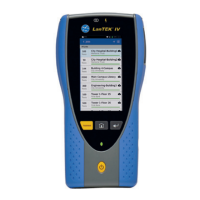
Details on touch screen, buttons, LED indicators, charging port, and connectivity.
Warning to disconnect cable immediately if high voltage is detected.
Overview of the VisiLINQ probe's LED indicator, action button, and components.
Displays test count, last completed test, and lists tests in the current job with status.
Displays all jobs stored on the tester.
Upload/download tests to AnyWARE Cloud or export to USB drive.
Options for viewing test results, starting tests, and accessing test-specific actions.
Configure language, Wi-Fi, and calibration settings.
Access device details, software info, and user guides.
Configure default autotest settings for new jobs to reduce setup time.
Enter job name and optional identifiers for grouping tests by building, floor, etc.
Add tests to job, define test range, prefix, and select cable type (Copper/Fiber).
Choose cable standard, link model, grade, and optional manufacturer details.
Confirm and finalize the test creation process.
Select Wi-Fi from the Settings menu and switch the toggle to turn on Wi-Fi.
Choose your network and enter the password if required.
Select SYNC to download pre-configured jobs or upload completed jobs.
Choose to transfer results to the cloud or USB storage.
Swipe down from the top of the screen to enable Live Wiremap in free mode.
Select test list options menu to activate Live Wiremap within a job.
Features for uploading jobs, viewing, downloading, emailing, and sharing PDF reports.
Details on test count, active job name, progress, and test status.
Displays all stored projects on the tester.
Upload/download tests to AnyWARE Cloud or export to USB storage.
Options for viewing test results, starting tests, and accessing test-specific actions.
Configure language, Wi-Fi connectivity, and calibration parameters.
Access device details, software information, and user guides.
Configure default autotest settings for new jobs to reduce setup time.
 General
| Category | Test Equipment |
|---|---|
| Model | LanTEK IV |
| Manufacturer | TREND NETWORKS |
| Type | Cable certifier |
| Display | Color LCD |
| Battery Life | 8 hours |
| Connectivity | USB, Ethernet |
| Autotest Time | Less than 10 seconds |
| Cable Types Supported | Fiber |
| Frequency Range | Up to 1 GHz |
| Supported Tests | Wiremap, Length, Resistance, Insertion Loss, Return Loss, NEXT, PSNEXT, Skew, Propagation Delay |
| Data Storage | Internal memory, USB drive |
| Remote Unit | Included |
| Operating Temperature | 0°C to 40°C |

 To Next Page