Troubleshooting
5
Windows Vista
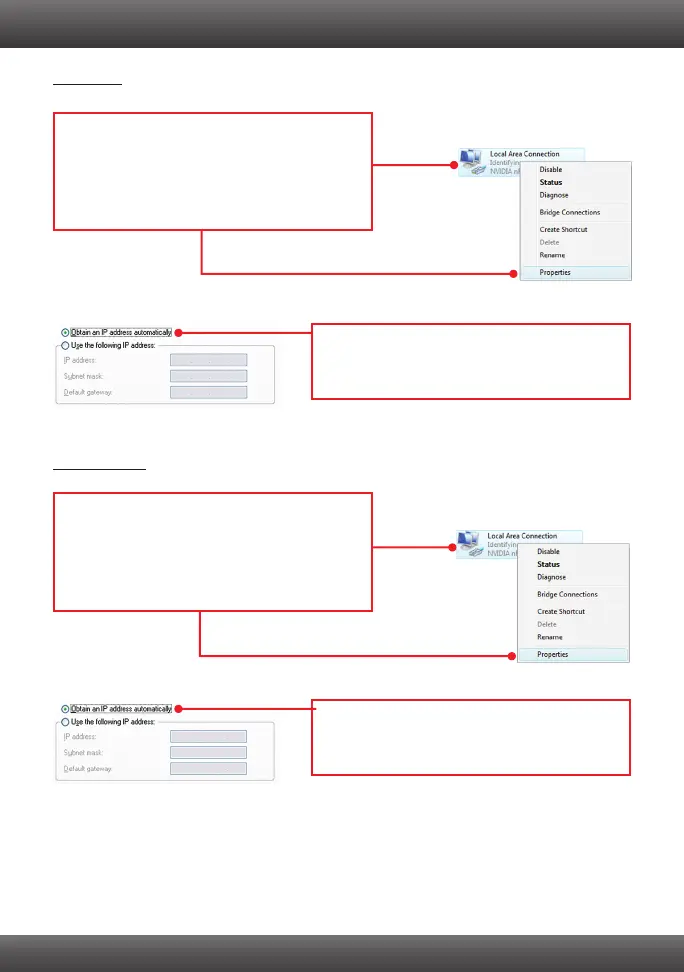
2. Click Internet Protocol Version 4(TCP/IPv4)
and then click Properties. Then click on Obtain
an IP address automatically.
Windows 7
1. Go into the Control Panel, click Network and
Internet, click Network and Sharing Center,
click Change Adapter Settings and then
right-click the Local Area Connection icon and
then click Properties.
1. Go into the Control Panel, click Network and
Internet, click Network and Sharing Center,
click Manage Network Connections and then
right-click the Local Area Connection icon
and then click Properties.
2. Click Internet Protocol Version 4(TCP/IPv4)
and then click Properties. Then click on Obtain
an IP address automatically.



 To Next Page