Troubleshooting
19
Troubleshooting
6
Windows XP/2000
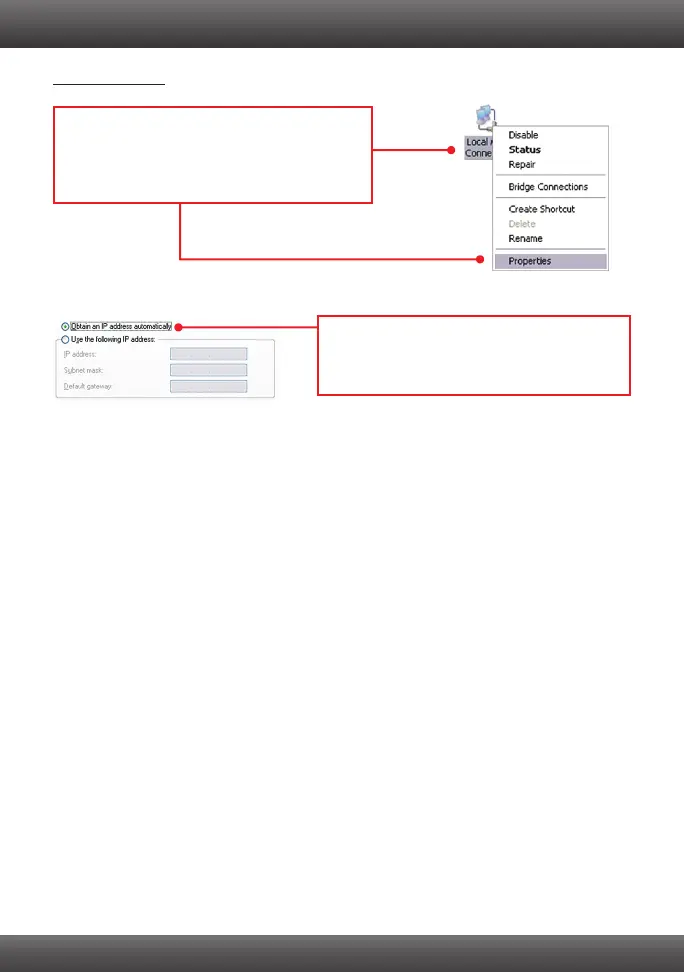
1. Go into the Control Panel, double-click the
Network Connections icon and then right-click
the Local Area Connection icon and then click
Properties.
2. Click Internet Protocol (TCP/IP) and then
click Properties. Then click on Obtain an IP
address automatically.
4. How do I install the drivers on Windows 98 or ME?
Please refer to the Help folder on the Driver CD-ROM.
5. Why am I only getting a network connection speed of 100Mbps instead of 1000Mbps?
1. Check the Ethernet Cable. Make sure you are using CAT-5e or CAT-6 Ethernet Cables.
Some CAT-5 cables are not rated to run in Gigabit.
2. Make sure you are connected to a 1000Mbps switch.
If you still encounter problems or have any questions regarding the TEG-PCITXR/TEG-PCITXRL,
please refer to the User's Guide included on the Driver CD-ROM or contact Trendnet's Technical
Support Department.



 To Next Page