EasyManua.ls Logo

TRENDnet TPL-306E - Page 18

TRENDnet TPL-306E
30 pages
Print Icon
To Next Page IconTo Next Page
To Previous Page IconTo Previous Page
Loading...
© Copyright 2012 TRENDnet. All Rights Reserved.
16
TRENDnet User’s Guide
TPL-306E / TPL-306E2K
Powerline Utility Overview
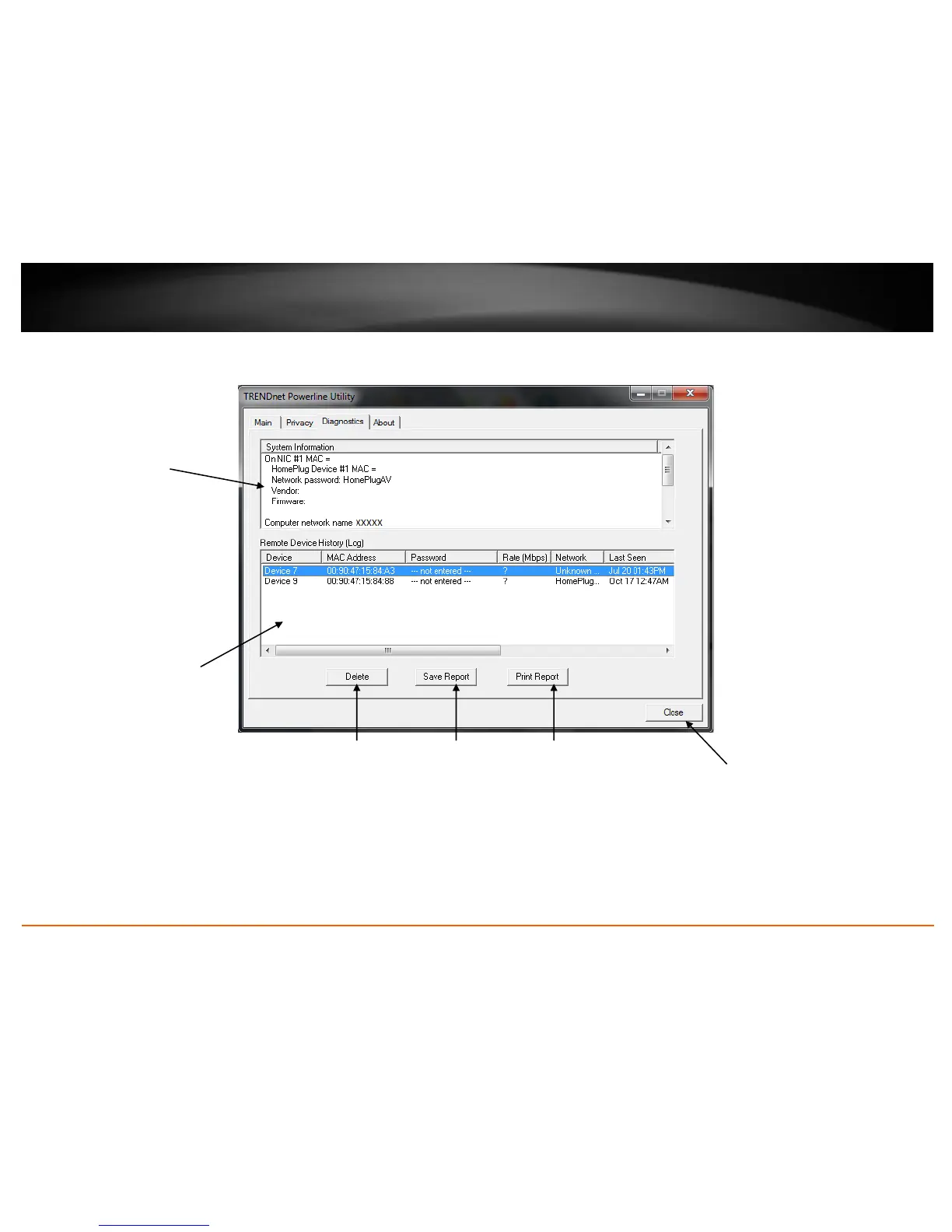
Diagnostics Window
System Information
Displays the device and
other related information
such as firmware version,
MAC address, and
encryption key (also called
network password).
You can vertically scroll
the window to view all of
the system information.
Remote Device History (Log)
Displays Powerline adapters or
other Powerline devices
(Remote Device) that have
been previously connected to
or discovered on your
Powerline Network.
Delete
Deletes or
removes the
selected entry
listed in the
Remote Device
History (Log)
(Remote Device)
Save Report
Saves the
information
contained in the
System
Information
window to a text
file on your
computer.
Print Report
Prints the
information
contained in the
System
Information
window.
Close
Closes and exits
the Powerline
Utility
application

Related product manuals