© Copyright 2012 TRENDnet. All Rights Reserved.
15
TRENDnet User’s Guide
TPL-308E / TPL-308E2K
Powerline Utility Overview
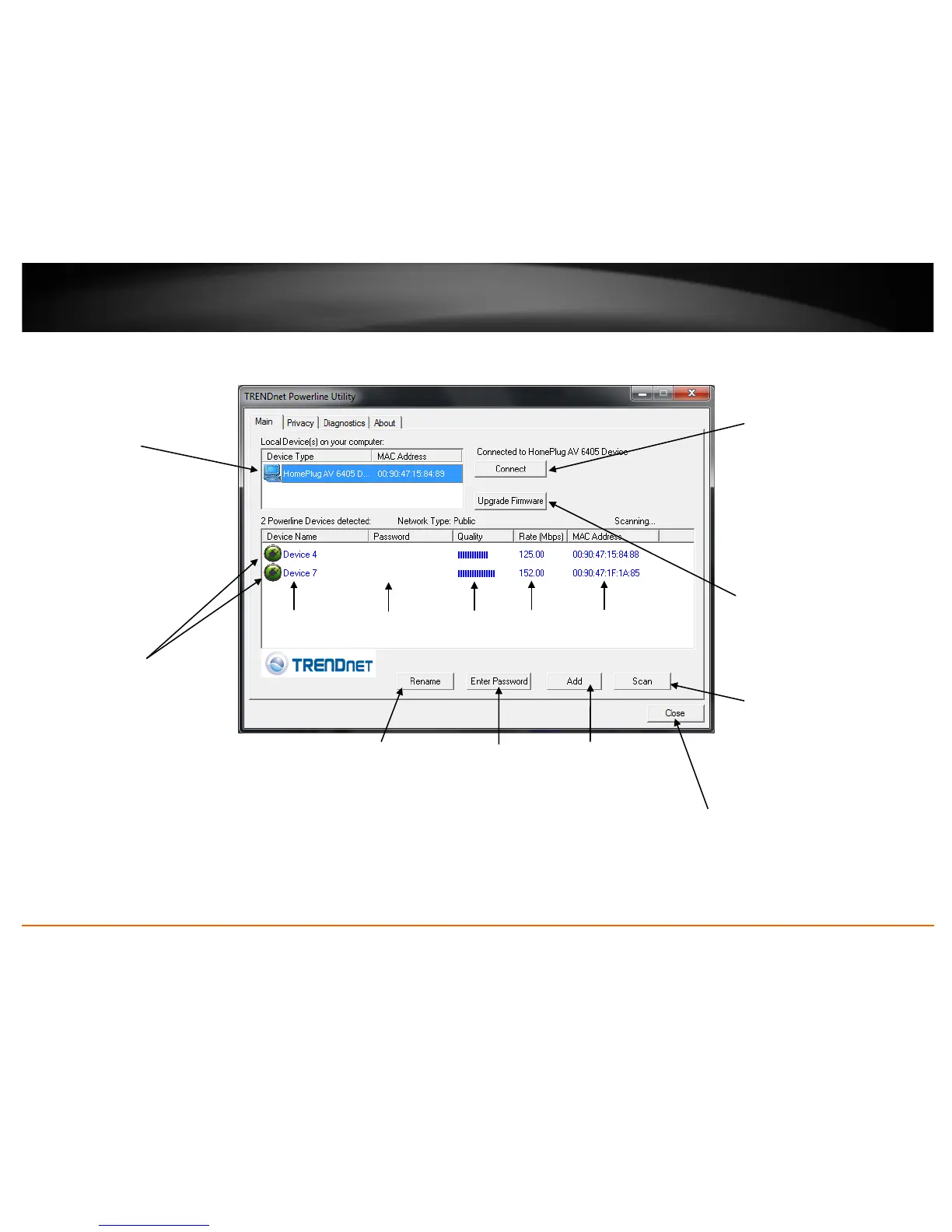
Main Window
Local Device
The Powerline adapter
connected to your
router.
Note: If your computer
is connected directly to
your Powerline adapter,
the Local Device listed
will be the Powerline
adapter your computer
is directly connected to.
Connect
If your Powerline
adapter (Local Device)
is not detected
automatically and does
not appear in the list,
click Connect to detect
and rescan and connect
to the Powerline
adapter (Local Device)
again.
Upgrade Firmware
Allows you to upgrade
the Powerline adapter
(Local Device) firmware
See page.
Remote Devices
Powerline adapters in
remote locations that are
connected to the selected
Powerline adapter (Local
Device) across the electrical
system.
Note: If all of your Powerline
adapters are already
connected to your Powerline
network, they will
automatically detected and
appear in the list. If not, you
will need to add them
manually.














 To Next Page