
 Need help?
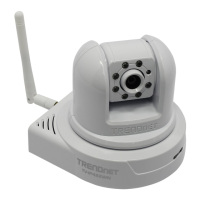
Do you have a question about the TRENDnet TV-IP422WN and is the answer not in the manual?
Steps to log in to the camera's web interface via browser.
Navigating and utilizing the camera's web-based configuration interface.
Guided setup process for configuring the camera's essential settings.
Adjusting IP, DDNS, IP filter, and wireless network parameters for connectivity.
Adjusting video resolution, quality, frame rate, and audio input/output.
Configuring motion detection areas, sensitivity, and recording triggers.
Launching and navigating the SecurView Pro application for camera management.
Setting up Dynamic DNS on the camera for remote access through a router.
 General
| Maximum resolution | 640 x 480 pixels |
|---|---|
| Sensor type | CMOS |
| Optical sensor size | 1/4 \ |
| Digital zoom | 3 x |
| Security algorithms | 128-bit WEP, 64-bit WEP, WPA-PSK, WPA2-PSK |
| Video motion detection | Yes |
| Cabling technology | 10/100Base-T(X) |
| Supported network protocols | TCP/IP, UDP, ICMP, DHCP, NTP, DNS, DDNS, SMTP, FTP, HTTP, Samba, PPPoE, UPnP, Bonjour, RTP, RTSP, RTCP |
| Dimensions (WxDxH) | 115 x 110 x 105 mm |
| Networking features | Fast Ethernet, WLAN |
| Compatible operating systems | Windows 7 (32/64 bit), Vista (32/64 bit), XP (32/64 bit) |
| Compliance industry standards | IEEE 802.11n, IEEE 802.11g/b, IEEE 802.3, IEEE 802.3u |
| Power consumption | 1500 mA |
| Power source type | PoE |
| Power consumption (typical) | 10 W |
| Interface | - |
| Ethernet LAN (RJ-45) ports | 1 |
| Certification | CE, FCC |
| Pan range | -165 - 165 ° |
| White balance | Auto |
| Tilt angle range | -15 - 90 ° |
| Minimum illumination | 0 lx |
| Storage temperature (T-T) | -15 - 60 °C |
| Operating temperature (T-T) | 0 - 45 °C |
| Operating relative humidity (H-H) | 0 - 90 % |
| Infra-red wavelength | 940 nm |
 Weight and Dimensions
| Weight | 360 g |
|---|






 To Next Page
