EasyManua.ls Logo

trentios PC35-AME - User Manual

trentios PC35-AME
8 pages
Print Icon
To Next Page IconTo Next Page
Loading...
USER MANUAL
PORTABLE AIR-CONDITIONER
1
1. "
PLEASE MAKE SURE THE PRODUCT VENTILATES ALL THE TIME "!
Please make sure the inlet and outlet ventilation is not blocked at all times.
2. Operate this unit on a horizontal surface to avoid water leakage.
3. Do not operate this unit in an explosive or corrosive atmosphere.
4. Operate this unit in an ambient of 35 degree centigrade or less.
5. The heating function of the unit should be operated in an indoor ambient
temperature between 7 and 23
6. Clean air filter periodically to enjoy the most efficient cooling.
7. When the unit is shut off, please wait at least 3.5 minutes before restarting
this is to prevent the compressor from being damaged.
8. This unit needs at least 7 Amps of electricity to have its compressor
operational. To avoid the household electricity block out, please do not use
any extension cord for this unit.
9. This unit is for indoor cooling, heating and dehumidifying.
10. When turning on the unit, the fan will operate but the compressor will
CAUTION
VERY IMPORTANT
Please read this instruction guide before install and using
your portable air conditioner unit.
This instruction manual is the universal-purpose version
for the units that you purchase, it might be slightly
different from the ones described in the manual, but it does
not affect your proper operations and usage.
start up after the cooling alarm flashes for three minutes
In heating function, the heating alarm will flash for 3.5 minutes before
the compressor and fan start up.
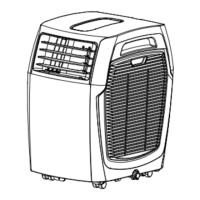
PC26-AMEII
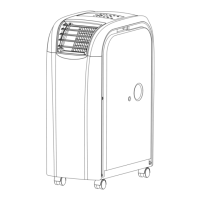
PC35-AME/PC40-AME

Questions and Answers

Summary

VERY IMPORTANT

Safety and Operational Precautions

Crucial safety and usage guidelines for the air conditioner, covering ventilation, temperature, and electrical requirements.

ATTENTION

Optimizing Heating and Cooling Performance

Tips for effective heating and cooling functions, including exhaust hose placement and unit clearance.

Portable Air Conditioner Benefits

Key advantages of the portable air conditioner unit, such as mobility and ease of installation.

UNPACKING INSTRUCTIONS

Unpacking and Setup Steps

Guide to safely unpack and prepare the unit for operation, including handling and hose installation.

NAME OF THE PARTS

Component Identification

Labels and descriptions of the various parts of the air conditioner, including control panel and vents.

CONTROL PANEL & DESCRIPTION OF FUNCTION

Power and Function Selection

How to turn the unit on/off and select operating modes like cooling, heating, or dehumidifying.

Temperature Regulation

Adjusting temperature settings for cooling and heating modes, with specified limits.

Fan Speed Control

Options for selecting fan speed (LOW, MEDIUM, HIGH, AUTO) for optimal airflow.

Programmable Timer

Setting the timer for automatic unit start (TIMER-ON) or stop (TIMER-OFF).

REMOTE CONTROL FUNCTION

Remote Control Operation

Detailed guide to using the remote control for all functions, including mode, timer, and fan speed.

Sleep Control and Swing Function

Instructions for sleep mode temperature adjustment and controlling the air outlet swing.

Alarm and Water Tank Status

Information on the E4 warning indicating a full water tank and how to resolve it.

NOTICE

Important Operational Notices

Key information regarding condensation evaporation, drainage requirements for different modes, and water tank full indicator.

MAINTENANCE

Condenser, Evaporator, and Casing Cleaning

Instructions for cleaning the unit's internal components and exterior casing to ensure proper function.

Air Filter Cleaning

Steps to remove and clean the air filter located on the side of the unit.

POWER SUPPLY

Power Supply and Connection Safety

Confirming correct power, safe plug insertion, and avoiding damage to the power wire.

PLACE FOR USE

Optimal Placement Guidelines

Recommendations for unit placement to ensure efficient operation and prevent overheating or leaks.

HELPFUL HINTS

Performance Optimization Tips

Ensuring the unit is not obstructed by furniture or curtains to maintain performance.

EXHAUST HOSE INSTALL

Exhaust Hose Installation Procedure

Step-by-step instructions for correctly attaching the exhaust hose to the unit.

WINDOW KIT INSTALL

Window Kit Installation

Guidance on installing the exhaust hose and adjustable window slider kit.

TROUBLE SHOOTING

Troubleshooting Common Problems

Identifies common error codes (E1, E2, E4) and their causes and troubleshooting steps.

SPECIFICATION

Product Specifications

Technical details including model numbers, power, capacity, refrigerant, and dimensions.

trentios PC35-AME Specifications

General IconGeneral
Cooling Capacity3.5 kW
EER3.21
RefrigerantR32
Power Supply220-240V, 50Hz
COP3.61
Noise Level (Indoor)42 dB(A)
Noise Level (Outdoor)52 dB(A)
Dimensions (Outdoor Unit)780 x 540 x 240 mm
Power Input1090W

Related product manuals