15
DPL 2243 ENGLISH
1.
Select “music” icon in the main menu to enter into music playlist. Move “▲” or “▼” cursor key
to select music file, then press the “ENTER” for confirm and start playing.
2. Press “MUSIC” button in the remote control, fast and directly start the music playback.
3. If in system setting “Auto play” is designated for “Music”, screen will auto play the music kept in
the internal memory, USB device or SD card when power on.
4. Right bottom two lines of information are the names of artist and album.
7. E-BOOK PLAYER
Press ”Up” or “Down” to choose the test file and ”Enter” to play.
During e-book playback, long press “EXIT” key in the remote control or “EXIT” button behind the
machine will pop up a dialog box for special effect settings of the txt, as shown below.
1.
Music: to play or cut off the music
2.
Auto play: Refers to the switching speed of play. There are four options: Fast, Middle, Slow, Off.
Select the speed, then press “ENTER” to save the setting. The system defaults “Off”.
3.
Color: to set up the script color, there are three options: “black, white, yellow”. Select the color,
then press “ENTER” to save the setting. The system defaults is “White”
4.
Jump: to jump to the required page directly.
8. OTHERS
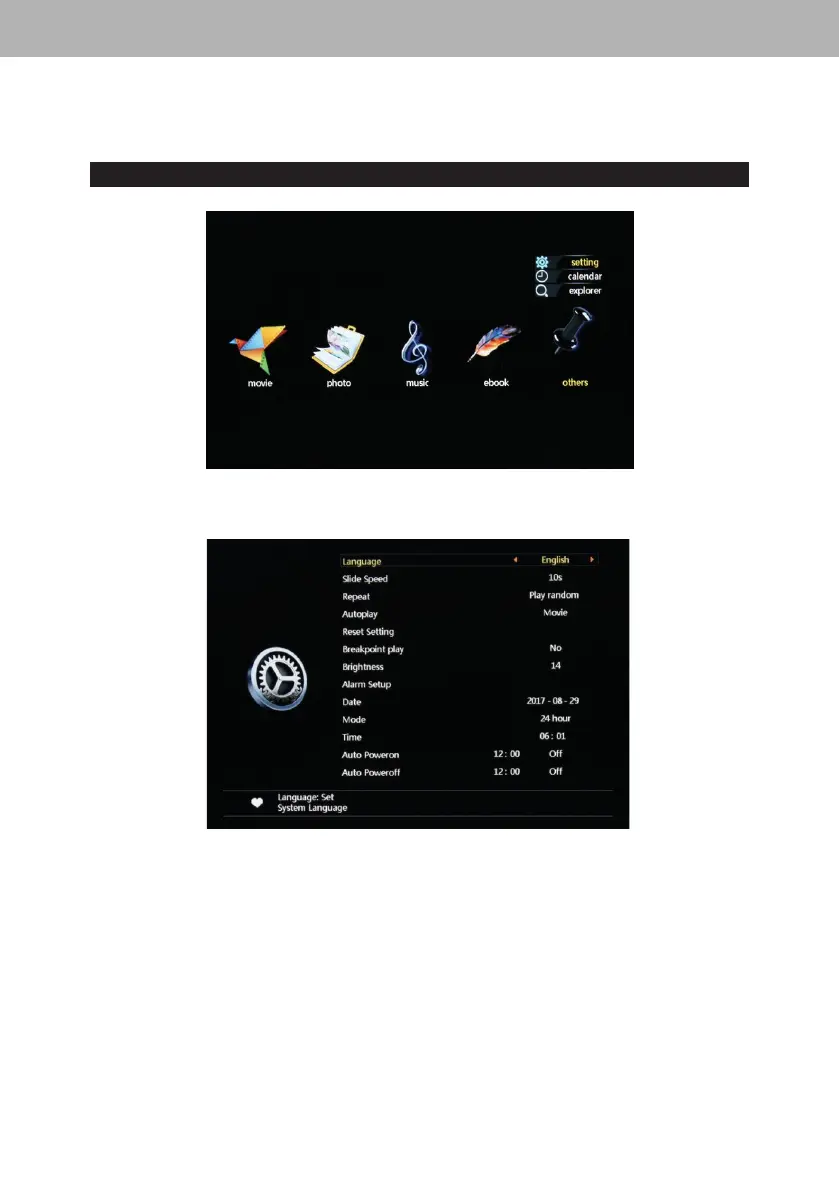
8.1 System Setting:
1. Language: System pre-configures 16 languages, including English, French, German, Russian,
Spanish, Portuguese, Italian, Turkish ,Dutch, Danish, Czech, Slovak, Hungary, Polish, Japanese,
Chinese. Move “◄” ”►” cursor to switch languages. After select, press “ENTER” to save the
setting. The system defaults” English”.
2. Slid Speed: Choose the speed of the pictures automatically played, there are
“5s,10s,15s,1min,15min,30min” options.
3.
Repeat: Four repeat modes for option: repeat all, repeat off, repeat one, play random Move
“◄” ”►”
cursor to switch between different modes. After select, press “ENTER” to save the
setting. The system defaults “repeat all”.
4.
Autoplay: Specify what kind of files should be played automatically when power on. There are
seven options: Photo, Music, Movie, Music+Photo, Custom, Off, Mixed Play. Move
“◄” ”►”
cursor to switch between different options. After select, press “ENTER” to save the setting. The
system defaults” Movie”.
5. Reset setting: Refers to when some system parameters are set incorrectly or an unusual
circumstance happens, the user can resume to default settings and back to normal status.


 To Next Page