3
DVBX 1413T
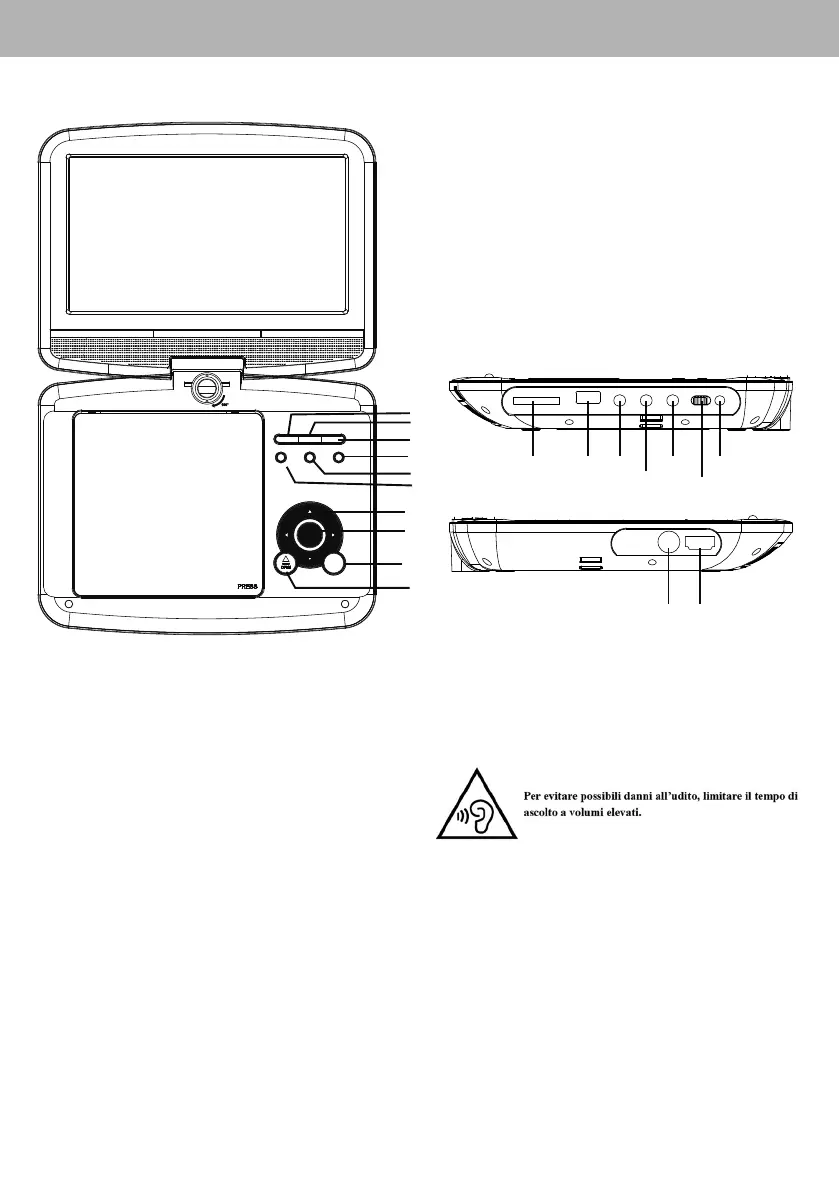
5 DESCRIZIONE COMANDI LETTORE DVD/DVBT
ITALIANO
1. Tasto 4;, riproduzione/pausa capitolo DVD/file
2. Tasto <, arresto riproduzione
3. Tasto SOURCE, selezione sorgente
4. Tasto VOL-, diminuzione del volume d’ascolto
5. Tasto VOL+, aumento del volume d’ascolto
6. Tasto MENU, menù dei titoli del disco DVD / lista
dei canali favoriti del DVB-T
7. Tasto 9/, capitolo DVD/file precedente / /tasto
di navigazione menu alto
Tasti :/, capitolo DVD/file successivo / tasto di
navigazione menu basso
Tasto 7/, indietro veloce / tasto di navigazione
menu sinistra
Tasto 8/4, avanti veloce / tasto di navigazione
menu destra
8. Tasto ENTER, conferma/attivazione di una voce di
menu selezionata
9. Tasto OPEN, apertura vano DVD/CD
10. Tasto SETUP, attivazione il menu di configurazione
11. Ingresso SD Card
12. Ingresso USB 2.0
13. Uscita AV (Audio/Video)
14. Presa cuffia
15. Uscita audio digitale coassiale
16. Interruttore ON/OFF
17. Ingresso adattatore DC 12V
18. Ingresso antenna
19. Uscita HDMI (solo per luso con sorgente DVB-T)
Identification of Controls
Main Unit
3
1. PLAY/PAUSE
2.STOP
3.SOURCE
4.VOL-
5.VOL+
6.MENU
7.▲/▼/◄/►(up/down/right/left)
Select an item in the menu.OK key confirms menu selection.
when playing,VCD,DVD,if available:
right: fast forward
left: fast reverse
up: previous track
down: next track
8.ENTER
9.OPEN
10. SETUP
11. SD/MMC
12. USB
13. AV OUT
14. Earphone Socket
15. COAXIAL
16. ON/OFF
17. DC IN 9-12V
18. ANT
19. HDMI
11
12
18
13
19
14
15 17
16
7
8
9
10
180 °
1
2
3
6
5
4
Identification of Controls
Main Unit
3
1. PLAY/PAUSE
2.STOP
3.SOURCE
4.VOL-
5.VOL+
6.MENU
7.▲/▼/◄/►(up/down/right/left)
Select an item in the menu.OK key confirms menu selection.
when playing,VCD,DVD,if available:
right: fast forward
left: fast reverse
up: previous track
down: next track
8.ENTER
9.OPEN
10. SETUP
11. SD/MMC
12. USB
13. AV OUT
14. Earphone Socket
15. COAXIAL
16. ON/OFF
17. DC IN 9-12V
18. ANT
19. HDMI
11
12
18
13
19
14
15 17
16


 To Next Page