20
CONNECTIONS AND REMOTE CONTROL
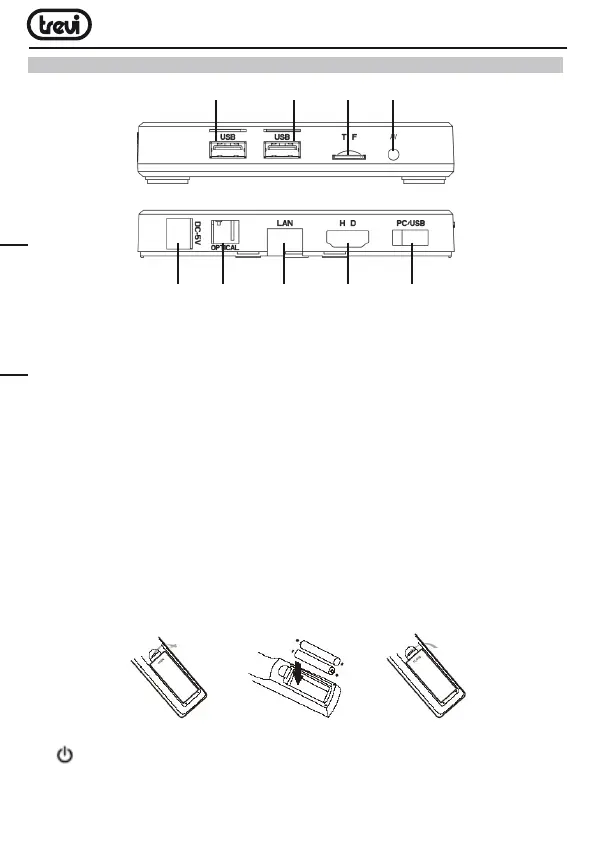
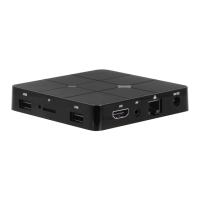
1. 2.USBSockets:ToconnectexternalUSBdevicessuchasmemorysticks,Hard
Externaldisk,wirelessmouse,wirelesskeyboards,etc....
3. Slot for Micro SD Cardi.
4.
AVOutput:Compositevideosignaloutput(CVBS).cablenotincluded.
5. PowersocketDCIN5V:Connectthesuppliedpoweradapter.
6. DIGITALOPTICALoutputsocket:ToconnectyourdeviceAudioSystemsurround.
7. LANRJ45Ethernet:10/100MbpsEthernetinterfaceforconnectiontothelocalnetwork.
8. HDMI:VideooutputforconnectiontoHDTV.
9.USBsocketsforconnectingtothePC.
REMOTE CONTROL
Installing the Batteries
RemovethebatterycoverfromtheRemoteControlandput2xAAAsizebatteriesinside
thecompartment.ThediagraminsidetheBatteryCompartmentshowsthecorrectway
to install the batteries.
11. BUTTON:PowerON/OFFkey.
12. TV IN BUTTON: To select the TV inputs.
13. SET BUTTON
:ToentertheTVsettings.
1 2 3 4
5 6 7 8 9
ENGLISH



 To Next Page