21
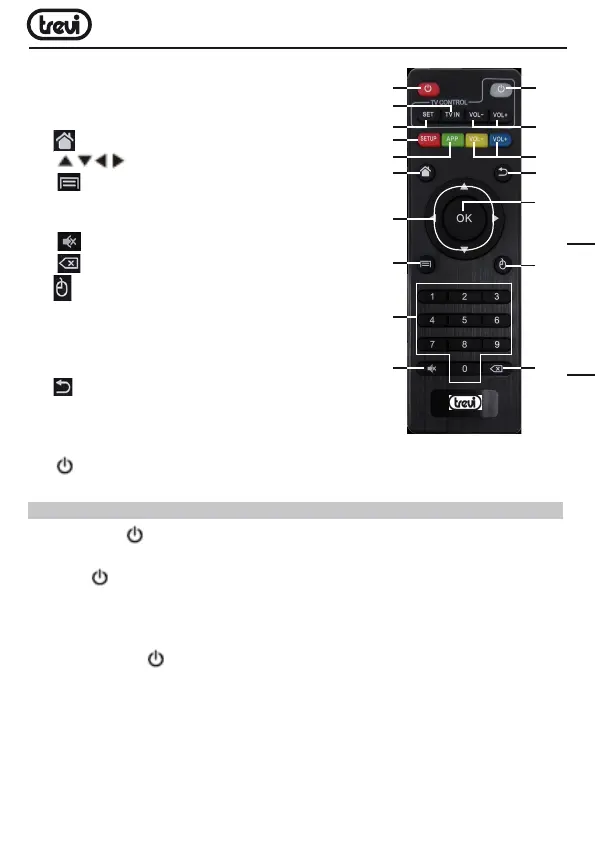
14. SETUP BUTTON:Togodirectlytothemenuof
the IP 365 S2 settings.
15. APP BUTTON:Toenterdirectlyintothe
application page.
16. BUTTON:ToreturntoMain(Home)page.
17. KEYS:Movehighlight.
18. BUTTON:Toopenthesub-menufolder
in certain applications / functions.
19. 0-9:Entervalueinon-screenmenu.
20. BUTTON:Resettingsoundlevel.
21. BUTTON:DeleteInputerrorinformation.
22. MOUSE BUTTON: To enable moving fast by
arrow(usingthenavigationkeys),pressagainto
enable the displacement step.
23. OK BUTTON:toconfirmandActivatethehighlighted
menu item.
24. QUIT BUTTON:Returntopreviousstep/Exit.
25. VOL+/VOL- BUTTONS:Increase/decrease
volume IP 365 S2.
26. VOL+/VOL- BUTTONS:Increase/decreasevolumeTV.
27. BUTTON:PowerON/OFFTV.
LEARN REMOTE CONTROL LEARNING METHODS
1. Long press “ ”(27)ofremotecontrol’TVkeypadfor5secondsuntilredindicating
lightofremotecontrolturnintokeepson,showinglearningstate;
2. Press “ ”(27)thelearningkey,redindicatinglightblinking,showinglearningreceive
state;
3.
Holdstudiedremotecontrol,pointatremotecontrolofSetTopBox,andpressstudied
keywithabout3-5mmdistance;
4. Press the button onTV’sremotecontrol,thelightemitsthreequickflashesandthen
remainfixed(coupledwiththecommandexecutedcorrectly).
5. Proceed by selecting the button (12) and then the corresponding function on the remote
control the TV.
6.Sameprocedureforthekeys(26).
7. Onceall5coupledkeyswaitforthelighttogooutalone.Nowwith5programmedkeys
youcanoperateyourTVwiththefunctionsthatyouhavepaired.
11
12
14
16
17
18
19
20
21
22
23
24
27
26
13
15
25
ENGLISH



 To Next Page