22
CONNECTIONS
Installation
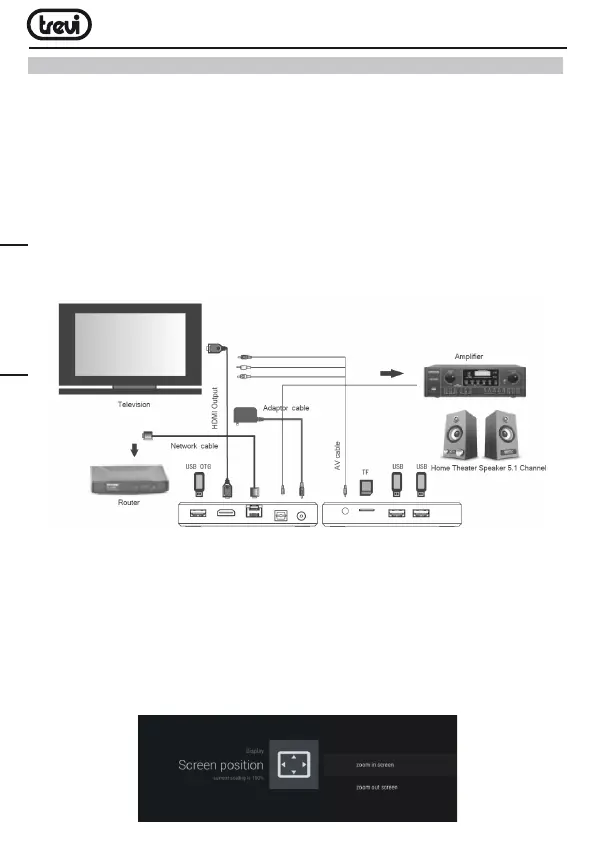
•Toturnonthedevice,connectthepoweradaptersuppliedtothepowersocketDC(5)
oftheIP365S2(27)andtheotherendtothewalloutlet.
•ConnectoneendoftheHDMIcabletosocket(8),connecttheotherendtotheHDMI
socketofyourTV.
•TurnontheTVandpresspowerOn/Offbutton(11)ontheremotecontrol.
•Waitafewsecondsforthedeviceloadstheoperatingsystem.
WARNING: The unit is factory set with video output on HDMI, if you want to use the composite
AV output (cable not included), first connect the unit to a TV via HDMI and then from the
menu “Settings”/“Display”/“Screen resolution“, select the video resolution to 480 or 576.
Shutdown:
•Turnoffyourdevice:pressandholdthepowerOn/Offbutton(11)onremoteforafew
secondsandthefrontalBlueLEDwillbecomeRed.
Regulation framework:
Atfirstpoweryouneedtosetsomeparameterssuchaslanguage,theconnectiontothe
networkandregulationoftheframework.
AdjusttheimageaccordingtoyourTV;toadjustthepicture,select“Setting”-“Display”-
“Screenposition”. Select “Zoom out” to tighten, select “Zoom in” to enlarge.
ENGLISH



 To Next Page