23
USER OPERATIONS
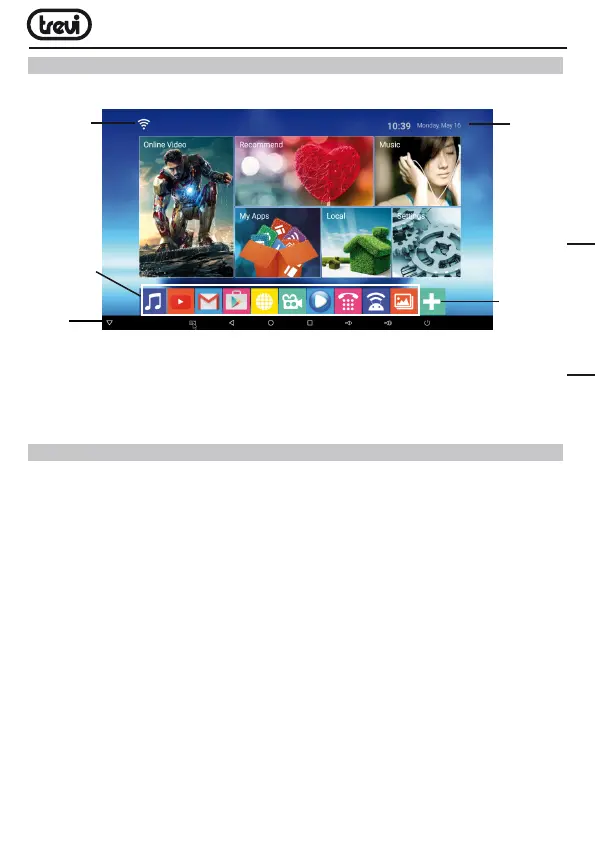
HOME menu
Note: The user can select the applications with the navigation keys (17) and open them
with the OK (23) button, or by pressing the mouse (22), an arrow will appear which you
can move quickly using the navigation keys (17) and confirming with OK (23).
CONNECTION TO NETWORKS
Wireless & networks
ToaccesstheInternet,firstofall,youmustconfigureanetworkthatcanuseaWi-FiAc-
cessPoint(AP)orawiredcableviaLANsocket.ChoosingitaccessessettingsWireless
andEthernet.
Connection via LAN socket:
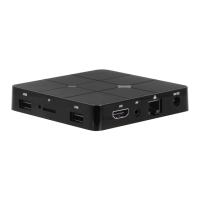
•ConnecttheLANcablecomingfromyourmodemrouter,theLANsocket(7)unit.
•Selectthe“Setting”-“Network”.
•SelectEthernetandwaitforthemessage“Connected”appearsundertheitem“internet
connection”.
Search and connect to a Wi-Fi network:
TomakeaconnectionofthistypemustbeinaWi-Fizone.
•Select“Setting”-“Wi-Fi”.
Enabling/disabling Wi-Fi:
•Select“Wi-Fi”,theunitwillautomaticallyactivateasearchofavailableWifinetworks
andwillshowontheTV.
•SelectyourfavoritenetworkandconfirmwithOK(23),ifprotected,enterthepassword
Data
and
Clock
Connection
to the
network
indicator
Add
icons
application
Status
bar
Application
Icons
ENGLISH



 To Next Page