23
IP 365
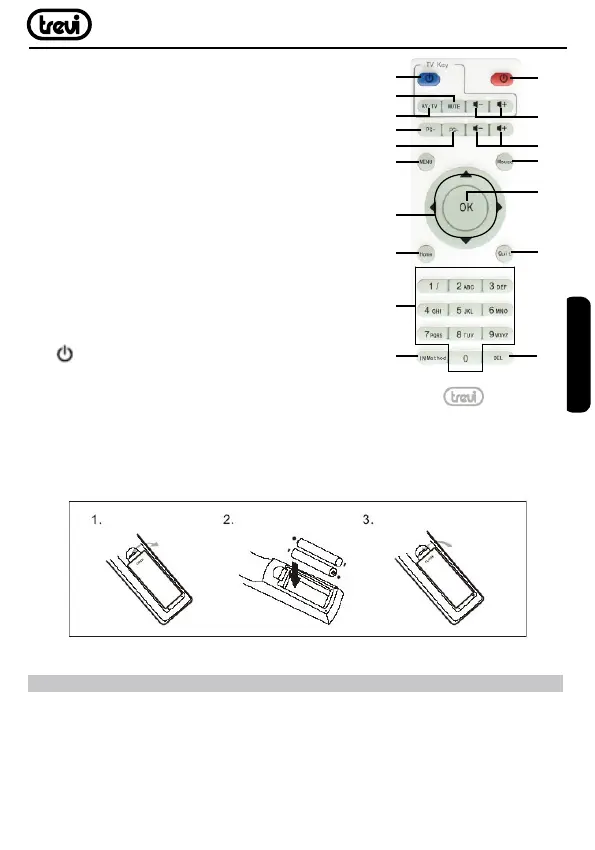
16. MENU: Unload any software.
17. NAVIGATION KEYS: Move highlight.
18. HOME: For any page, press Menu key to enter
main page .
19. 0-9: Enter value in on-screen menu.
20. INPUT METHOD: Fast Enter setting page.
21. DEL: Delete Input error information.
22. QUIT: Return to previous step/Exit.
23. OK: to conrm and Activate the highlighted
menu item.
24. MOUSE: To enable moving fast by arrow
(using the navigation keys), press again to enable
the displacement step.
25. Vol+/Vol-: Increase/decrease volume IP 365.
26. Vol+/Vol-: Increase/decrease volume TV.
27.
: Power Switch/ power key IP 365.
Installing the Batteries
Remove the battery cover from the Remote Control and put 2xAAA size batteries inside
the compartment. The diagram inside the Battery Compartment shows the correct way
to install the batteries.
LEARN REMOTE CONTROL LEARNING METHODS
1. Long press “ ”of remote control’ TV keypad for 5 seconds until red indicating light of
remote control turn into keeps on, showing learning state;
2. Press the learning key, red indicating light blinking, showing learning receive state;
3. Hold studied remote control, point at remote control of Set Top Box, and press studied
key with about 3-5 mm distance;
4. Red indicating light keeps on after three times ashing rapidly when having a successful
11
12
14
16
17
18
19
20
21
22
23
24
27
26
13
15
25
ENGLISH



 To Next Page