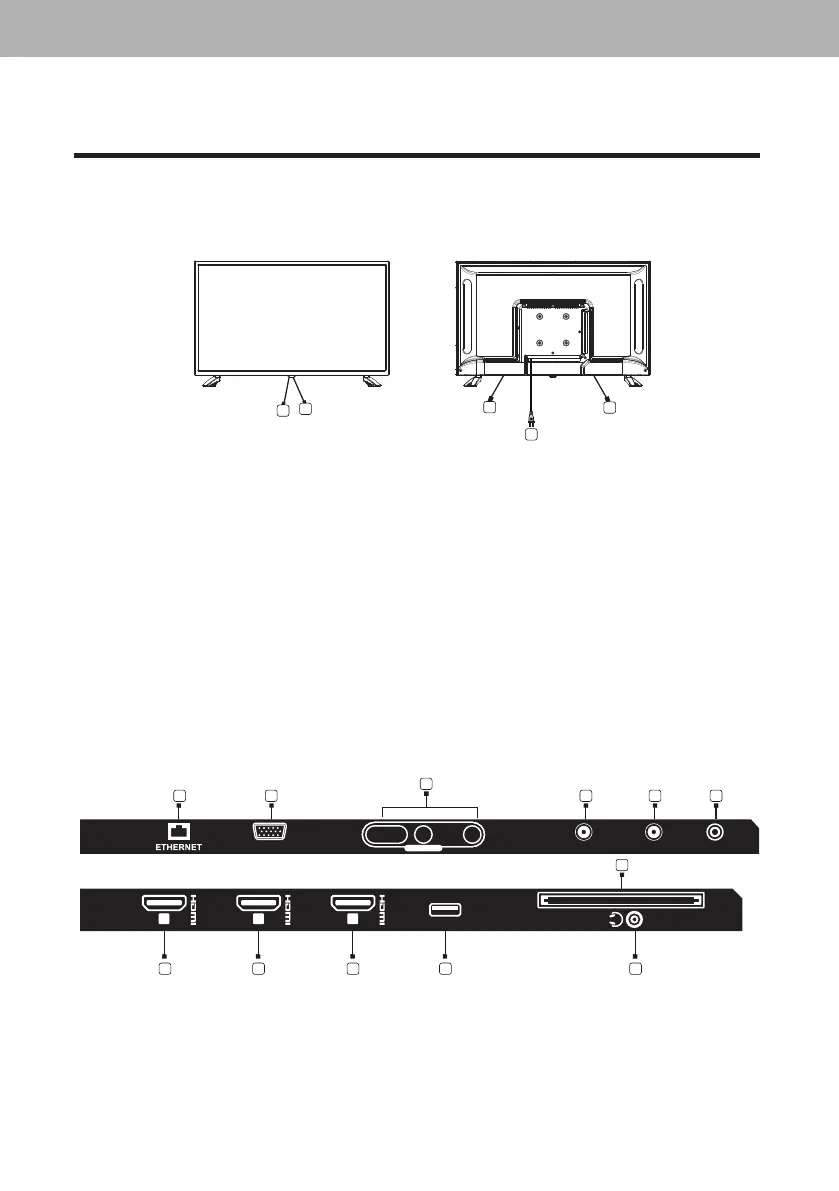
1.3. Keys And Interfaces
Thedesignandspecicationtakesactualproductsasthestandard.
1. Remotesensorwindow
2. Powerindicator
3. Speaker
4. Powerpluginput
5. ETHERNET
6. VGA
7. AVinput
8. RFIN(S/S2)
9. RFIN(T/T2)
10. COAXIAL
12. HDMI1(ARC)
13. HDMI2
14. HDMI3
15. USB
16. EARPHONEoutput
LED COLOR TV
10
1. Connection And Preparation Of TV
1.1. Accessories
Î
QuickStartGuide
Î
RemoteControl
1.2. Installation Of Stand
(Forthephysicalstructure,pleaserefertotherealobject)
1. PlacetheTVwiththefrontpanelfacingdownwardsonthesoftclothorsoftpadsona
desk.
2. InsertthestandintothebottomsocketoftheTV,LstandtoLbottom,Rstandtoright
bottom,LandRlettersaremarkedatthebottomoftheTV.
3. Insertthescrewsintothesocketsandtightenthem.


 To Next Page