3
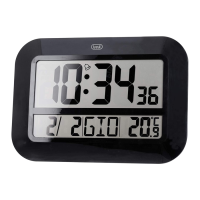
OM 3540 D
DIGITAL WALL CLOCK
ENGLISH
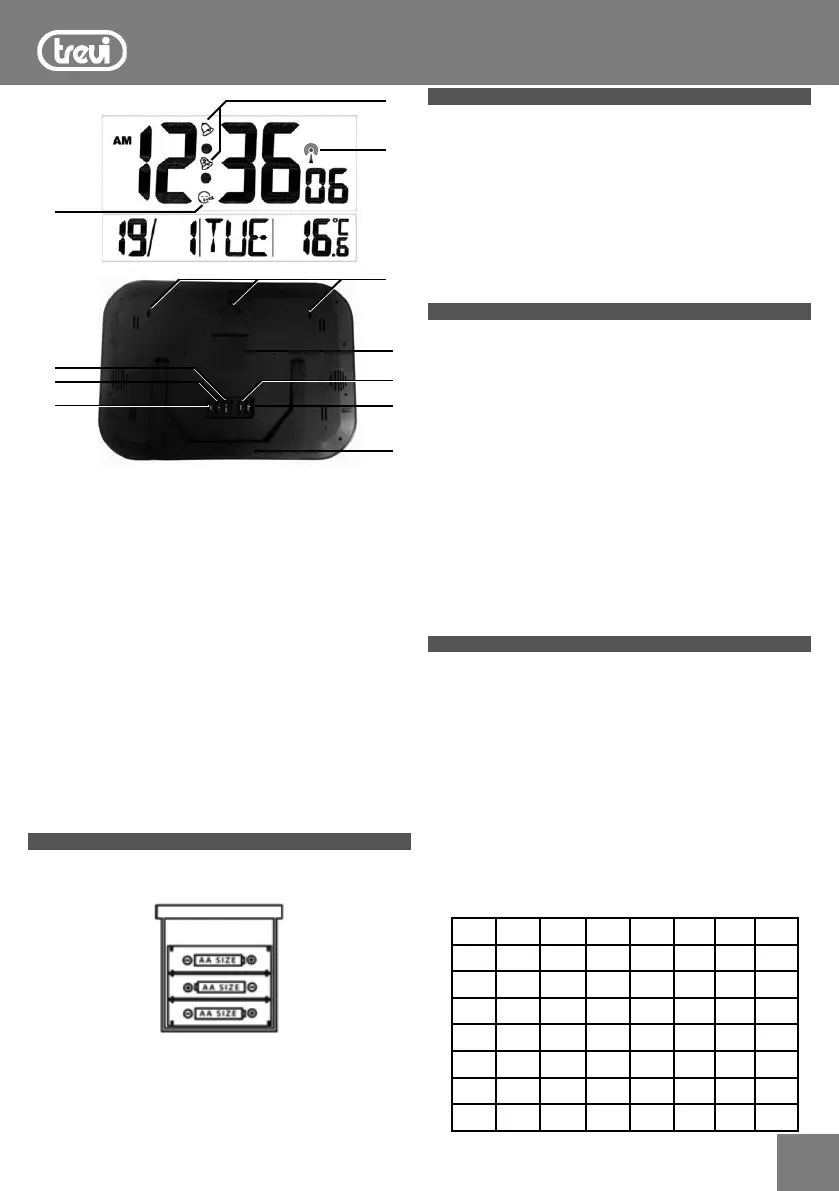
1. DOWN °C/°F button
- At setting mode, downwards setting value.
- To toggle the temperature display between °C or °F.
- To turn ON/OFF the wave.
2. UP button. At setting mode, upwards setting value
3. MODE button
- Hold for 3 sec. to enter into time setting mode.
- Turn on/off the alarm.
4. Pedestal
5. SNOOZE button, turn on snooze function.
6. ALARM button, hold for 3 sec. to enter into alarm setting
mode.
7. Battery compartment
8. Hole for wall display
9. Radio control symbol
10. Alarm 1/2 icons
11. Snooze icon
GET STARTED
Step1: Insert 3 new AA batteries (not included) into the clock.
Observe the correct polarity, with a BI sound.
Restart: If there is no indoor temperature data after 60 seconds,
remove batteries from the clock and press a button 20 times.
TIME DISPLAY BY RADIO CONTROL
This appliance is equipped with a receiver capable of receiving
the time signal of the Physikalisch Technische Bundesanstalt
Braunschweig (central Germany) admissible within a 1500Km.
When inserting the batteries will automatically signal reception,
the radio control symbol (9) will blink and within 24 hours you
will receive the time signal of the radio control and WAVE OK (9)
will be on the display.
In case of needing to restart signal reception, press DOWN
°C/°F (1) button.
TIME ZONE
The time is transmitted from the central Germany, so if we are
in a country with different time than the Germany is necessary
to set the time zone.
1. When you hang time signal, press and hold for a few seconds
the MODE button (3) to enter the manual clock setting. It will
adjust the time format “24h” or “12h”.
2. Press the MODE button (3) again, the display will show “00”
with the words “Zone” flashing on the time zone.
3. Set the time zone of your region through the UP (2) or DOWN
°C/°F (1).
Notes:
Place the weather station away from equipment that generates
magnetic fields such as mobile phones, televisions etc....
It not in all areas of Europe may be able to receive the signal of
the radio control. In this case you must set the time manually.
MANUA SET TIME, DATE AND TEMPERATURE
1. Hold the MODE key (3) steadily for around 3 seconds, the
“12hr” or “24hr” would flash in 1HZ. Press UP key (2) or
DOWN key (1) to adjust.
2. Press MODE key (3) again, then enter into time setting mode
and use UP key (2) or DOWN key (1) to choose the value.
The time set order is hour, minute, year, month, date and day
of week then display language.(see below message).
3. The week will be automatically set.
4. Press the MODE button (3) to exit, or wait 20 seconds without
pressing buttons to return to the normal time display.
Note: 8 languages of weekday: English > German> French >
Italian >Dutch > Spanish >Danish>Russian.
ENG SUN MON TUE WED THU FRI SAT
GER SON MON DIE MIT DON FRE SAM
FRE DIM LUN MAR MER JEU VEN SAM
ITA DOM LUN MAR MER GIO VEN SAB
NET ZON MAA DIN WOE DON VRI ZAT
ESP DOM LUN MAR MIE JUE VIE SAB
DAM SON MAN TIR ONS TOR FRE LOR
RUS BCK NHA BTP CPA YTB NTH CBT
.4
2.
1.
3.
.5
.7
.6
.8
.10
.9
11.


 To Next Page