EasyManua.ls Logo

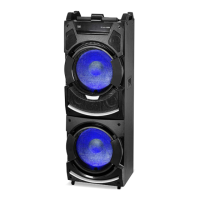
Trevi XF 4500 DJ - User Manual

Trevi XF 4500 DJ
40 pages
Go to English
Print Icon
To Next Page IconTo Next Page
Loading...
ALTOPARLANTE AMPLIFICATO ALTA POTENZA
MIX FADER/2x BLUETOOTH/2x USB/2x AUX IN/2x MIC
Manuale d'uso e collegamento
HIGH POWER AMPLIFIED SPEAKER SYSTEM
MIX FADER/2x BLUETOOTH/2x USB/2x AUX IN/2x MIC
Connection and Operation Manual
HAUT-PARLEUR AMPLIFIÉ À HAUTE PUISSANCE
MIX FADER/2x BLUETOOTH/2x USB/2x AUX IN/2x MIC
Mode d'emploi et branchement
HOHE LEISTUNGS VERSTÄRKER LAUTSPRECHER
MIX FADER/2x BLUETOOTH/2x USB/2x AUX IN/2x MIC
Gebrauchs- und Anschlusshandbuch
ALTAVOCES AMPLIFICADO DE ALTA POTENCIA
MIX FADER/2x BLUETOOTH/2x USB/2x AUX IN/2x MIC
Manual para el uso y la conexión
2x
AUX IN
XF 4500 DJ
Guida d’uso
User guide
500 W
MAX
2x BT
BLUETOOTH
Per informazioni integrative ed aggiornamenti su questo prodotto visita www.trevi.it
For additional information and updates of this product see www.trevi.it
DISCO
LIGHT
2x USB
PLAYER
2x SD card
PLAYER
MIX
CONSOLLE
Per informazioni integrative ed aggiornamenti su questo prodotto visita www.trevi.it

Questions and Answers

  • K
    Kylie CaldwellAug 7, 2025
    What to do if there is no sound when power is turned ON on Trevi XF 4500 DJ Speakers?
    • K
      Kevin AndersenAug 7, 2025
      If there is no sound from your Trevi Speakers when the power is on, check the following: * Ensure there is an input sound source by inputting an AUX signal. * Adjust the volume, as the volume knob may be in the lowest position. * Plug in a USB drive and play an MP3 file.
  • J
    Jose SmithAug 11, 2025
    Why does my Trevi XF 4500 DJ Speakers remote control not work?
    • J
      John McdonaldAug 11, 2025
      Your Trevi Speakers remote control might not be working because: * The source hasn't been selected. Ensure you select the correct source with the remote control before pressing any function button. * The remote control is too far from the unit. Try reducing the distance. * The batteries are not inserted correctly. Make sure the polarities (+/– signs) are aligned as indicated. * The batteries are low. Replace them with new ones. * The remote control receiver on the unit is covered. Aim the remote control directly at the sensor on the front of the main unit.
  • S
    Shane HarperAug 15, 2025
    What to do if Trevi Speakers makes loud noises?
    • R
      Robert BriggsAug 16, 2025
      If your Trevi Speakers are making loud noises, it could be due to several reasons: 1. The microphone is switched on and too close to the speaker. Keep the microphone 2 meters away from the speaker. 2. The microphone is switched on but not being used. Turn off the microphone if it is not in use. 3. The microphone volume is too loud. Adjust the microphone volume to a lower level. 4. A mobile phone is being used too close to the speaker. Keep the mobile phone away from the speaker while on a call. 5. Other wireless equipment is placed too close to the speaker. Keep the speaker away from other wireless equipment.
  • D
    dmosesAug 19, 2025
    How to fix distorted sound on Trevi XF 4500 DJ?
    • J
      Jacob WebbAug 20, 2025
      If you are experiencing distorted sound on your Trevi Speakers: * Turn the volume down, as it may be too loud. * Check and change the audio file, as there may be an error with the file.
  • H
    hmeltonAug 25, 2025
    What to do if there is no sound after inserting USB in Trevi XF 4500 DJ Speakers?
    • B
      Brenda BryantAug 25, 2025
      If you are experiencing no sound after inserting a USB into your Trevi Speakers: * Ensure the file format is MP3. * Make sure the USB is correctly plugged in.
  • L
    Lisa ClarkAug 28, 2025
    What to do if Trevi Speakers have no response?
    • O
      oneillmichaelAug 28, 2025
      If your Trevi Speakers are not responding, disconnect and reconnect the AC power plug, then turn the unit on again.
  • J
    Jessica GreeneSep 1, 2025
    Why is there no sound from the microphone on my Trevi Speakers?
    • B
      Brett FosterSep 1, 2025
      If there is no sound from the microphone on your Trevi Speakers: 1. Ensure the microphone is correctly plugged into the socket. 2. Turn on the microphone. 3. Adjust the microphone volume, as it may be on the lowest setting.

Trevi XF 4500 DJ Specifications

General IconGeneral
BrandTrevi
ModelXF 4500 DJ
CategorySpeakers
LanguageEnglish

Related product manuals