EasyManua.ls Logo

Tria PRECISION - GETTING TO KNOW YOUR TRIA LASER PRECISION

Tria PRECISION
39 pages
Print Icon
To Next Page IconTo Next Page
To Previous Page IconTo Previous Page
Loading...
4
triabeauty.ca
5
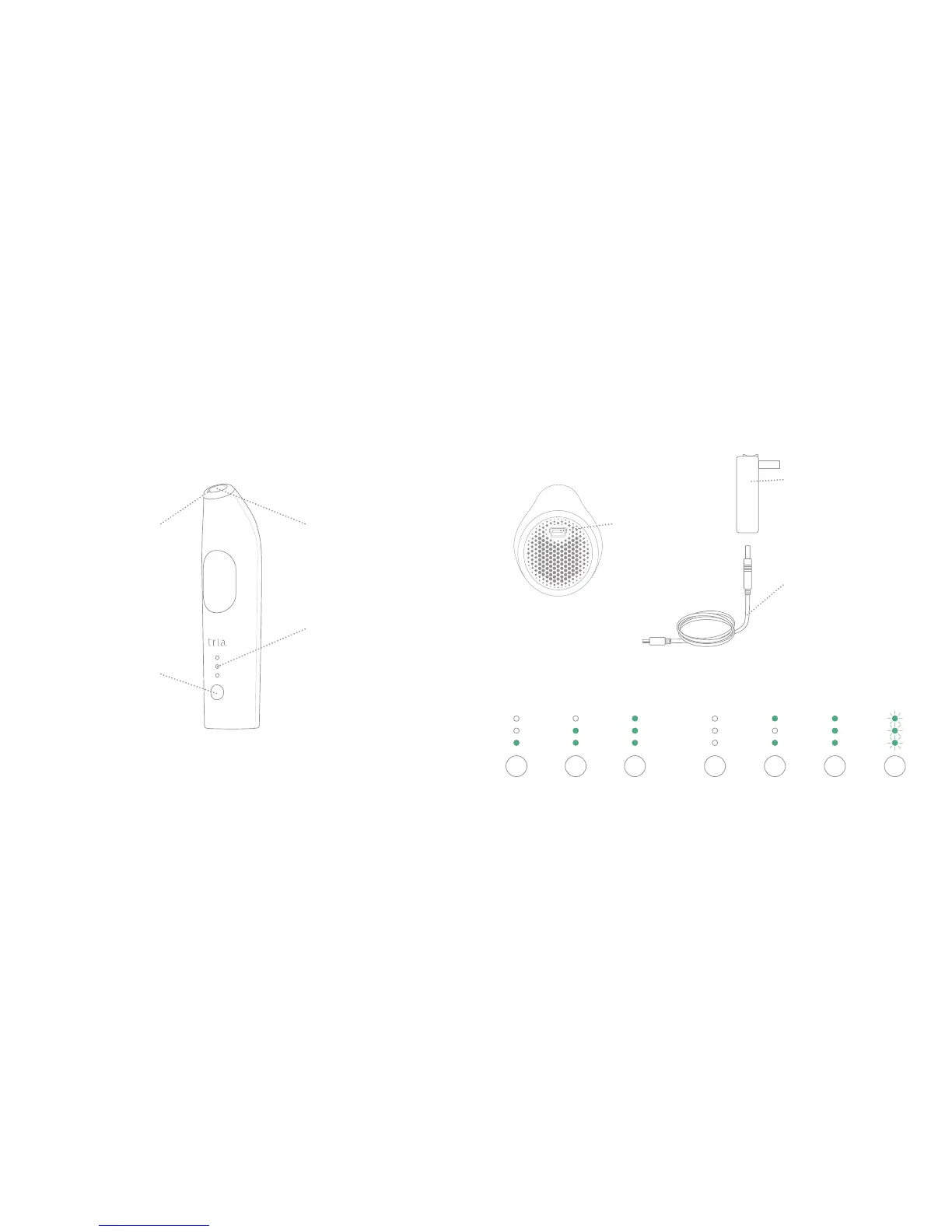
getting to know your tria Laser Precision
CHARGER SOCKET
Plug the power cord
into this socket
POWER BUTTON
Adjusts the treatment
level and turns the
Tria Laser Precision
on and off
BATTERY CHARGER
Charges the Tria Laser
Precision. The Tria Laser
Precision will not operate
while plugged in.
POWER CORD
Connects the device and
the battery charger
INDICATOR LIGHTS
Indicates power on,
treatment level, battery
charge, skin sensor lock
and error status
INDICATOR LIGHTS GUIDE
TREATMENT WINDOW
Delivers laser light
during treatment
SKIN SENSOR
A safety feature
that unlocks the
Tria Laser Precision
BOTTOM OF DEVICE
Other IndicatorsTreatment Levels
Low Medium
High
O
Skin Sensor
Locked
Fully Charged
(when
plugged in)
Error
(3 flashing)

Other manuals for Tria PRECISION

Related product manuals