This document provides assembly instructions for a Tribesigns Little Tree computer table, available in models JW0390X, JW0449, JW0530, and JW0588. The manual emphasizes a user-friendly approach to assembly and customer support.
Function Description
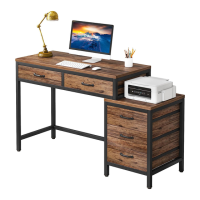
The Tribesigns computer table is designed to provide a functional and organized workspace. It features a spacious tabletop, integrated drawers, and open shelving compartments, offering ample storage for office supplies, documents, and electronic devices. The table's design allows for flexibility in configuration, with options for both left-hand and right-hand setups, catering to different user preferences and room layouts. The multiple storage options help maintain a clutter-free environment, enhancing productivity and organization.
Usage Features
The computer table is designed for ease of use and adaptability.
- Flexible Configuration: The table can be assembled in two main configurations: a left-hand setup or a right-hand setup. This allows users to choose the orientation that best suits their workspace and personal preference. The modular design means that the drawer and shelving units can be positioned on either side of the main tabletop.
- Ample Storage: The table incorporates several storage solutions:
- Drawers: Multiple drawers are included, providing enclosed storage for items that need to be kept out of sight, such as sensitive documents, stationery, or personal belongings. The drawers are designed to slide smoothly, ensuring easy access to contents.
- Open Shelving: Open shelving compartments offer convenient access to frequently used items, books, or decorative elements. These shelves contribute to the table's aesthetic appeal while maintaining functionality.
- Sturdy Construction: The assembly instructions highlight the importance of proper installation of cams and pins, as well as the use of various screws and tubes, to ensure a stable and durable structure. The frame components are designed to support the weight of typical computer equipment and office supplies.
- Ergonomic Design (Implied): While not explicitly stated as ergonomic, the table's design, with its various storage options and spacious work surface, aims to create an organized and comfortable environment for extended periods of use. The ability to keep essential items within reach reduces the need for excessive movement, contributing to a more efficient workflow.
- Versatile Application: Beyond being a computer table, its design makes it suitable for various uses, such as a study desk, writing table, or even a crafting station, depending on the user's needs. Its clean lines and functional design allow it to blend into different interior styles.
Maintenance Features
The manual provides general guidelines for assembly and care, which implicitly contribute to the longevity and maintenance of the product.
- Careful Assembly: The instructions emphasize the importance of reading all steps carefully and performing them in the correct order. This is crucial for ensuring the structural integrity of the table and preventing damage during assembly. Users are advised to place all parts on a soft, clean, and flat surface (like a carpet) to prevent scratches.
- Proper Fastening: The manual specifically warns against fully tightening screws until all parts are in place, to avoid misalignment of holes. It also advises against using an electric screwdriver for cam and pin installation, and if one is used, to reduce power and torque to prevent damage to the furniture. This attention to detail during assembly is a key maintenance feature, as it prevents premature wear and tear or structural weaknesses.
- Customer Support for Parts: In case of missing, damaged, or incorrect parts, the manual directs users to contact customer support before assembling. This proactive approach ensures that any issues are resolved with replacement parts, preventing users from attempting to force ill-fitting components, which could damage the table.
- Quality Assurance (Implied): The inclusion of a "Caution" note to ensure all parts are included and to contact support for replacements suggests a commitment to product quality and customer satisfaction, which indirectly supports the long-term maintenance of the table.
- Easy Cleaning (Implied): While not explicitly detailed, the materials typically used in such furniture (wood composites and metal frames) are generally easy to clean with a damp cloth, contributing to simple upkeep and maintaining the table's appearance over time.
- Troubleshooting Support: The "Call us!" section highlights the availability of customer support for any issues, including missing, damaged, or incorrect items. This support system acts as a maintenance feature by providing a resource for users to address problems that might arise during or after assembly, ensuring the table remains functional and in good condition. The emphasis on taking photos of packaging and products before contacting support streamlines the troubleshooting process.
- Return Policy (Implied): The "No heartburn, when we handle the return" section, while primarily about returns, also implies a commitment to customer satisfaction that extends to product quality. This indirectly supports maintenance by ensuring users receive a product that meets their expectations and is free from defects.

 Need help?
 General



 To Next Page