Getting Started
Basic Procedures
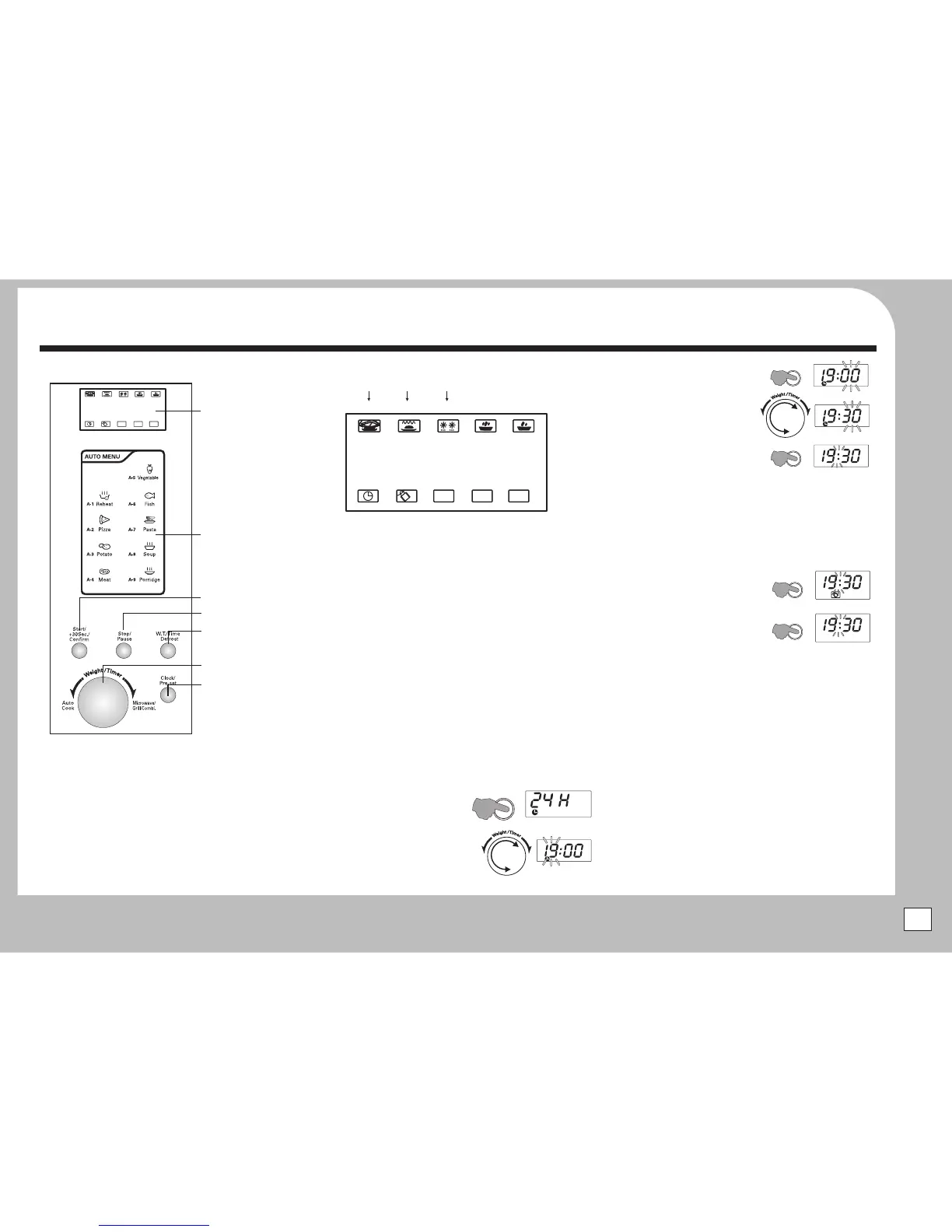
The ControlPanel
TheDisplay:Displays all current cooking and time events.
Start/30 Sec/Confirm:
Stop/Pause:
W.T/Time/Defrost:
Weight/Timer Dial
Press to start the oven, add time (in 30 sec
increments) , confirm an actionwhen combi-cooking.
Pressto pause or stop the oven, or cancel a program.
Pressto defrost food by weight or time.
: Use to add weight and time, select Auto
Cook programs and selectCombi-coolking programs.
Clock/Preset: Press to Set the clock, set a preset cooking time.
During cooking, press to check the clock or preset cooking time.
Around the perimeter of the screen there are icons. These icons,
singly or in combination give you a visual indication of the
processwhich the ovenis carryingout.
When executing a program the digital display indicates the
amount of cookingtime remaining on the program
Unwrapand uncoil the power cord fully.
Plug the mains plug into a suitable wall socket.
Switchthe mains poweron.
Your ovenis now ready to be programmed
The Display Screen
.
USINGTHE OVEN
SWITCHINGON
$
$
$
$
SETTINGTHE CLOCK
CHILD LOCK
BASIC MICROWAVE COOKING
When first switched on the display will indicate “00". You can
choose either a 12 or 24 hour clock. If you choose the 12 hour
clock, AM and PM are not indicated.
To enter a time of 19:30 (7:30pm)
Pressthe t button:
to select a 24 hour clock
(Twice selects a 12 hr clock )
Rotate the
knob to select 19 hours.
Pressthe t button:
Rotate the
knob to select 30 minutes
Pressthe button:
The time is now set.The clock
indicator goes out.
You can check the clock at any time when cooking is in progress
by pressing the t button.
You may reset the clock time whenever you wish.
The Child safety lock prevents operation by small children. The
oven cannot be operated while the child lock is on.
Press and hold the
button until a beep sounds and
the LOCK indicator lights.
To cancel, press and hold the
button until the
LOCK indicator goesoff.
Open the oven door. Place the food in the centre of the oven on
the turntable. Close the door.
Select the microwave power: Confirm the setting:
Select the cooking time: Startthe cooking process.
Press to clear any previous setting
Rotate the Knob to select a microwave power.
Pressthe button to set the level.
Rotate the Knob to set a cookingtime
Pushthe knob to start the oven.
$
$
$
$
$
$
$
$
$
$
$
$
Clock/Prese
Once
Weight/Timer
Clock/Prese
Weight/Timer
Clock/Preset
Clock/Prese
Stop/Pause
Stop/Pause
Procedure:
Method:
Stop/Pause
Weight/Timer
Start/+30Sec/Confirm
Weight/Timer
Start/+30Sec/Confirm
The indicator on the display lights to show the
microwavefunction. The powerlevelis also indicated.
MICRO
AUTO
COOK
AUTO
COOK
g
ML
88
:
88
Display
Auto Menu Panel
Start/30 Sec/Confirm
Stop/Pause
W.T/Time/Defrost
Control Dial
Clock/Pre-set
AUTO
COOK
AUTO
COOK
g
ML
88
:
88
Auto
Cook
Child
Lock
Microwave
Grill
Defrost
80-100%
Power
10-50%
Power
Clock Weight
(in g)
Volume
(in ml)
MICROWAVE POWERCURRENT OVEN FUNCTION
Clock/
Preset
ROTATE
Clock/
Preset
ROTATE
Clock/
Preset
Stop/
Pause
Stop/
Pause
5


 To Next Page