Operation
Time Delayed Cooking
TIME-DELAYED COOKING
The oven can be set to switch on at a pre-set time. The oven clock
needs to be set before you can carry out this procedure- see P 5.
Press to clear any programme.
CAUTION:
Stop/ Pause
Lengthy time delayed cooking should not be used
with with foods containing fresh milk or perishables. Be extra
carefulin hot weather.
1:
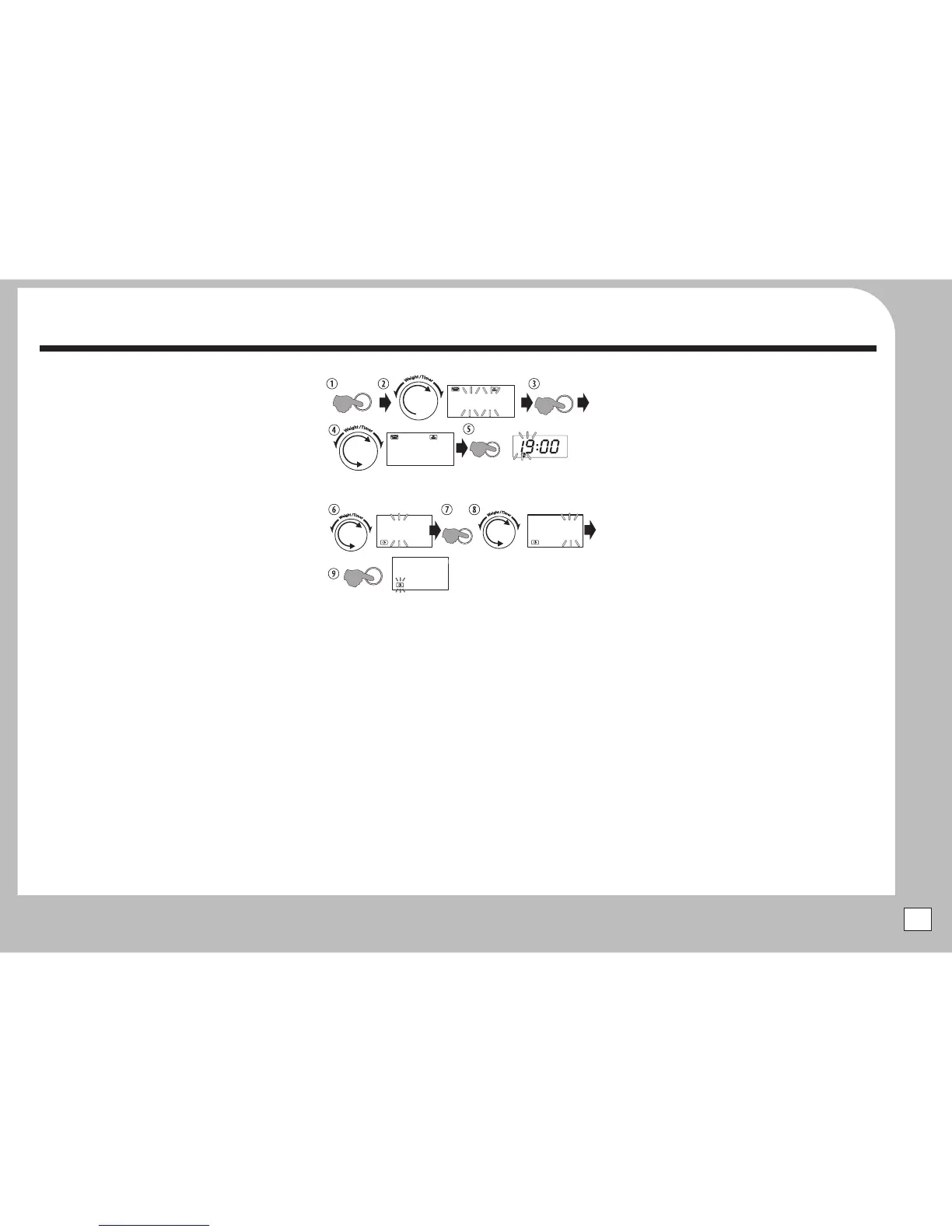
Example:The time is 7:00 PM(19:00). Set a time of 10:30 PM
(22:30) to start microwaving food for 3 min 40sec at 80%
STAGE 1:SET UPTHE BASIC PROGRAMME
STAGE 2:SETTHE STARTTIME
Although you can select any Auto-Cook menu, a Grill or Combi-
Cook programme or a microwave only programme at a power of
your own choosing, we recommend that delayed cookingshould
be used only with microwave cooking.
You cannotTime delay a Defrost programme.
Rotate to select a cooking programme.
Pressthe button to confirm.
Rotate tothe right to select the amount.
Pressthe button.The current time flashes.
Set the programmedtime as per clock setting.
Pressthe button to confirm.
The oven beeps twice and
commencesthe cooking cycle.
2:
3:
4:
5:
6:
When the pre-set time arrives:
Note: Pressing the Stop/Pause button at any time while setting
the programme or during the waiting period will cancel the
completeprocedure.
Weight/Timer
Start/+30 Sec./Confirm
Weight/Timer
Clock/Pre-Set
7: Start/+30 Sec./Confirm
Stop/
Pause
ROTATE
AUTO
COOK
AUTO
COOK
g
ML
p i
:
80
Start/+30 Sec./
Confirm
ROTATE
AUTO
COOK
AUTO
COOK
g
ML
p3
:
40
Clock/
Preset
AUTO
COOK
AUTO
COOK
2
2
:
00
ROTATE
Set the hour
Clock/
Preset
AUTO
COOK
AUTO
COOK
2
2
:
30
ROTATE
Set the minutes
Start/+30 Sec./
Confirm
AUTO
COOK
AUTO
COOK
i
9
:
00
The clock time returns. The
clock icon flashes to indicate
time delayed operation
9


 To Next Page