Points to remember with the Express cooking program
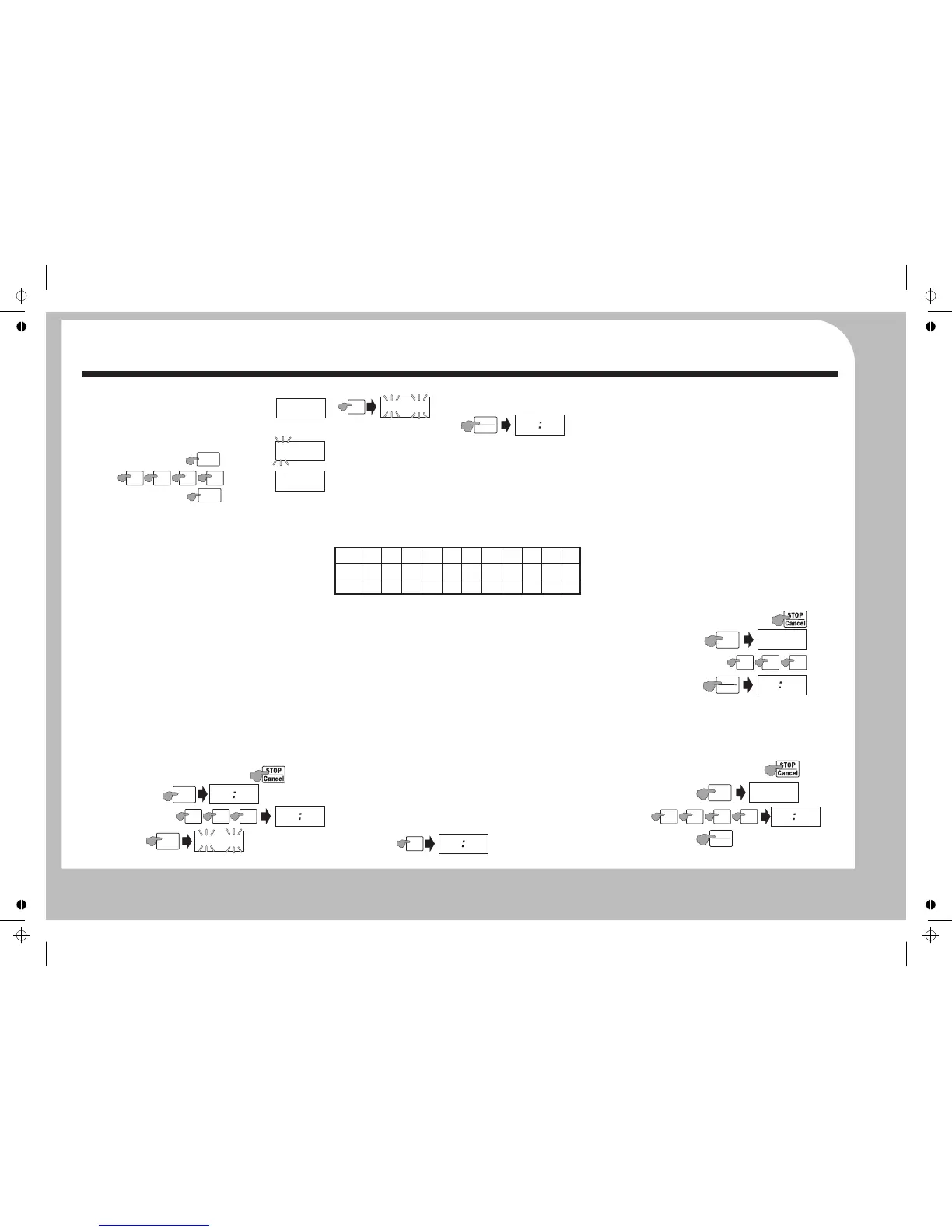
SETTING THE CLOCK
$Switch the power on at the mains socket.
$The oven will start almost immediately so be prepared!
$The display will indicate as shown.
$Press the START button repeatedly to add cooking time in 30
6: Press START to commence.
sec. intervals.
The clock is a 12 hour clock.
$Express cooking is a very good way of rapidly heating small
Example: To set a time of 7:30 (am or pm):
*Note: To cook at 100% power, skip this stage. Just press Start.
portions of food, or easily adding a small amount of cooking
$Press the CLOCK button
When the cooking cycle is over: The oven will ‘beep’ five times
time to finish dishes that are slightly undercooked.
and the display will revert to the clock time.
$Press
NOTES
$Wait a short time and then open the door and remove the
All programs can be set up with the oven door open or closed
$Press the CLOCK button
cooked food. Close the door.
except Quick Start where the door must be closed.
Microwave Power Table.
$The digits will stop flashing and the clock is set
DEFROSTING
When setting the Microwave Power, press the appropriate
To carry out all the oven procedures you must set the time.
number key to select the Power Level as in the table below
You can defrost food either by entering the weight of the food or
You can check the clock at any time when cooking is in progress
if the food packaging has a microwave defrost time, you can enter
by pressing the CLOCK button.
the Defrost time.
To reset the clock time: Stop the oven (see below). Press the
CLOCK button and follow the above procedure
DEFROST BY WEIGHT
You can defrost between 100 g and 2.0 kg of food by weight.
BASIC MICROWAVE COOKING
Example : Auto Defrost 730 g of food
During Cooking
Open the oven door. Place the food in the centre of the oven on
$To pause cooking: Open the oven door or press Stop/Cancel.
the turntable. Close the door.
$To resume cooking: Close the door (if open); press Start.
Press Weight Defrost
Procedure: Select the cooking time: Select the microwave
$To cancel a program: Press Stop/Cancel twice.
power: Start the cooking process.
$To check the clock time: Press the Clock button.
Enter the weight (730 g)
Method:
$To check the Microwave Power: Press the Power button.
$Press Stop/Cancel twice to clear any previous setting.
.
$To add time: Press Start. Each press adds 30 secs to the time.
$Press Time Cook to select the Cooking Program
Note: When carrying out a procedure, if you fail to complete the
The programme calculates the time required.
$Select the cooking time with the Number keys.
procedure or delay too long, after a short period the oven will
DEFROST BY TIME
$Press Power to set the microwave power.
cancel the procedure and return to its previous state.
Use this program for large food items or when the defrosting time
$Select the Microwave Power Level with the Number keys.
is known.
EXPRESS COOKING
$Press Start to start the oven.
Example : Time Defrost food for 20 minutes
1: By pressing the START button repeatedly you can Express cook
at FULL power(100%) Each press of the START button increases
the cooking time in 30 sec. intervals(max. time 99 min:99 sec.).
Press Time Defrost
2: The number keys 1-6 are Express Cook keys. By pressing one
of these keys you can express cook for the preset time.
20 min
5: *Select the Power Level 50% (Refer to the table below)
1: Press Stop/Cancel to clear any program.
2:
3:
4: Press Start
(max 99 min : 99 sec)
Example: Cook food for 3 min 29 sec at 50% power
1: Press Stop/Cancel to clear any program.
1: Press Stop/Cancel to clear any program.
2:
2: Press Time/Cook
3: Set the cooking time
3: Set
Example: Express Cook food for 5 min (at full 100% ) power.
4: Press Start.
4: Press Power
Time
Cook
Getting Started
Operation - 1
0
0
:
000
Clock
7
3 0
7
:
300
0
:
000
Clock
0
3
2
9
00 00
3
2
9
Power
P
L
I
0
The default Power level
100% flashes
5
P
L
I
5
START
+30 SEC
0
3
2
9
No. Key
Power
Display
10
100%
PL10
9
90%
PL9
8
80%
PL8
7
70%
PL7
6
60%
PL6
5
50%
PL5
4
40%
PL4
3
30%
PL3
2
20%
PL2
1
10%
PL1
0
0%
PL0
5
P
5
0
0
7
3 0
I
I
P
EF
Weight
Defrost
START
+30 SEC
I
6
4
8
I
2
P
EF
Time
Defrost
START
+30 SEC
2
0 0
0
2
0 00


 To Next Page
 Loading...