Operation
Operation - 2
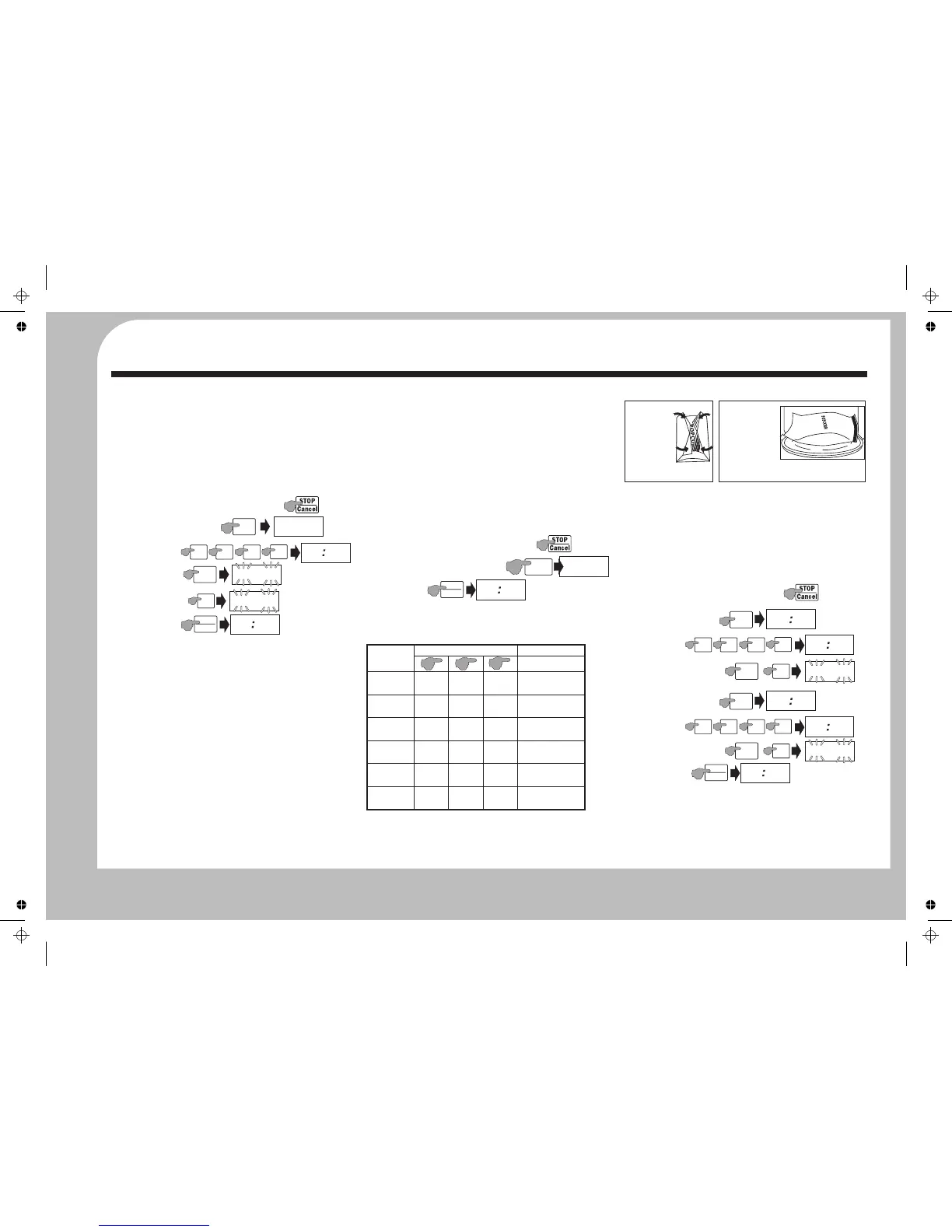
ALTERING THE DEFROST POWER SETTING (TIME DEFROST)
The default microwave power level for both Weight and Time
Defrost is 30%. In the Time Defrost menu this can be altered for
faster or slower defrosting.
Note: Although you can alter the power from 0% to 100% we
advise you not to use less than 20% or more than 40%. Very low
power settings may not properly defrost the food. High power
settings will begin to cook the food before it is fully defrosted.
Example : Auto Defrost food for 20 minute sat 20% power
Press Time Defrost
20 min
Press Start
When defrosting:
Stop the oven periodically to remove or separate defrosted
portions.
Periodically check food during the defrosting process, turning it
if necessary.
When using plastic containers, defrost only just long enough to
remove from the plastic and place in a microwave-safe dish.
When the defrost cycle is over: the oven will beep 5 times.
$Open the oven door.
$You should now ensure the food is fully defrosted before
proceeding. If the food is not defrosted, program the oven in
one minute increments until totally defrosted.
$Always ensure that food is fully defrosted before cooking.
This is particularly important with poultry and pork.
$Never cook defrosted (or raw) meat in a microwave oven
1: Press Stop/Cancel to clear any program.
2:
3: Set
4: Press Power.
5: Press 2 (20%).
6:
AUTO-COOKING
Auto Cooking is designed to automate the cooking of commonly
used basic foods. The results of auto cooking depend the
temperature of the food, its shape and size, and personal
preference. There are 6 Auto-Cook menus.
Method:
$Press Stop/Cancel twice to clear any previous setting.
$Press the required Auto-Cook menu repeatedly to select the
weight or amount of food. Refer to the table for help.
$Press Start to start the oven.
Example: Auto-Cook 500 g. of frozen vegetables by weight.
Microwaving Popcorn
1: Press Stop/Cancel to clear any program.
2: Press Frozen vegetable 3 times.
3: Press Start
Note: You cannot add time to an Auto-Cook program.
1: Always use the Auto-Cook program to microwave popcorn.
2: When microwaving 100g of popcorn in the bag:
MULTI-COOKING
The oven can carry out two successive processes in sequence. If
Defrost forms part of a multi-cook process it will automatically be
carried out first regardless of whether it is entered first or not.
Auto-cooking cannot form part of a multi-cooking process.
Example : Microwave at 40% power for 20 minutes and then
microwave at 90% power for 30 minutes
20 min
30 min
The first process will start. When this process is is complete the
oven will commence the next process.
When the cooking cycle is over: The oven will ‘beep’ five times
and display the clock time. Wait a short time and then open the
door and remove the cooked food. Close the door.
Press Stop/Cancel to clear any program.
A: Set the First stage
A1: Press Time Cook
A2: Set
A3: Set 40% Power
B: Set the Second stage
A1: Press Time Cook
A2: Set
A3: Set 90% Power
C: Press Start
I
2
P
EF
Time
Defrost
2
0 0
0
2
0
0
0
Power
P
L
I
3
The default Defrost
Power 30% flashes
2
P
L
I
2
START
+30 SEC
2
0
0
0
Vegetable
Frozen
Beverage
Potato
Pizza
150 g 350 g 500 g
3m:30sec 7m:30sec 11m:0 sec
1 (cup) 2 (cups) 3 (cups)
1m:10sec 2m:0sec 2m:50sec
1 c.150g
8m:30sec 11m:0sec5m:30sec
2 c.300g 3 c.450g
100 g
1m:0sec
200 g
1m:30sec
400 g
2m:0sec
250 g
3m:0sec
350 g
4m:0sec
500 g
6m:0sec
AUTO-COOK
BUTTON
X1 X2
X3
NUMBER OF PRESSES
Reheat
Popcorn
50g
2m:40sec1m:30sec
100g
NOTES
Refer to the
specific instructions
Prick skins of whole
potatoes
I
P
500
Frozen
Vegetable
X3
START
+30 SEC
i
I
0
0
The default time is set
AUTO-COOK MENU TABLE
A: Fo ld a
triangle down
on each corner
o f t he b ag
b ef o re y o u
start cooking.
B: If th e bag
expands and no
lo ng er ro tat es
prop erly: Press
ST OP/ CANCE L,
open the door and
adjust the bag position to ensure even cooking.
2
0 0
0
2
0
0
0
Power
4
P
L
I
4
Time
Cook
00 00
Time
Cook
00 00
3
0 0
0
3
0
0
0
Power
9
P
L
I
9
START
+30 SEC
2
0
0
0


 To Next Page
 Loading...