Trident 78 Owners Manual9
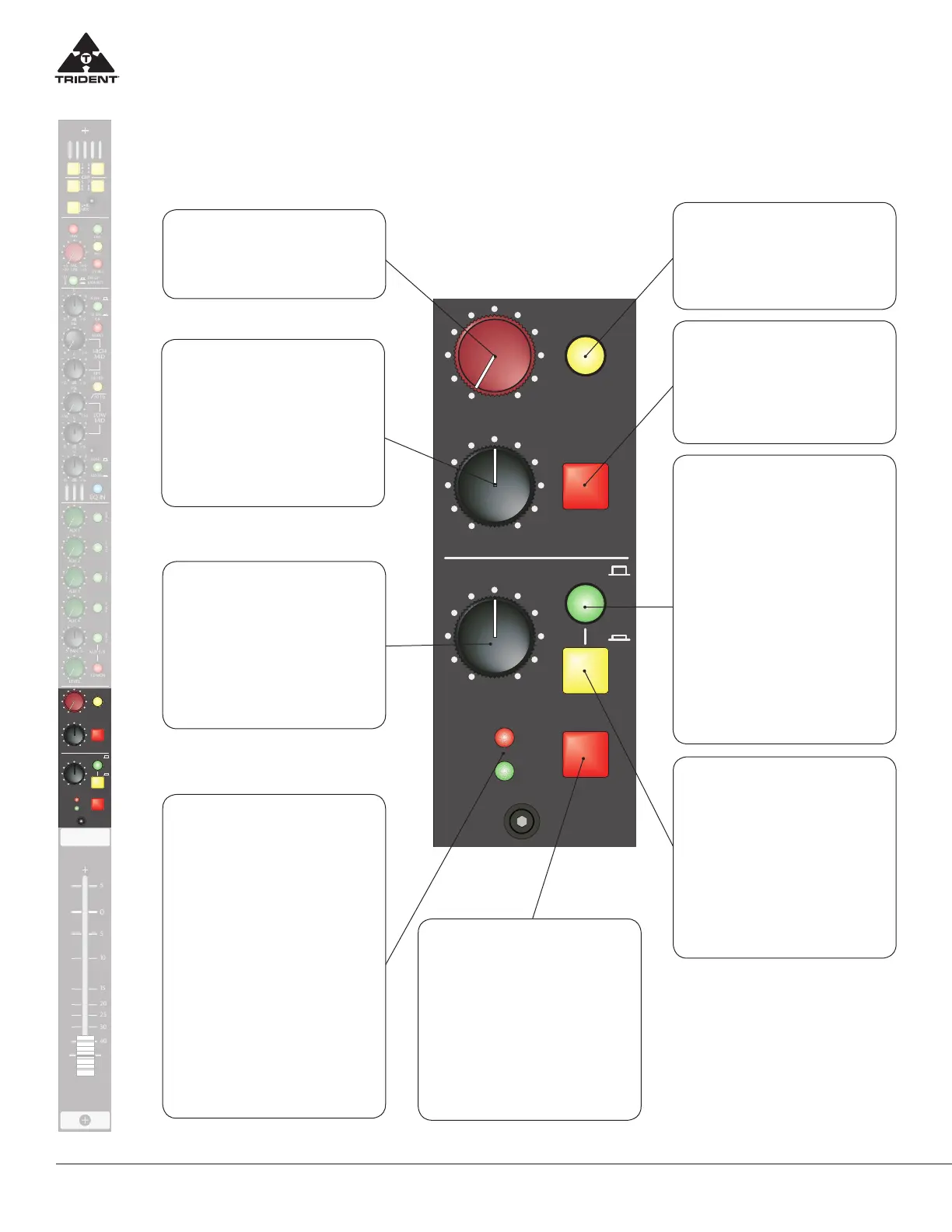
Trident 78 Input Channel Monitor Section
MON PAN
(Monitor Pan) Control
This control blends the post moni-
tor level signal between the Left and
Right buses. When at the centre, de-
tented position, both Left and Right
buses are fed equal amounts of signal
(each down by 3dB).
MONITOR LEVEL Control
Adjusts the monitor signal level to
the Left/Right bus.
MONITOR MUTE
When pressed will Mute the monitor
signal to the Left/Right bus. It is rec-
ommended when the monitor section
is not being used that it be muted.
AFL/PFL Select
Selects the channel source feed that
will be fed to solo bus when the Chan-
nel SOLO is pressed. UP - solo system
is fed from the channel post fader/post
pan pot point and is a stereo signal
that follows the pan pot. This allows
the user to monitor the channel in the
solo system and to see its contribution
to the mix. Down - solo system is fed
from the channel pre fader point and is
a mono source. This allows the user to
monitor the signal in the solo system
before the channel fader/mute, allow-
ing the user to check the signal in the
channel without being routed to any
output buses.
EQ to MON
Assigns the 4 band channel EQ to the
Monitor Section, removing it from the
channel path.
The Monitor section of
the channel module allows the
user to feed the signal on the
associated Monitor Return pins
of the DSUB connector to
the Left and Right buses with
level pan and if selected
with EQ control.
Channel Signal Indicators
+10 – Indicates RED when the chan-
nel signal level has reached +14dBu
(+10 VU) -20 – Indicates GREEN
when the channel signal level has
reached -16dBu (-20 VU) The chan-
nel indicator signal source can be se-
lected pre or post the channel fader
through an option available on the
input module circuit board. (Note:
Signal headroom available on the in-
put module is +22dBu and when the
+10 indicator illuminates the signal
level is approaching 6 to 8 dB before
clipping when just flashing red with
signal peaks). These are extremely
useful features and provide a con-
stant indication that a signal is pres-
ent in the module (green LED) and
that the signal peak is being reached
(red LED).
Channel PAN Control
This control blends the channel post-
fader/post mute signal between any of
the assigned bus pairs (L-R Mix, Group
1-2, Group 3-4, Group 5-6 and Group
7-8) located at the top of the module.
When at the centre, detented position,
both sides are fed equal amounts of
signal (each down by 3dB).
SOLO (Channel)
When pressed, routes the channel AFL
or PFL (see AFL/PFL Select above)
signal to the Solo bus. Additionally this
switches the Main Monitor Output (nor-
mally fed the Left/Right Mix) to source
the signal from the AFL/PFL Master
Level in the Master section as well as
to trigger LED indicators in the Master
section and Meter-Bridge stating a solo
has been pressed.
MUTE (Channel)
When pressed will mute the assigned
outputs of the channel (Group 1 - 8, L-R
Mix and all post Aux sends). The Mute
does not aect the channel’s solo PFL
feed, but WILL aect the channel me-
tering in the Meter Bridge, the Direct
Output of the channel (if selected as
post fader by option on module) and
the channel’s solo AFL feed (which is
post fader and post this mute).


 To Next Page
 Loading...