BALANCE
=
LEVEL
LR
MUTE
AUX 1
MASTER
AUX 1
EFX
RETURN 1
0
+3
+6
+9
+12
+15
-3
-6
-9
-12
-15
-20
1
SOLO
MUTE
AUX 5/6
PAN
56
LEVEL
AUX 4
MON LEVEL
=
MON PAN
MONITOR
RETURN
5
0
5
10
15
20
25
30
40
SOLO
LEVEL
MUTE
0
+3
+6
+9
+12
+15
-3
-6
-9
-12
-15
-20
2
SOLO
MUTE
AUX 5/6
PAN
56
LEVEL
AUX 4
MON LEVEL
=
MON PAN
MONITOR
RETURN
5
0
5
10
15
20
25
30
40
LEVEL
MUTE
0
+3
+6
+9
+12
+15
-3
-6
-9
-12
-15
-20
3
SOLO
MUTE
AUX 5/6
PAN
56
LEVEL
AUX 4
MON LEVEL
=
MON PAN
MONITOR
RETURN
5
0
5
10
15
20
25
30
40
LEVEL
MUTE
0
+3
+6
+9
+12
+15
-3
-6
-9
-12
-15
-20
4
SOLO
MUTE
AUX 5/6
PAN
56
LEVEL
AUX 4
MON LEVEL
=
MON PAN
MONITOR
RETURN
5
0
5
10
15
20
25
30
40
====
AUX 3 AUX 3 AUX 3 AUX 3
MONITOR
SOURCE
METER SOURCE
AUX 2
MONITOR
SOURCE
METER SOURCE
AUX 3
MONITOR
SOURCE
METER SOURCE
AUX 4
MONITOR
SOURCE
METER SOURCE
GRP 1
INSERT ON
BALANCE
=
LR
AUX 2
MASTER
EFX
RETURN 2
SOLO
GRP 2
INSERT ON
BALANCE
=
LR
AUX 3
MASTER
EFX
RETURN 3
SOLO
GRP 3
INSERT ON
BALANCE
=
LR
AUX 4
MASTER
EFX
RETURN 4
SOLO
GRP 4
INSERT ON
P
R
E
P
R
E
P
R
E
Trident 78 Owners Manual11
Trident 78 Group Monitor Section
=
AUX 1
MASTER
AUX 1
EFX
RETURN 1
0
+3
+6
+9
+12
+15
-3
-6
-9
-12
-15
-20
1
SOLO
MUTE
AUX 5/6
PAN
56
LEVEL
AUX 4
MON LEVEL
=
MON PAN
MONITOR
RETURN
5
0
5
10
15
20
25
30
40
SOLO
LEVEL
MUTE
0
+3
+6
+9
+12
+15
-3
-6
-9
-12
-15
-20
2
SOLO
MUTE
AUX 5/6
PAN
56
LEVEL
AUX 4
MON LEVEL
=
MON PAN
MONITOR
RETURN
5
0
5
10
15
20
25
30
40
LEVEL
MUTE
0
+3
+6
+9
+12
+15
-3
-6
-9
-12
-15
-20
3
SOLO
MUTE
AUX 5/6
PAN
56
LEVEL
AUX 4
MON LEVEL
=
MON PAN
MONITOR
RETURN
5
0
5
10
15
20
25
30
40
LEVEL
MUTE
0
+3
+6
+9
+12
+15
-3
-6
-9
-12
-15
-20
4
SOLO
MUTE
AUX 5/6
PAN
56
LEVEL
AUX 4
MON LEVEL
=
MON PAN
MONITOR
RETURN
5
0
5
10
15
20
25
30
40
====
AUX 3 AUX 3 AUX 3 AUX 3
MONITOR
SOURCE
METER SOURCE
AUX 2
MONITOR
SOURCE
METER SOURCE
AUX 3
MONITOR
SOURCE
METER SOURCE
AUX 4
MONITOR
SOURCE
METER SOURCE
GRP 1
INSERT ON
BALANCE
=
LR
AUX 2
MASTER
EFX
RETURN 2
SOLO
GRP 2
INSERT ON
BALANCE
=
LR
AUX 3
MASTER
EFX
RETURN 3
SOLO
GRP 3
INSERT ON
BALANCE
=
LR
AUX 4
MASTER
EFX
RETURN 4
SOLO
GRP 4
INSERT ON
P
R
E
P
R
E
P
R
E
P
R
E
P
R
E
P
R
E
P
R
E
P
R
E
P
R
E
P
R
E
P
R
E
P
R
E
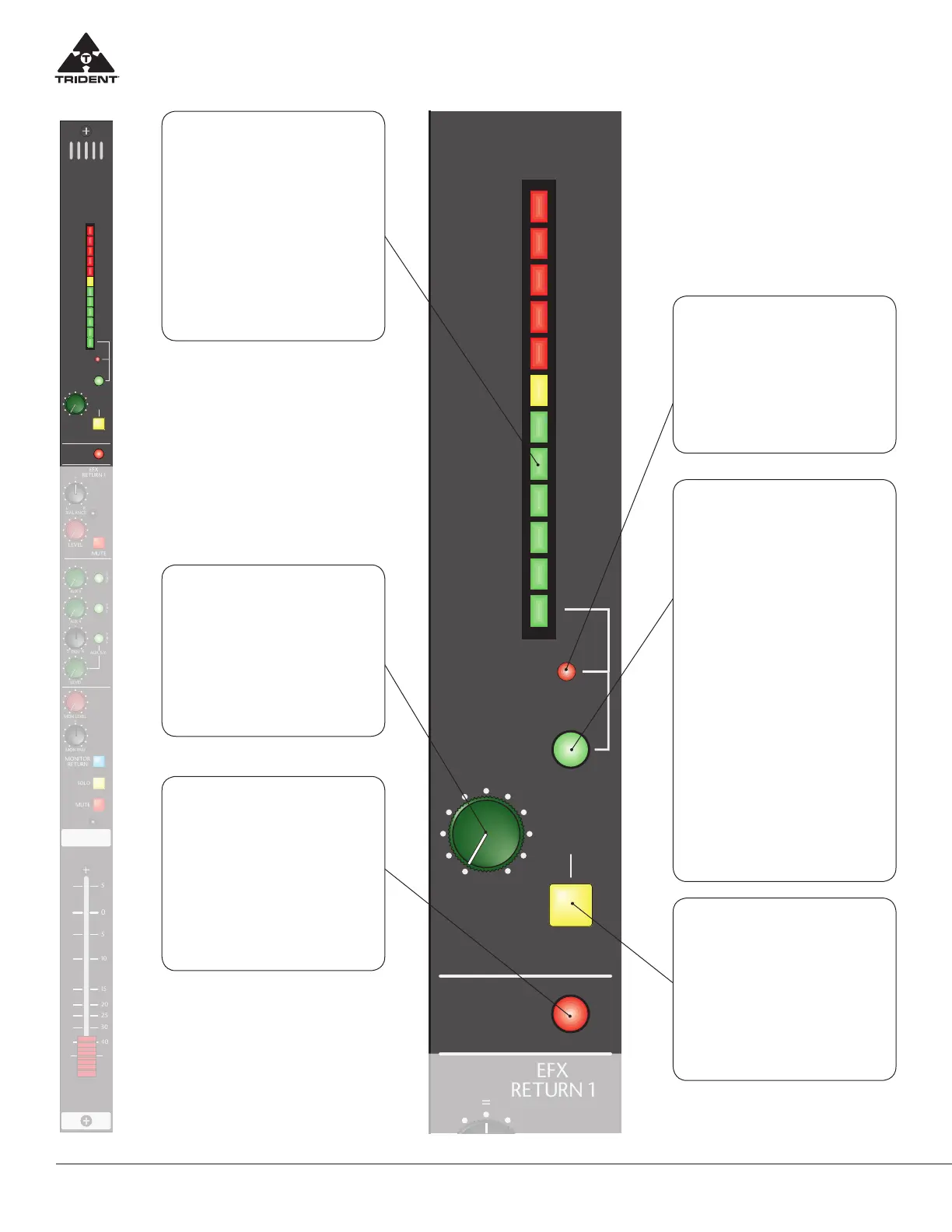
12-Segment
Bargraph Meter
Displays one of 3 sources as deter-
mined by the switches below (MON
SOURCE and AUX TO MTR). The me-
ter is a peak responding meter with
a fast attack and slower release. It is
very useful when used with complex
dynamic waveforms and able to dis-
play sharp transient responses and
greatly assist the engineer when it
comes to avoiding distortion during
recording.
MON SOURCE LED
When this LED is illuminated, the
associated Group meter is being fed
either the Group Output signal or the
Group Monitor Input signal as de-
termined by the MONITOR RETURN
switch located at the bottom of the
channel strip.
AUX SOLO
Assigns the post Aux Master Level sig-
nal to the Solo system for display on
the Master meters and into the mon-
itor/headphone systems. This signal
feed to the solo system in mono.
NOTE: Since there are only Six Auxil-
iary sends on this console, this control
is not available on Group strip 7 and 8.
AUX (X) SWITCH
Pressing this switch assigns the as-
sociated Aux Output (post the Aux
Master Level on the master module)
to the bargraph meter above. This al-
lows the user to check Auxiliary out-
puts signal levels from the console on
the meter. Note: When this switch is
pressed the Auxiliary signal sourced
to the bargraph meter overrides any
other signal to the bargraph select-
ed by the MONITOR RETURN switch
as described by the MON SOURCE
LED above. Additionally pressing
this switch will switch OFF the MON
SOURCE LED above to indicate the
bargraph meter is only being fed the
associated AUX level.
NOTE: Since there are only Six Auxil-
iary sends on this console, this control
is not available on Group strip 7 and
8. And the signals to the bargraph
meters are always following the MON-
ITOR RETURN switch on those two
group channel strips.
AUX MASTER LEVEL
This control adjusts the Aux 1 bus mix
level that appears on the associated
Aux Output pins of the DSUB on the
rear panel.
NOTE: Since there are only Six Auxil-
iary sends on this console, this control
is not available on Group strip 7 and 8.
GROUP INSERT ON
When depressed, this switch places
the rear panel Group insert path to the
Insert Send and back from the Insert
Return in line with the signal path. This
insert is point directly after the Group
mix stage and before the Group Fader
and allows the user to connect an ex-
ternal device in series with the Group
signal and to be able to switch it in/
out via the front panel.


 To Next Page
 Loading...