User Interface
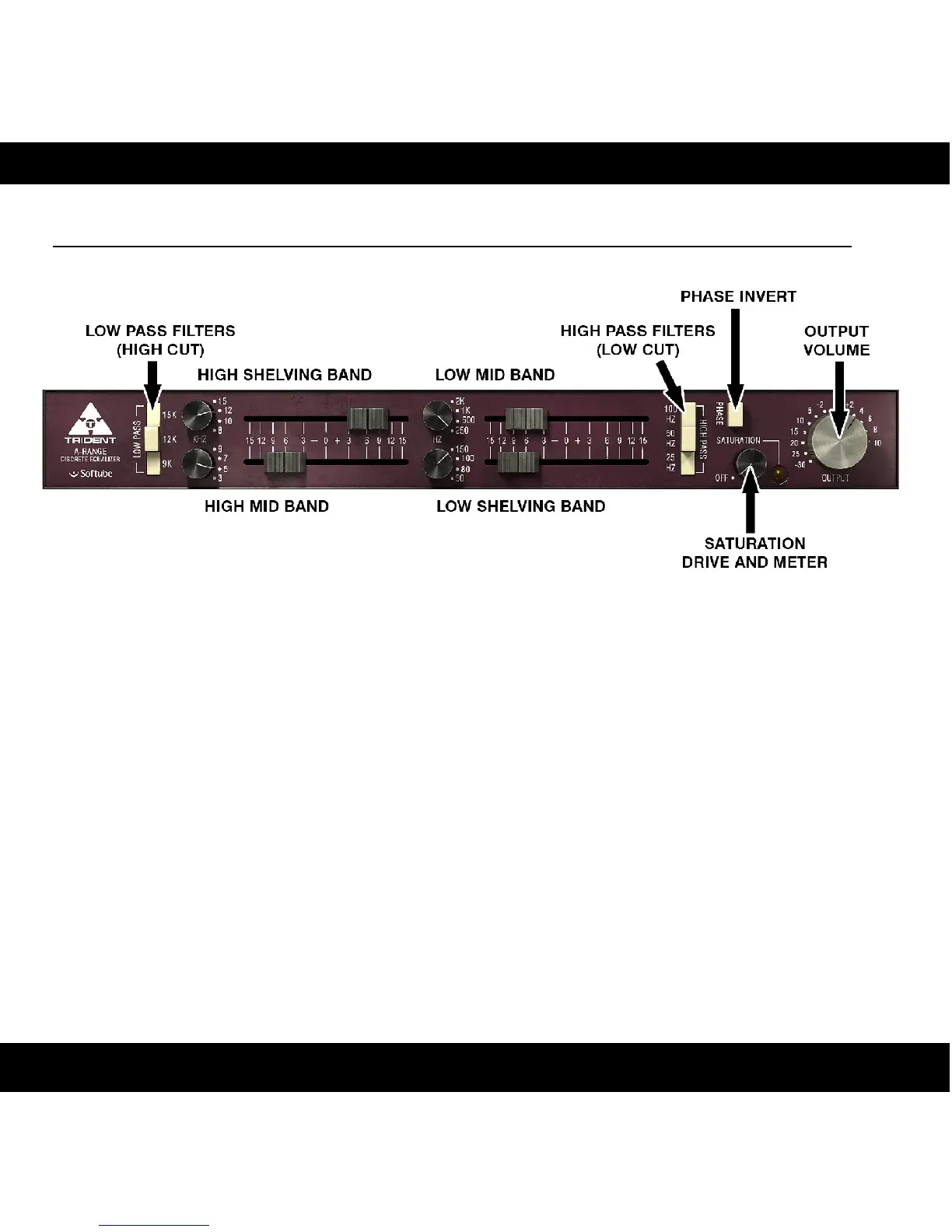
The layout of the A-Range equalizer is simple and easy. You have four different bands of
equalization, with a frequency selector knob and a gain fader each. Low and High Pass
filters can be activated by pressing the off-white buttons, and a handy Phase Invert switch
is found on the right side of the panel. The Saturation knob engages the console
saturation, and is best used as a subtle effect. If you don't wish to get saturation, just put it
in the OFF position and all saturation circuits will be de-activated.
The A-Range console was actually designed to have very little distortion, but it was
nevertheless possible to crank up the input volume and equalization bands to make it
distort, an effect that has been of much use in lots of recordings. The actual amount of
saturation depended heavily on the audio material and amplification before the console, so
we added the Saturation knob to make things easier for you. If all bands are set to zero
gain, Saturation on its default position (12 o'clock) and Output Volume on 0 dB, the
A-Range plug-in will have unity gain.
8


 To Next Page