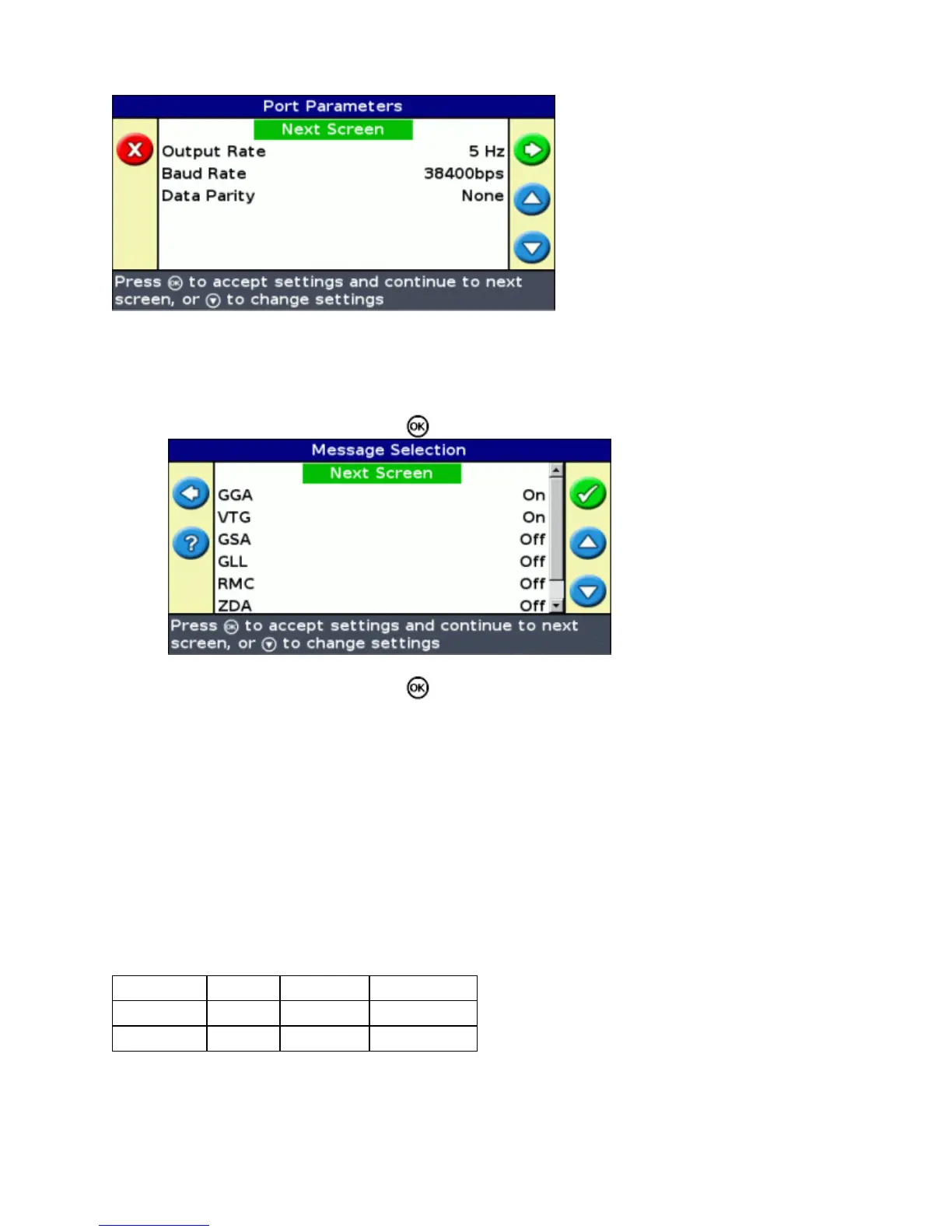
Set the lightbar port parameters.1.
Tip − To be able to communicate, the parameters must match those of the device.
Select Next Screen and then press . The Message Selection screen appears.2.
Set the various message formats to On or Off, depending on whether they are required.3.
Select Next Screen and then press .4.
If you turned GGA on, then select the number of decimal places in the GGA message.5.
Note: Some external devices cannot read the GGA message if there are too many decimal places in the
string.
External Receiver Support
The EZ−Guide 250 lightbar can recieve GPS positions from TSIP−compatible recievers. This enables you to use
any of the correction types available on your receiver, including OmniSTAR, Beacon, and RTK.
The following TSIP−compatible recievers are supported by the EZ−Guide 250 lighbar:
Trimble Case IH Ag Leader New Holland
AgGPS 252 AFS 252 GPS 5100 NH 252
AgGPS 332 − − −
To enable TSIP messages as the correction source:
Connect the receiver to the lightbar and then turn them on.1.
59



 To Next Page