3 Connecting to a Field-IQ System
22 EZ-Guide 500 System Cabling Guide
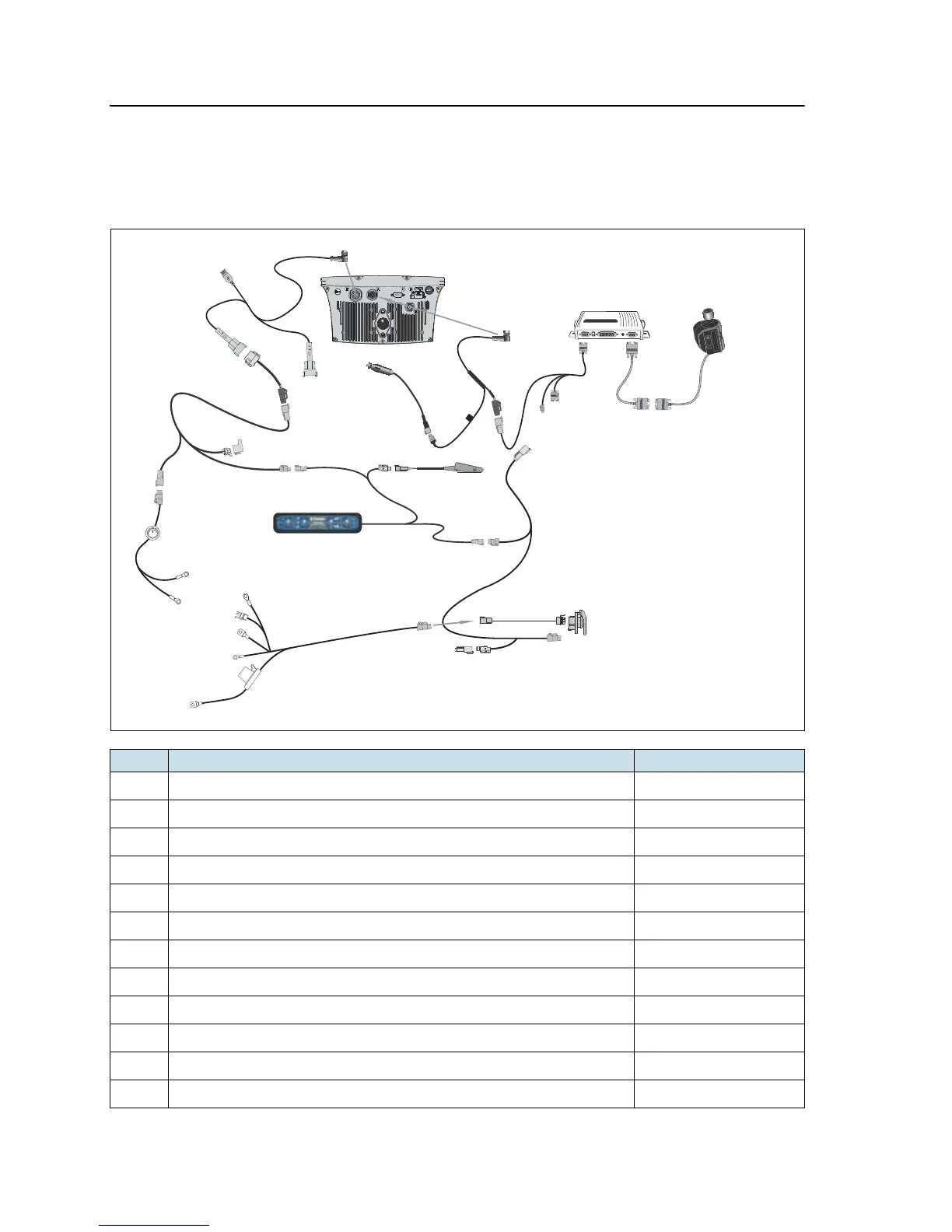
EZ-Guide 500 lightbar and EZ-Steer assisted steering system
This diagram shows how to connect an FmX integrated display with the Field-IQ
system to an EZ-Steer assisted steering system and EZ-Guide 500 lightbar:
Item Description Trimble part number
c
EZ-Guide 500 lightbar 66100-xx
d
Lightbar power cable 62817
e
CAN–TBC active terminator cable (with power) 75522
f
Power cable with switch 75743
g
Field-IQ master switch box 75050-01
h
Optional: remote foot switch 60490
i
Cable assembly, CAN cab to hitch connection 77368
j
Cable assembly, power to hitch connection 76941
k
Cable assembly, IBRC to DTP adapter (optional Powell connector) 77413
l
Port expansion cable 62609
m
EZ-Steer extension cable 62974
n
EZ-Steer controller



 To Next Page