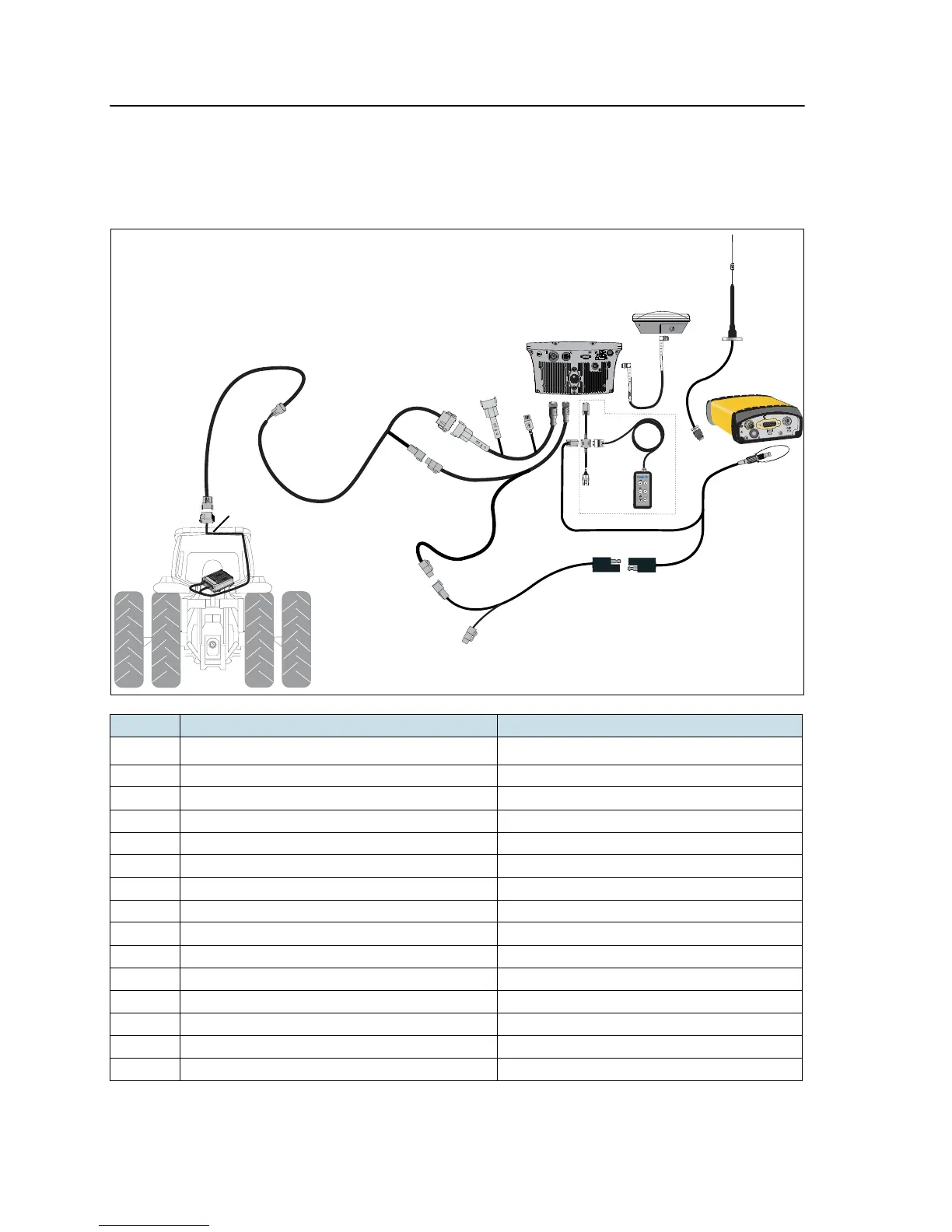
6 Connecting to Factory Ready Autopilot System
50 EZ-Guide 500 System Cabling Guide
EZ-Guide 500 system / Autopilot / SNB900 RTK Radio
This figure shows how to connect an EZ-Guide 500 system to an Autopilot system
using an SNB900 RTK radio:
Item Description Part number
c
EZ-Guide 500 lightbar 66100-xx
d GPS antenna 77038-00
e SBN900 radio antenna 22882-00
f SBN900 radio antenna magnetic mount 62109
g GPS antenna cable 50449
h N Female to REV. POL TNC Male 62114
i SNB900 radio 68480-X0
j Remote keypad (optional) 66030-00
k CNH Hybrid to GPS cable 67120
l NAVController II 55563-00
m Factory-installed harness -
n EZ-Guide 500-to-Autopilot cable 62754
o Port expansion cable 62609
p Power tap to EZ-Guide 500 63185
q External interface cable 62749
L
ABEL
ETHERNET
REVERSE
POLARITY
AUDIO
VENT: DO NOT REMOVE



 To Next Page