EasyManua.ls Logo

Trimble Juno T41 - Page 27

Default Icon
91 pages
Print Icon
To Next Page IconTo Next Page
To Previous Page IconTo Previous Page
Loading...
Juno T41
User Manual
15
network
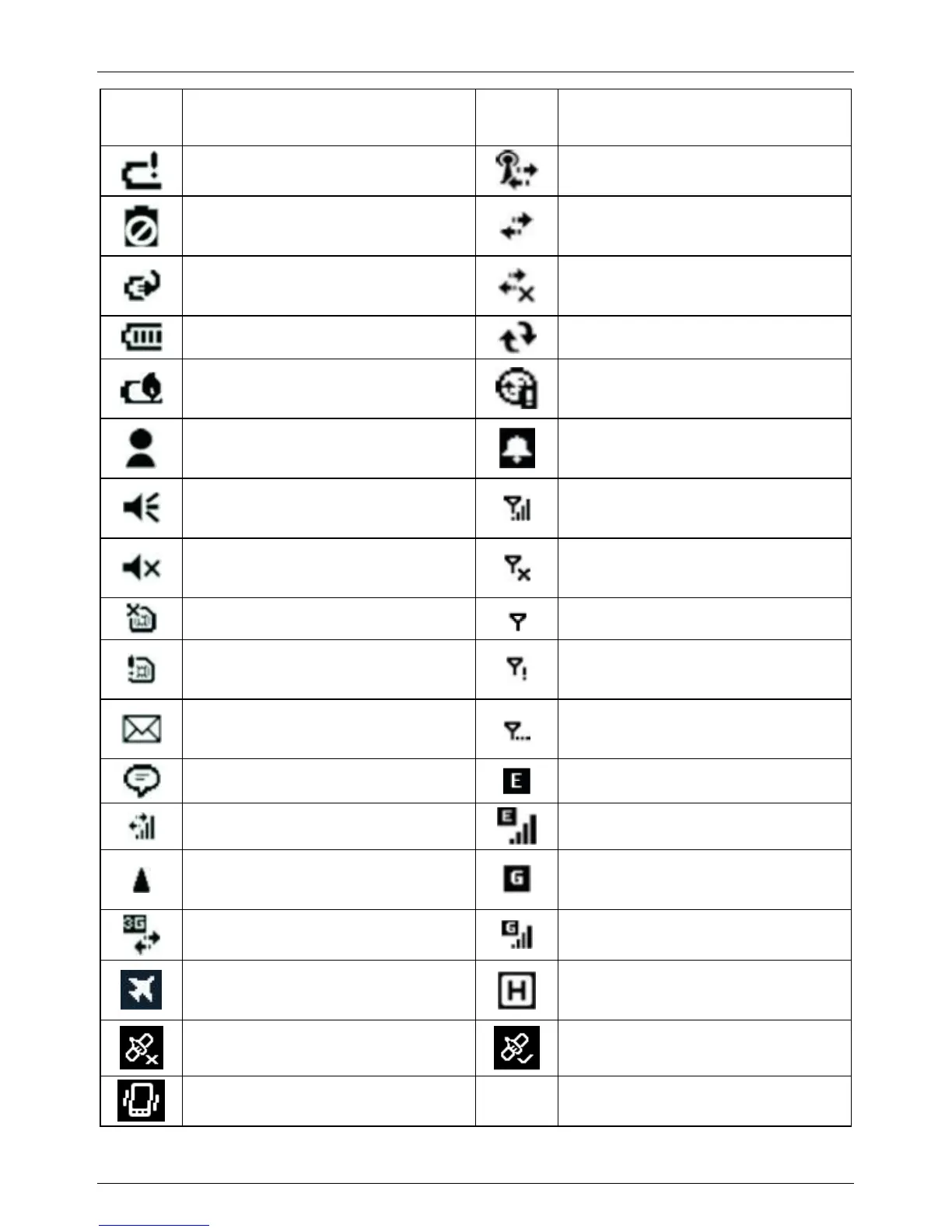
Battery power is very low
Wireless network connected
Battery communication error
Active connection, but not
currently synchronizing
Battery charging
Inactive connection to computer
or wireless network
Battery level
Synchronizing
Battery out of temperature
range WARNING
Synchronizing error
Instant messages received
Pending alarm
Speaker is on
Phone is turned on and signal
strength
Speaker is off (or in mute
position)
Phone is turned off. To turn it
on, tap this icon
SIM card missing
No signal
Faulty SIM card
No service. Phone connection
unavailable or network error.
E-mail has been received
Lost signal. The device is
searching for a signal.
Tap to view more notifications
EDGE network is available
Data call is in progress
EDGE network connected
Roaming mode
GPRS network available
3G connected
GPRS network connected
Airplane mode enabled. The
device radios are all off.

HSDPA network available
GPS receiver is off.
GPS receiver is on.
Vibrate mode is on

Other manuals for Trimble Juno T41

Related product manuals