Trimble M3 Total Station User Guide 75
Coordinates 7
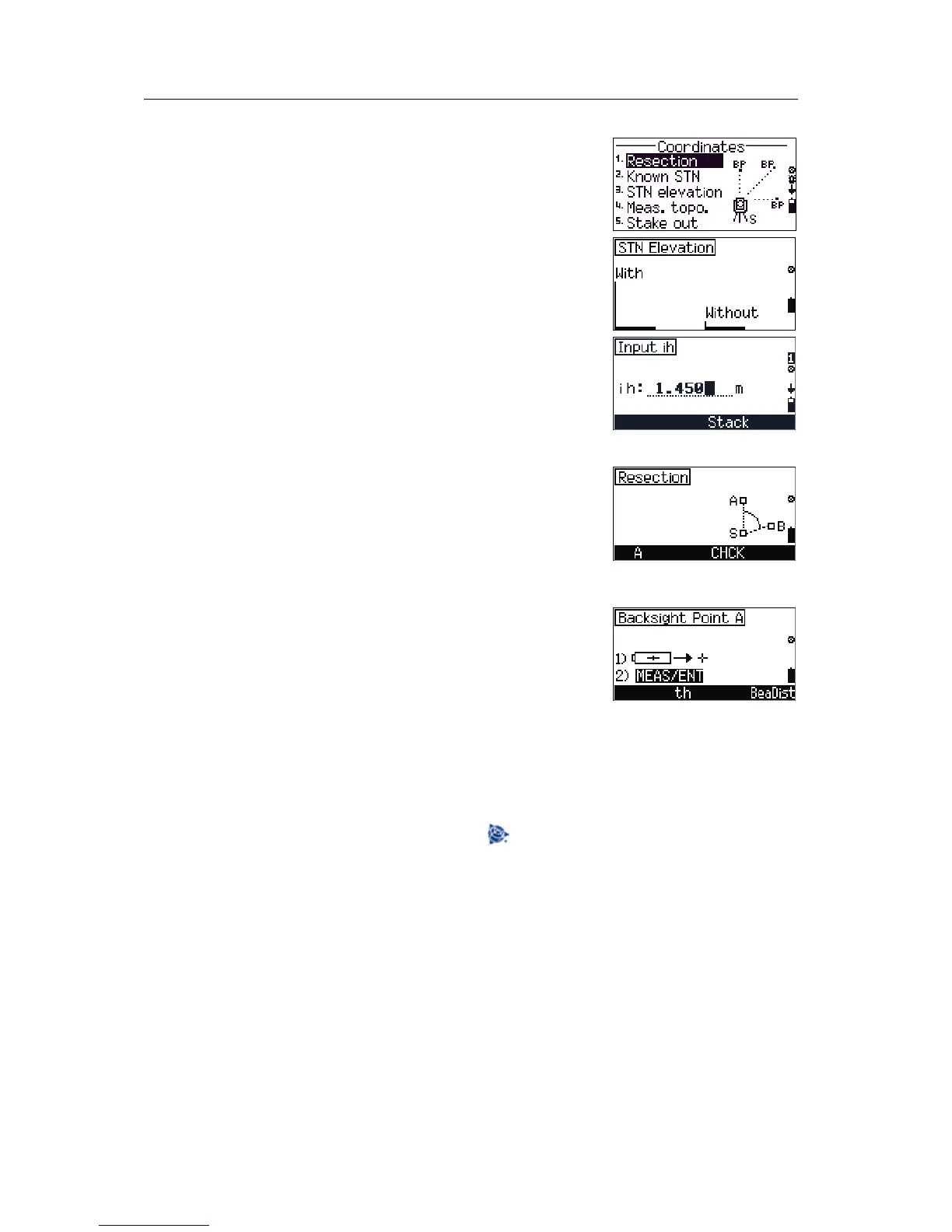
When you select [1] Resection in the
Coordinates menu screen, you are prompted to
select 2D setup
without or 3D setup with before
starting the resection function.
1. Press
[F1] with in the Stationing of
elev. screen. You are prompted to input the
instrument height (ih).
2. Use the number keys to input the
ih value and
then press
[MEAS/ENT].
3. The Record as screen appears. Press [F4] Yes.
4. The
Resection screen appears.
A and B are backsight points with known
coordinates. S is the station. The coordinates of S
will be calculated after the measurement is
completed.
5. Press
[F1] A to take a measurement to Point A.
6. Sight point A and then press
[MEAS/ENT].
7. Do the following:
– The previously set target height will be used
with this measurement. If you need to
change the height of the target, in the
Backsight Point A screen, press [F2]
th.
– Alternatively, open the bearing and
distance screen, press
[F4] BeaDist. See
Bearing-Distance, page 63.
B
Tip – To change the point name, press .
After you have taken the measurement to point A, the
box for point A changes to a black box, which means
that the measurement is done.



 To Next Page