8
• Pushing the back gauge crank slightly towards the system and turn anti-clockwise in order to insert the
paper pile. Turn the back gauge crank clockwise to adjust the measure to what you need.
• Turn the clamp hand wheel clockwise to clamp the paper pile and close the safety guard.
• Pushing two enable switches simultaneously and hold it until the cutting is complete.
• The light will check the position of the paper pile to be cut.
• The blade will automatically stop when the safety guard is open. The system can be operated only
when the safety guard is closed securely.
Operation
ElectricModelsOnly:
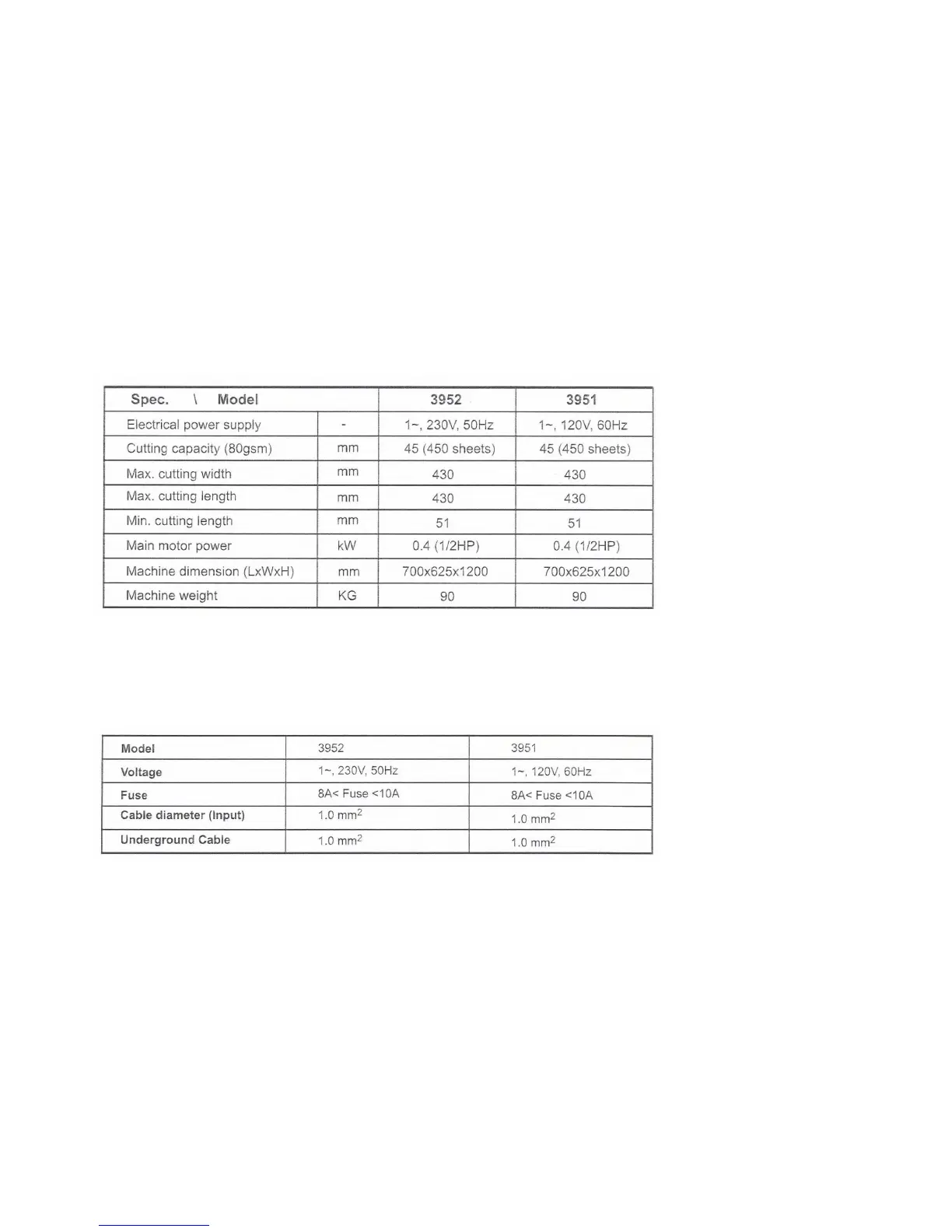
Electric Power Paper Trimming Specication
Installation of power system
Pleasefollowthebelowspecicationwheninstallingthesystem:
• The knife does not move: please make sure the main motor magnetic contact is activated.
• No power: Please check the power source and the fuse
• Overloaded: Please wait until the breaker reset automatically when the indicator light is o, and then
reduce the pile of paper.
• The system cannot work after closing the safety guard: Press the 2 enable switches again and check
the safety guard is completely closed.
Trouble Shooting
Pleasenote:Donotdisposeofelectricalappliancesasunsortedwaste,disposeofthissystemcorrectly.



 To Next Page